Jan 10, 2013 12:20 AM UTC
Implementation In Progress

Use Tabs for open models/drawings in Creo (like in ProE, IE, Firefox, Chrome, FoxIt pdf viewer, etc)?

Related products:Creo Parametric

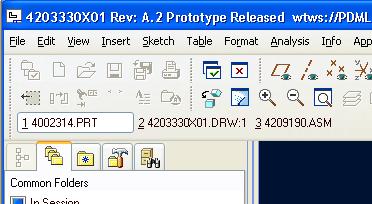
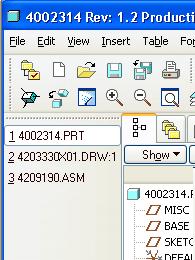
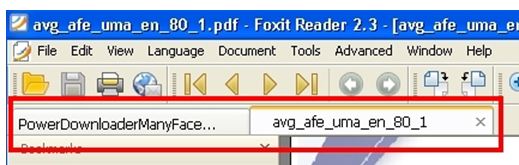
Please vote if you want to have an option where Creo CAD objects could be easily displayed and manipulated in tabs like in web browsers, FoxIt, & WF4:

 

Tabs--IE.JPG

tabs-foxit.JPG

tabs_horizontal.JPGtabs_vertical.JPG


More Details:

ProE could display Tabs for all open objects, very similar to what Firefox and all web browsers do (and FoxIt pdf viewer).  This way the user can see all objects open and click any one to activate.  You could put tabs above (like in IE, Firefox, Chrome, etc) or to the left/right. 


Although a bit rough around the edges, ProE WF4 could do this yet Creo cannot. 


Reference Poll for more information:

http://communities.ptc.com/polls/1252


Related Discussion:

http://communities.ptc.com/thread/39944

(if links do not work, manually copy/paste them to address bar)

29 replies

LawrenceSAuthor
Jul 31, 2014 6:28 PM UTC

Paul,

Thank you for commenting and inquiring as to how this will benefit users.  I hope other user give feedback in addition to mine.

In Creo2 and in WF, using the drop down menu has always automatically activated the CAD object when it is selected. I am eager to try Creo3 and see how the auto activation works, although I am cautiously concerned how the automatic activation will work when the user is creating a feature and wants to look at another model/dwg for reference without canceling the feature.

The easiest way to answer your question, is to just look at the web browser you are using.  To those who use CAD extensively, I would say working with it is comparable to working in IE (or pick your favorite browser). As you read this I would bet that you probably have at least 2 browser tabs open (if you don’t others around you certainly do).  Why would you do this when you could choose to open every website in a separate window, and then just depend on the Windows taskbar to display the name?  I don’t know anyone under 70 who would willingly give up the use of tabs while browsing.  They are simple, compact, efficient when multitasking and cleanly displayed with minimal eye and mouse motion to view or switch to them.  Also, if you have a certain number of programs open Windows starts to group them so then you cannot see the names without cycling through them (or expanding your taskbar, which takes up more monitor space).  I have my task bar set up to display 2 lines to help with this, but it can still get loaded up depending on what I am working on.

Taking up screen display is always a concern and for that reason it should have the option to have it, or not, and have the option of where it should be displayed (both as PTC did in WF).  Some of my coworkers liked it across the top of their screen as in a web browser, others (like myself) liked it across the left side of the screen.  This depended on both the monitor type (many widescreen monitors have an excess of horizontal space, especially considering the ribbon takes up a large percent of vertical space on these monitors) but especially the user preference.  I think the user should be able to choose the location in all 4 sides of the screen with a 5th option to be either above or below the ribbon.

It is interesting to note that more and more programs are implementing this, even though Windows displays separate windows in the taskbar.  Besides all web browsers and Foxit (this is currently the only reason I use it over adobe), I have noticed other software doing this including some office suites such as Kingsoft Office, and even Windows Explorer in Win8 (It may have been an add on) can do it too!  All of these softwares had ‘automatic’ ‘activation’ when clicking on them, and displayed in the taskbar, YET users still find it easier and more efficient to use tabs. 

Also, take note though that the way this was done in pre-WF5 is that the tabs do not prevent the user from looking at two or more objects in session side by side.  I don’t think anyone would want to lose that ability. But you have already successfully done this before in ProE, and am hopefully you will carry it over into Creo.

Feb 27, 2015 12:43 PM UTC

I guess Paul's silence either means they are considering adding it or that they don't believe it's a legitimate option.  I think it's the latter.  Although there could be a third option.  He just forgot about this topic.  But I doubt it.

LawrenceSAuthor
Jun 16, 2015 5:15 PM UTC

Perhaps he is waiting for other people's inputs.  Maybe I was too comprehensive in my reply to Paul Sagar and because of it other users felt there was nothing more that needed adding...Silence is a tricky thing to try to interpret because there is only ubiquitous evidence!

Paul Sagar, perhaps you could let us know if you are wanting more people to reply, or if you are looking for something else?

Jun 16, 2015 6:04 PM UTC

All,

Sadly they still missed the boat. Tabs were always well accepted by the members of the TC's. We are hoping that there will be tabs in Creo 4.

Here is the run down in Creo 3.

Quick access toolbar dropdown to change windows and be automatically activated

Same functionality in the View tab

Opening a model from the assembly tree opens and is automatically activated

Missed functionality

With one open file (part, asm, or drawing) and then opening a new file from your embedded browser workspace, window IS NOT automatically actived

- this is very annoying

Sep 2, 2016 6:30 AM UTC

Good Idea!

I have to bump this..

And really, 3 1/2 years later, this is still a good idea.

As a side note, and thats pretty new,

you can open now more than on creo sessions and are able to have this way more construction elements open at the same time!

fff.pnghttps://support.ptc.com/appserver/cs/view/solution.jsp?source=subscription&n=CS234779

Jun 14, 2018 6:13 PM UTC
Status changed to: Acknowledged
LawrenceSAuthor
Feb 22, 2019 11:22 PM UTC

@hheinze, thanks for letting us know about opening more than 1 session.  Since you mentioned it we started allowing more than 1 license with some nice advantages.  However, unfortunately it still doesn't allow you to have more than one WS active at any given time...but this is really a different topic.


We are on Creo4 now and although the new window switching works pretty well, I would still like to be to have visible tabs at a glance to see what is open, then switch to it with one click. 


Good news is that PTC has acknowledged this idea, although I am not sure what that means as far as considering and implementing.  Especially since this is still one of the top 3 ideas and has been almost since its inception 6 years ago and all it is requesting is to do something that has already been done before that they removed/broke.  And the top 2 ideas are good as well, although the first seems to be inevitable if it hasn't been done already.  I am not sure what to make of these idea forums.  Perhaps it would be great if PTC published ideas that were conceived and requested for on this forum and that PTC have implemented due to it being an idea.  I'm really looking for some kind of encouragement.

Feb 27, 2020 1:13 PM UTC

Autodesk Inventor has the ability to view with tabs or drag to other windows similar to Chrome, just FYI

Jun 23, 2020 1:14 PM UTC
Status changed to: Under Consideration

This is not currently planned for the next release (Creo 8.0), but we will keep it under consideration for the future.

LawrenceSAuthor
Jun 23, 2020 6:22 PM UTC

@mneumueller , Thank you for the update and the encouragement that it is being worked on!  I really appreciate your efforts in helping to implement this! 😀


It is difficult for me on the outside to understand the programming/logistical challenges of bringing back something that was already there 8+ versions and 8+ years ago (and is staple technology).  I sure wish this process could go faster but am glad to see that it is at least "under construction".