Jan 10, 2013 12:20 AM UTC
Implementation In Progress

Use Tabs for open models/drawings in Creo (like in ProE, IE, Firefox, Chrome, FoxIt pdf viewer, etc)?

Related products:Creo Parametric

Please vote if you want to have an option where Creo CAD objects could be easily displayed and manipulated in tabs like in web browsers, FoxIt, & WF4:

 

Tabs--IE.JPG

tabs-foxit.JPG

tabs_horizontal.JPGtabs_vertical.JPG


More Details:

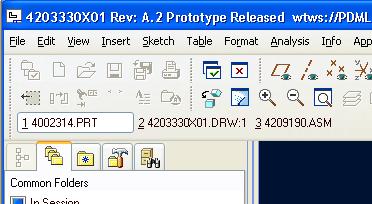
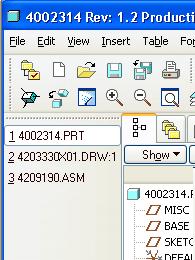
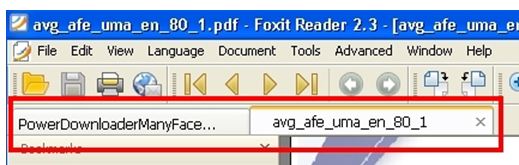
ProE could display Tabs for all open objects, very similar to what Firefox and all web browsers do (and FoxIt pdf viewer).  This way the user can see all objects open and click any one to activate.  You could put tabs above (like in IE, Firefox, Chrome, etc) or to the left/right. 


Although a bit rough around the edges, ProE WF4 could do this yet Creo cannot. 


Reference Poll for more information:

http://communities.ptc.com/polls/1252


Related Discussion:

http://communities.ptc.com/thread/39944

(if links do not work, manually copy/paste them to address bar)

29 replies

LawrenceSAuthor
Jan 10, 2013 3:14 PM UTC

Also Note that the way ProE did the tabs, the user could still view multiple objects simultaneously in order to compare opened objects. 

Creo would have to maintain this flexibility in order for the tabbed interface to be useful (Foxit and IE do not do this, but I have heard that Chrome can break tabs out of the Single interface into a separate window whenever the user needs to view multiple webpages simultaneously. 

Easily viewing multiple Creo Objects simultaneously is indispensable for Creo and the tabbed interface should maintain this flexibility (as it did in ProE WF4).

3-Newcomer
May 10, 2013 12:42 PM UTC

Yes, you can simply drag a tab in Chrome out of the amin window into its own window.

I'd agree that tabebd windows should not mean a single window.  Solid Works uses a single window and you cannot break parts out without opening another session.  There fore there is no way to compare parts side by side on two monitors.

LawrenceSAuthor
May 10, 2013 6:27 PM UTC

Thank you for reenforcing this with an excellent example of the good and the bad implementation. 

Wow! That sure was short sighted of the makers of SolidWorks!  Again, I hope PTC doesn't impliment this same limitation because it would turn a great feature into a nearly usefless one.  Model comparisons are essential.

LawrenceSAuthor
Aug 14, 2013 2:06 PM UTC

This Idea has recieved quite a few votes.  I wonder why a PTC rep has not chimed in yet...?  Are you looking into implementing this feature in Creo?

Jan 20, 2014 8:05 PM UTC

I am on some of the PTC TC's that meet twice a year. I have been asking for this in WF5, Creo 1 and Creo 2 at all the TC meetings and PTC Conferences meet the expert sessions.

Our users love having the tabs in WF4.

LawrenceSAuthor
Jan 20, 2014 9:29 PM UTC

I am very glad to hear that your users like it as much as ours and that you are trying to promote it so strongly.  How does PTC reply when you bring it up?  Have they told you of plans to re-implement this?

I cannot tell if you voted for not for this.  If not, vote and tell everyone you know who likes it to vote also (for us only a few of our 60+ users have accounts online where they could vote so each vote really represents a lot of users).  Last I checked this is within the top 5 ideas for having the most positive votes so hopefully this gets to the right person(s) at PTC for them to realize that this is a very desired feature and that they should reimplement this as soon as tehy can stably do so!. 

Jan 20, 2014 9:48 PM UTC

It is available in WF5 model not drawing. A little clunky as it spills my session onto my other screen if I have move than about 6 open and they go away if you pick a drawing till you go to the Window dropdown and select a model window again.

LawrenceSAuthor
Jan 21, 2014 4:23 PM UTC

If I understand you right it did that for me when I had it displayed at the top of the ProE screen (like every other program does tabs).  Although I normally like tabs here, because of that bug where the window spillsover past the normal screen width when enough drawings are open (or long drawing names) I put it on my left side and it is more predictable and more stable.  That being said, some of my coworkers still like it at the top of the window and others on the right side.  People really like this feature and it is discouraging for them to go to Creo because Creo Removed this feature.

Its funny (sad) that the PTC sales rep who visted us numbered the 100's of enhancements and then said didn't take away one feature.  He either doesn't use the programs and believes what he is told or was lying and I don't know how he kept a straight face.  I have only been testing Creo and although there are some pretty nice new features, PTC certainly removed other features...such as this one.  The sooner PTC brings tabs back to Creo, the better and faster we will be and work.  PTC, if you need some encouragement...You can do it!  Ra Ra Ra!  If you can do it no one can (or SWs will ).

LawrenceSAuthor
Mar 14, 2014 3:24 PM UTC

ptc-408694, (name?)

You mentioned that you have requested this at the TC, has it been well recieved, shrugged off, or complexity in implementing?

We just switched to Creo from wf4 and many of our users miss this feature and adds to frustration with the software.

Jul 30, 2014 2:53 PM UTC

I would like to get some further insight into the reasoning and usecases for this capability.

In Creo today you have the dropdoen in the Quick access toolbar to easily switch between open objects. In Creo 3 we now have automatic activation as well, so you no longer need to switch and then activate you object. In addition to that the windows task bar also shows all open objects and therefore is another way to quickly switch. Therefore what would the benefits be to using tabs - bearing in mind that they would take up more screen space, making your view screen smaller

Thanks in advance

Paul Sagar

Director of Creo Product Management