
Oct 7, 2018 5:30 PM UTC
Acknowledged

To paint threaded holes with some color

Related products:Creo Parametric

I would like that Creo could paint the threaded hole with some color, like other 3dCad programs do:thread.png
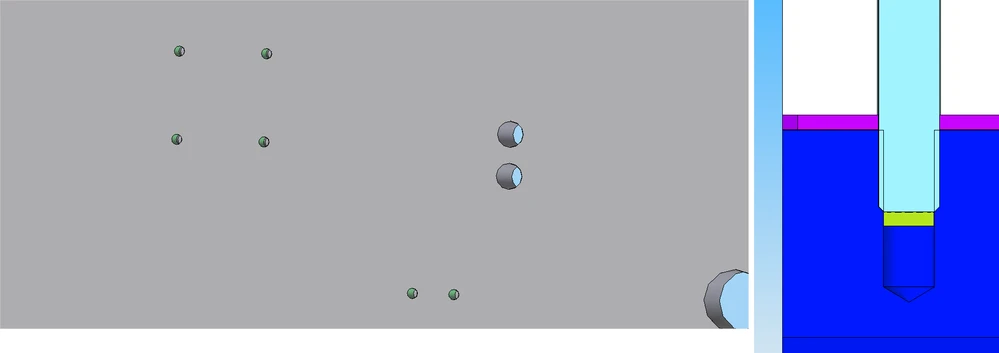
If the thread is painted, you can see at a glance which holes are threaded...or in a section you can see if there is enough thread... all this in shading style, now you have to change to wireframe or hidden line to check it. Thanks

16 replies

Jun 12, 2023 12:31 PM UTC

It even works like this in Creo Elements

Jul 8, 2023 11:04 PM UTC

I like the way Autodesk Inventor does this for threaded holes.  It puts a mapped image on the inside of the hole that makes it look like a thread so that you can easily tell in shaded mode that the hole is threaded.

Nov 18, 2024 3:22 PM UTC

Dear all, 


i would know if there is a solution to this topic or if is still not solved. 


Thanks

Nov 18, 2024 6:12 PM UTC

Unfortunately it is not solved yet.

Nov 19, 2024 7:33 AM UTC

Hi, PTC is working on this. We've seen screenshots of future releases where they enhanced the color coding of holes. As far as i recall, it would be an (major, if it's up to me) enhancement in Creo 12.

Nov 19, 2024 7:53 AM UTC

Thanks for you answer, 


i would highlight also some features that could be interesting related with this topic. 

For example could be really helpful to paint holes in tolerance like holes fo centering pin. 

So maybe rules for specific type of holes of for specific .hol files could be really interesting. 

Again if this could be something retroactive like if i open an old file i'll automatically see thread holes painted will be really good.


Thanks 

Grazie