
Oct 7, 2018 5:30 PM UTC
Acknowledged

To paint threaded holes with some color

Related products:Creo Parametric

I would like that Creo could paint the threaded hole with some color, like other 3dCad programs do:thread.png
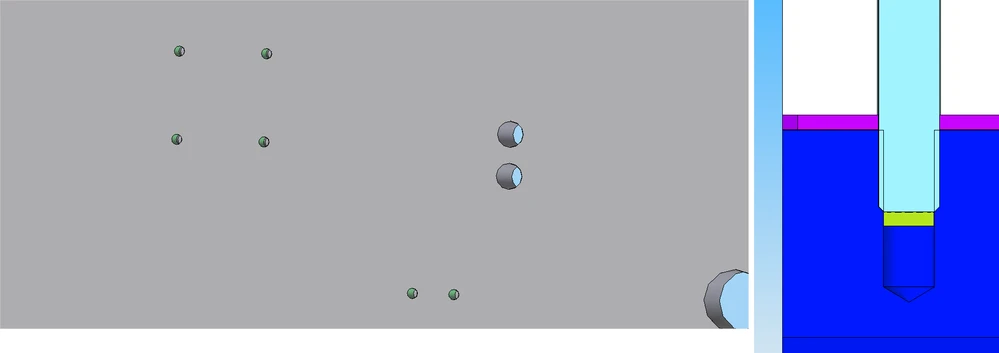
If the thread is painted, you can see at a glance which holes are threaded...or in a section you can see if there is enough thread... all this in shading style, now you have to change to wireframe or hidden line to check it. Thanks

16 replies

Mar 29, 2019 11:24 PM UTC
Status changed to: Acknowledged
Jun 22, 2020 12:21 PM UTC

This is required also for MBD approach. Either single configurable color or zebra bitmap, which is laid to threaded surfaces.

Jul 12, 2021 8:47 AM UTC

It should be configured the color, depending the hole type. Example

Threaded holes - Yellow

Countersink holes - Pink

Counterbored Holes - Green

Pin Holes - Blue

Jul 13, 2021 1:31 PM UTC

Is this an industry standard or a company requirement?

What other CAD systems do this automatically?


Jul 13, 2021 1:39 PM UTC

Mold companies, Die tooling, has this requests!

Other CAD softwares, we can parametrize the colors of the features, including Holes. SolidWorks, SolidEdge, Autodesk Inventor, NX, CATIA, all we can parametrize the color of the feature, and every time we change that feature (extrudes, holes, rounds...) the newly created faces are "painted" with the selected color.

If we define a color in a UDF, when we place them should be attached the desired color, even if after we change the design condition of the UDF! Even if the number of holes have increased!

Jul 14, 2021 8:06 PM UTC

Also, this colors of the different surfaces of the holes (threaded part, through part, counterbored part), should not be assigned a static RGB value read from a config file at Creo start. This should be shown by the graphics card (or when exporting) by real-time reading those values from a table or pallette. We in the molds industry work with several clients, and each client might have his RGB color assignment.


If we grab standard parts from a library which already have defined holes, we do not want to change the RGB color values of those surfaces each time we want the holes color coded differently according to a new client project. That's why I ask for PTC to try to implement this much needed feature (color coded holes) but in a flexible and dynamic way. This way we can pre-define a table (pallete) of colors for each threaded hole surfaces for each client (this is the table that can be loaded at Creo startup), but for each project we should be able to specify a row of that table to read the RGB color values from. And if we swap to another row (another client), those holes in all the parts, in all the assemblies, should be shown with the RGB values of the newly selected row (client). This way it avoids us to have to repaint all the parts holes manually every time we want to change the color scheme.

Jul 14, 2021 8:18 PM UTC

We should also be able to have a "project script" to be able to run on the main assembly, ie, a Pro/Prorgam (or its updated incarnation), and programatically associate a pallete row depending on the "client" or "standard" that we want the color scheme to follow. This way we would not have to manually swap the color scheme every time we open a project (main assembly). Alternatively, make the color RGB values and hole surfaces color assignment accessible via scripting, like this for example:


hole_thread_surface_color: RGB(255, 255, 0) // yellow

hole_drill_surface_color: RGB(0, 0, 255) // blue

hole_through_surface_color: RGB(128, 128, 128)

hole_counterbore_surface_color: RGB(64, 192, 0)


But the best option is for selecting the all colors in one single line, if those colors are implemented as a table, with columns specifying hole surface regions, and rows specyfing alternative color code standards (or clients).


if client == "ACME"

  Set_hole_color_table_pallete("acme_row") // searches the table with a first column called "acme_row" and changes the pallete if found, ignores if not found

  // alternative

  Set_color_color_table_pallete_index(3) // index specifies row of the hole color pallete, does nothing if index out of bounds, ie, bigger than the rows on the table

endif

TreblaAuthor
Jul 21, 2021 10:20 AM UTC

Hi @BenLoosli 


I don't know exactly how many 3DCad can do this automatically  now.

I can tell you that Solid Edge does.  Specifically  Solid Edge v.20 does, so at least from year 2008 is doing this...

Jul 21, 2021 10:51 AM UTC

I worked with solidedge V14 in 2004, and at that time solidEdge do it.

Apr 12, 2023 10:22 AM UTC

SolidEdge, SOLIDWORKS, Catia, Inventor,... All BUT Creo Parametric in fact 😉