Nov 13, 2017 6:05 AM UTC
Under Consideration

table with repeat region in 3D

Related products:Creo Parametric

Hi,


in optic of MBD, it was useful to have the capabilities to create some table in 3D with Repeat Region (with the same capabilities of the 2D)
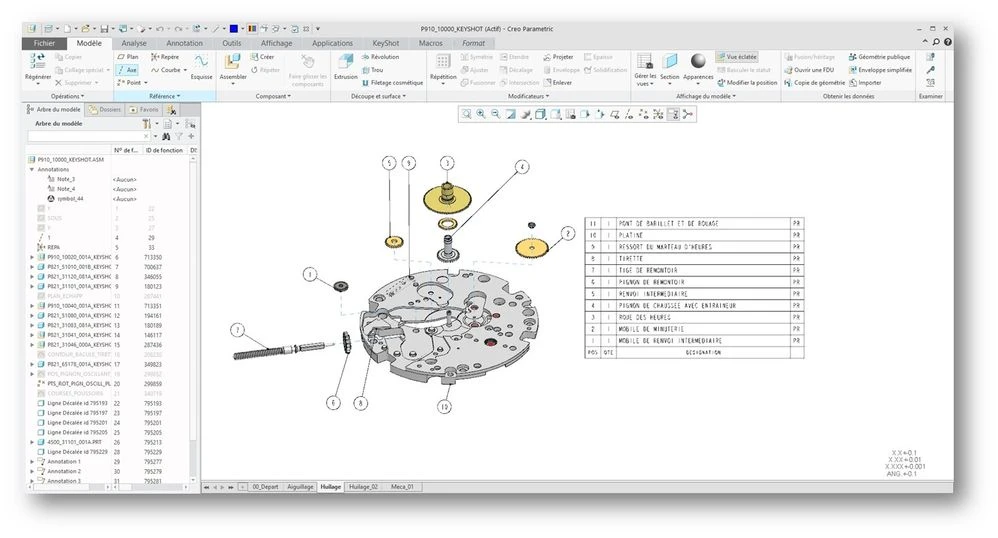

 

table.jpg


27 replies

Nov 19, 2017 5:53 PM UTC

I would love this for cabling, which is heavily dependent on tables.

Jun 14, 2018 3:50 PM UTC
Status changed to: Under Consideration
Jun 14, 2018 5:13 PM UTC
Status changed to: Under Consideration
Apr 28, 2019 1:09 PM UTC
Status changed to: Under Consideration
Jun 26, 2019 9:14 AM UTC

This Functionality is very important to have the ability to use MBD in assembly-lines/assembly-stations without drawings. Currently the drawing is still necessary because of the BOM-Table and BOM-Balloons. Therefore this request is also affecting Creo View, which should also support this functionality by using the pvs/pvz-export.


Maybe a splitted view with the Model on one side and the BOM-Table on the other side can rout to a useful solution.


BTW: we use Component-parameters with our BOM-Tool (Toolkit) to save the position-numbers or other parameters permanently to the model. The Component-parameters can be used by notes with the syntax &POSITION:att_cmp, but unfortunately not for custom-symbols.

2019-06-26 10_57_47-ASM0001 (Aktiv) - Creo Parametric.png

Feb 2, 2021 2:14 PM UTC

Why has this not been implemented yet ? CREO7 and still no ability to create Tables in model annotations. extremely disappointed

May 4, 2021 6:16 AM UTC

Complementary operations are also needed: exclude from BOM, Phantom and envelopevcomponents, since not all items in the assembly are included in the production process.

Jun 7, 2021 4:13 PM UTC

would be awesome to auto generate find numbers as a 3d annotation set in addition to a BOM repeat region without having to create a 2d drawing

Aug 17, 2021 12:01 AM UTC

PTC Please do this, I have been struggling with Manufacturing Engineers complaining to me as I'm the only MBD certified engineer at my facility. I am currently thinking of ways to create a custom symbol, maybe by creating a custom parameter that is pulled from Windchill, but if PTC would just create repeat regions in MBD and add the table tab it would be soooooo much easier and much appreciated. 

Dec 9, 2021 8:27 AM UTC

Hi @Mfridman 


#2. We working on MBD and are facing a lot of challenges in pulling out Revision history and BOM.

Pulling up table in to Part mode is a challenge. (Revision Table, Color Part Table )

  • We created a symbol Table by using line command, which is a challenge. Then pulled up the symbol table into part mode 
  • Added notes to the table flat to screen in the combination state.
  • After saving the part --- > check into Windchill and reopening the Part the notes are moving a and merging in other cells
  •  After opening in Creo view also its the same case 
  • notes_flaoting.JPG
  • TABLE.JPG

"So we need 3d annotation to include table functionality (with symbol type)" - what do you mean when you say "with symbol type"

  • We need Table Functionality in the 3D mode (MBD).
    • Which will allow to Add Rows and Columns ,Merge cells
    • Repeat Region Functionality
    • In Assembly mode able to add balloons from the table . Able to generate BOM  
  • Other software's like Solid Works, Solid Edge everyone is providing this functionality 

#6 point 

So regarding the balloons request. do you really feel that is really required for MBD?

What you say I agree, Real time examples 

Example :- But when we export it to a PDF and exploring the details on the downstream (Shop floor) for the person working on machine will be difficult

Vendor/Supplier- need to figure out the part in the TDP which is share with him and discuss with Engineer and GSS person 


- If we do a exploded view to highlight all the parts in the assembly is much needed.

ballonCapture.JPG


Right now I am creating table using Notes not sure if its a right process and weather it will sustain. 

Need to align the columns a lot 

Notes added :-  @[and @]


@[REVISION@]@[Approved_By @]@[ DESCRPTION @]@[ Date (day-mo-yr) @]
@[D @]@[LANDGSJ @]@[Combination for the chang @]@[ Date (08-12-2021 @]


note table Capture.JPG