
Jul 30, 2014 7:55 PM UTC
Delivered

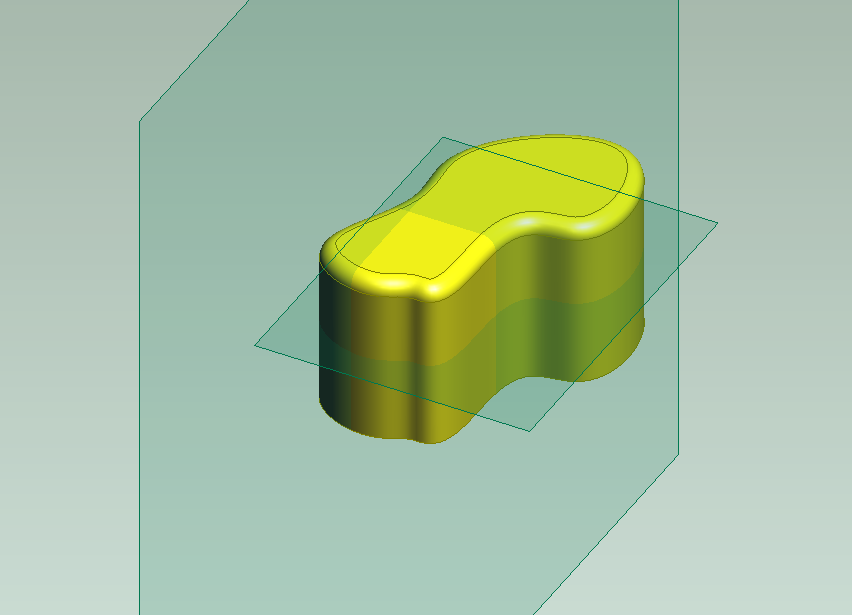
Show Datum Planes "as glass"
Related products:Creo Parametric

ASGLASS.pngMany years ago I used Pro/Desktop PTC software - it was really good. UI was very intuitive and user friendly! There was an option to show all workplanes - datum planes "as glass" - it means all datum planes have light green clolur with high level of transparency. As a result of that user can see better where the datums interfere with the geometry. It is posible to obtain similar result using Fill, but I think If we'll have just a checkbox in the context menu for Datum Plane feature to see it "as glass" - will be really great!

13 replies

rsobeckiAuthor
Jul 31, 2014 4:12 AM UTC

In Creo it is posible to see the result using e.g Fill, but it is time consuming...

Fillasglass.PNG

rsobeckiAuthor
Feb 19, 2016 6:30 AM UTC

Yes! Yes!! Yes!!!

3-Newcomer
Feb 19, 2016 3:21 PM UTC

I like it, but I'd prefer it to be a config option.  SW uses this and with many planes it gets to be too much.  Of course, many planes in Creo gets to be too much too.

Also I don't want the names on the planes, keep them parallel to the screen.  As you turn the model, the text gets foreshortened and you can't read it.  The lower of the two images above starts to illustrate what I'm talking about.

rsobeckiAuthor
Feb 19, 2016 9:40 PM UTC

‌I think it can be also an idea if under RMB in context menu over feature DTM in model tree will be an option with check box to choose on or off for show as glass - what do you think?

rsobeckiAuthor
Feb 20, 2016 6:11 AM UTC

‌thanks Steven you refresh this topic because I lost hope that someone is interested about my ideas! Now the hope is again in my heart

Mar 4, 2016 10:17 AM UTC

DTM_glass.png

rsobeckiAuthor
Mar 29, 2016 12:42 PM UTC

I think this is only idea how it can look - right Sergey?

By the way the idea is good

Mar 29, 2016 1:28 PM UTC

While I like this idea, I also have a concern, as Doug mentioned before.

How will the display of MANY datum planes be handled?  I am thinking of a medium to large assembly with lots of components.  You can easily end up with dozens and dozens of datum planes.

I see the following options:

  1. Leave glass planes shown. (Possible performance hit.)
  2. Manually switch off glass planes to regular display.
  3. Automatically switch off glass planes somehow based on number of planes shown or another factor.
  4. Have a setting for both assemblies and components that allow the display to be set independently.
  5. Others...

Regardless of the method to control the glass plane display,  I think there will have to be some options given to the end user to control it.

Jun 14, 2018 6:44 PM UTC
Status changed to: Acknowledged
Jun 29, 2020 5:24 PM UTC
Status changed to: Implementation In Progress

This is currently being implemented for Creo 8.0