
Mar 17, 2022 9:58 PM UTC
Current Functionality

Make "Assigned" as the default option in Mass Properties Calculations Dialog

Related products:Creo Parametric

1. Describe your environment: What is your industry? What is your role in your organization? Describe your stakeholders.
Mechanical design and Robotics.


2. What version of Creo Parametric are you currently running?
7.0.7

3. Describe the problem you are trying to solve. Please include detailed documentation such as screenshots, images or video.
We use assigned mass properties frequently for OTS parts, or parts where geometry+density is not sufficient to determine mass (PCAs, bearings, things with incomplete geometry, etc).

We take the extra care to assign mass properties because we want the assembly mass to be correct.

However, it is _extremely_ easy to forget to select "Assigned" mass properties when reporting the mass, shocking customers and stakeholders at how heavy their product is.


I think it's clear to the entire community that "Assigned" should be the default, and Computed only be used in extremely rare cases (or never). The "Computed" option should be relabeled "Incorrect" and hidden from public view.
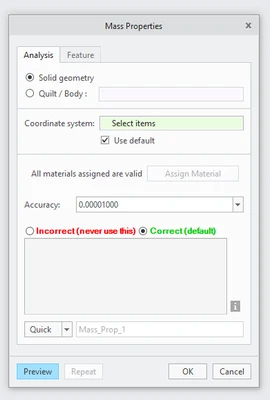
 

Andy_1-1647554115334.png


4. What is the use case for your organization?
Please get rid of this daily nuisance and source of error and hair loss.

5. What business value would your suggestion represent for your organization?
It would be everything. How hard could this possibly be to fix?

16 replies

olivierlp
Community Manager
Mar 18, 2022 6:10 PM UTC

Hi @Andy  Welcome to the PTC Community. 

When you get a chance, please comment here and tell is what @TomU suggested works for you. 

Olivier
AndyAuthor
Mar 18, 2022 6:21 PM UTC

@olivierlp Yes! @TomU had the right suggestion. Using that config option, Assigned is now the default, and Mass Properties now always reports the correct mass by default for all combinations of assigned and geometry/material masses in parts. We put this in our company config.pro, so it applies to all users. Perfect!

olivierlp
Community Manager
Mar 18, 2022 6:26 PM UTC
Status changed to: Current Functionality

Glad it is working! Thanks for the confirmation. 

Olivier
Mar 18, 2022 9:58 PM UTC

If your parts are model accurately, then calculated will be the proper mass for the parts. We assign material specs with density to every part modelled so we get an accurate mass which is transferred to the Weight parameter in our files by a relation. 

Why would you need to 'set' a mass to a part that is modelled with proper specs? Size of the part and default part density will drive the proper mass.

We have a number of material files that are used to assign the proper density to part files.

The assembly mass is calculated by the system adding up the part masses. 

The weight of a part or assembly is listed on our drawings.

AndyAuthor
Mar 18, 2022 11:02 PM UTC

@BenLoosli all custom parts use geometry/material because we have that detail and want Creo to tell us the resulting mass.


However, imagine having a big induction motor in your assembly that you did not design, but you bought off the shelf: you don't know what the guts look like, you don't know the materials used, you just have the mass information from the datasheet. So, the only way to go is assign material properties. With the Calculated report, your assembly mass will be wrong, because Creo is calculating the mass of a solid steel volume (the guts don't exist, because it's a purchase part). With the Assigned report, all your custom parts still report correct values because they're still using geometry/material for their masses, but now your full assembly also has the correct mass because it's using the value from the induction motor datasheet and not the incorrect value Creo is calculating.

Mar 21, 2022 12:36 PM UTC

I use "dummy models" all the time (just FYI, any model I create is a dummy model based on who created it!!). I simply add a mass at the CG and assign a density that gives me the proper weight and CG location (or CG guesstimate if not supplied).