
Mar 17, 2022 9:58 PM UTC
Current Functionality

Make "Assigned" as the default option in Mass Properties Calculations Dialog

Related products:Creo Parametric

1. Describe your environment: What is your industry? What is your role in your organization? Describe your stakeholders.
Mechanical design and Robotics.


2. What version of Creo Parametric are you currently running?
7.0.7

3. Describe the problem you are trying to solve. Please include detailed documentation such as screenshots, images or video.
We use assigned mass properties frequently for OTS parts, or parts where geometry+density is not sufficient to determine mass (PCAs, bearings, things with incomplete geometry, etc).

We take the extra care to assign mass properties because we want the assembly mass to be correct.

However, it is _extremely_ easy to forget to select "Assigned" mass properties when reporting the mass, shocking customers and stakeholders at how heavy their product is.


I think it's clear to the entire community that "Assigned" should be the default, and Computed only be used in extremely rare cases (or never). The "Computed" option should be relabeled "Incorrect" and hidden from public view.
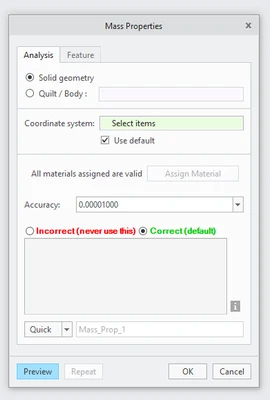
 

Andy_1-1647554115334.png


4. What is the use case for your organization?
Please get rid of this daily nuisance and source of error and hair loss.

5. What business value would your suggestion represent for your organization?
It would be everything. How hard could this possibly be to fix?

16 replies

Mar 17, 2022 10:19 PM UTC

I doubt PTC would change the default value, but with enough votes they might be willing to add a config option that would allow you to change the default in your environment.

Mar 17, 2022 10:31 PM UTC

Actually, it looks like this already exists.  See the config option mp_analysis_default_source.


TomU_0-1647556238098.png


AndyAuthor
Mar 17, 2022 10:40 PM UTC

@TomU, you are my hero. The posts I was reading about how this isn't possible must be outdated. Our VAR didn't even know about this...

Mar 17, 2022 10:56 PM UTC

Make sure you test it.  'mp_source' will flip back and forth and the part level but still defaults to 'geometry' at the assembly level.  Not sure what will actually get calculated behind the scenes.  If everything you do is 'assigned', then that option will probably work for you.  😎

Mar 18, 2022 1:22 PM UTC

I certainly do NOT want the default changed. We strive to model our parts and use the geometry for mass property calculations.

AndyAuthor
Mar 18, 2022 4:23 PM UTC

@BenLoosli Out of curiosity, how do you handle things like PCAs, motors, or other OTS hardware which doesn't have internal geometry or material properties (like a housed gearhead where you only have the housing solid)?


As to how Creo works -- and please correct me if I'm wrong -- but I see the following Punnett square:

  • User does not assign mass properties:
    • Calculated --> correct mass report, because all parts report by geometry/material
    • Assigned --> correct mass report, because there are no assigned masses and all parts report by geometry/material
  • User does assign mass properties:
    • Calculated --> incorrect mass report, because the tool ignores user-assigned masses
    • Assigned --> correct mass report, because the tool reports the user-assigned masses

So, using Calculated as the default fails by default (and fails without error, which seems even worse to me) for the users which assign mass properties. Using Assigned as the default always reports the correct assembly mass (even for users which do not assign masses).


Anyway, this is moot because there's a config option now 🎉

Mar 18, 2022 4:33 PM UTC

Our procedure for changing the weight of a model that is imported.

File – Prepare – Model Properties

This opens the Model Properties window

Click Change on the Mass Properties line to open the Mass Property Window

Change Define Properties by from Geometry and Density to Geometry and Properties in the top drop down

Once changed, Enter your weight in the Mass field under Basic Properties

We then run a mapkey that does the mass property regeneration and updates the Weight parameter from a relation.

AndyAuthor
Mar 18, 2022 4:38 PM UTC

@BenLoosli so, doesn't that mean your assembly masses are incorrect if you use Calculated instead of Assigned? Or is the mapkey designed to get around the issue of Calculated reporting incorrect masses in this case?

Mar 18, 2022 4:49 PM UTC

Isn't it the case that an assembly, in and of itself, does not have any mass, that the mass reported for an assembly is the aggregation of all the masses in its constituent components? I always thought it was parts that reported their mass, which is either calculated or assigned, and then the assembly just adds up the total of each of its bits. If one of those bits is an assembly also, same thing, it reports what it sums up from its components.


The difficulty I've had with motors, gearboxes, controllers and the like is not necessarily the mass, but knowing where the center of mass is located. If a device I'm building up has to be lifted with a strap I like to know where to put the eye loop or shackel, etc.

AndyAuthor
Mar 18, 2022 5:01 PM UTC

@KenFarley I'm less familiar with assigning masses at the assembly level. I am thinking specifically about assigning part masses, and having the assembly mass report correctly. But, I think it works exactly how you say by adding up the bits. I think my point remains, that reporting Assigned masses is always correct to what the user has specified (either geometry/material or assigned mass), while Calculated has the potential to fail by default. I'm not sure why a user would ever want Creo to ignore masses they took time/care to assign.