
Jul 27, 2015 9:33 AM UTC
Acknowledged

Enable Performance Advisor to show the real Login Name and Host Name of sessions instead of the masked data currently available

Related products:Creo Parametric

Idea

Enable Performance Advisor to show the real Login Name and Host Name of sessions instead of the masked data currently available.


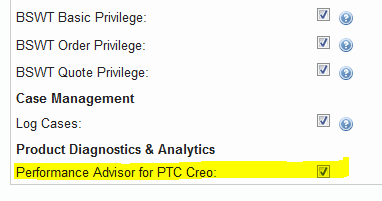
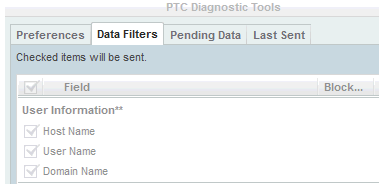
This should be configured for users with proper privileges, assigned through the eSupport Account Privileges for Performance Advisor for PTC Creo, and if this data have been willingly sent in unencoded form for that purpose by configuring the "PTC Diagnostic Tools" data filters:


Background

There is no easy way to find out the correlation between the masked data "User_ID" and "UUID" and their counterpart like User Name and Host Name even if this data have been willingly sent in unencoded form for that purpose by configuring the "PTC Diagnostic Tools" data filters.

Therefore the Performance Advisor, a tool that would be really useful, loses a great part of its effectiveness because of difficulties needed to identify quickly in the dashboard the failing sessions using masked data instead of actual User Name/Host Name and the work needed to maintain those mappings up to date.

In a company with a lot of users and workstations those difficulties, and the overload required, make this tool useless.

47 replies

Apr 24, 2017 10:30 AM UTC

Re showing the real Name.

I would love to do the project however it is a legal minefield from displaying the user data to storing the user data. 

It is not a question of technology it is a question of legality and security.  Furthermore with new laws coming into force in Europe next year the task is not getting any simpler.

Every back door I have tried to use has been blocked by laws in US, Europe or PAC Rim.

thanks, Jim

Apr 24, 2017 10:55 AM UTC

Jim Barrett-Smith‌,

I had requested before that we have the ability to give the GUIDs friendly names on the Creo Side the same way we can on the Windchill side.  Is there some legal problem with this approach?

Apr 24, 2017 11:12 AM UTC

Simple solution:

PTC will develop an application which uses two information sources

  • user list and machine list saved locally on customer's server
  • remote Performance Advisor database saved on PTC servers

MH

1-Visitor
Jul 24, 2017 1:20 PM UTC

Until PTC has a better solution, maybe you could use mine ...

We created an AutoIt executable for starting up several Creo system configurations.

There I added some code, that collects the user and the machine ID at start-up and writes it to an SQLite database:


#include <Constants.au3>
#include <SQLite.au3>
#include "SQLite3_3.19.3.0\SQLite.dll.au3"
#include <WinAPI.au3>
#include "XML_1.1.1.13\XML.au3"

Global $g_sUserIdXmlFile = _WinAPI_ExpandEnvironmentStrings("%LOCALAPPDATA%\PTC\QualityAgent\SentFiles\Creo_Parametric_2_0_M240.xml")
Global $g_sUserIdXpath = "/PTC/Creo/User_ID"
Global $g_sMachineIdXmlFile = _WinAPI_ExpandEnvironmentStrings("%LOCALAPPDATA%\PTC\QualityAgent\SentFiles\system_info.xml")
Global $g_sMachineIdXpath = "/PTC/PROCESSING/UUID"
Global $g_sSQLiteDllFilename = "SQLite3_3.19.3.0\sqlite3.dll"
Global $g_sIdDatabase = "\\<YourServer>\<YourShare>\user_machine_ids.db"

collectIds()

Func collectIds()
	Local $oXmlDoc = _XML_CreateDOMDocument()
	If @error Then Return
	_XML_Load($oXmlDoc, $g_sUserIdXmlFile)
	If @error Then Return
	Local $aXmlUserId = _XML_GetValue($oXmlDoc, $g_sUserIdXpath)
	If @error Then Return
	_XML_Load($oXmlDoc, $g_sMachineIdXmlFile)
	If @error Then Return
	Local $aXmlMachineId = _XML_GetValue($oXmlDoc, $g_sMachineIdXpath)
	If @error Then Return

	_SQLite_Startup($g_sSQLiteDllFilename, False, 1)
	If @error Then Return
	_SQLite_Open($g_sIdDatabase)
	If @error Then
		_SQLite_Shutdown()
		Return
	EndIf
	_SQLite_Exec(-1, "CREATE TABLE IF NOT EXISTS users(id TEXT PRIMARY KEY ON CONFLICT REPLACE, username TEXT);")
	If @error Then
		_SQLite_Shutdown()
		Return
	EndIf
	_SQLite_Exec(-1, "CREATE TABLE IF NOT EXISTS machines(id TEXT PRIMARY KEY ON CONFLICT REPLACE, hostname TEXT);")
	If @error Then
		_SQLite_Shutdown()
		Return
	EndIf
	_SQLite_Exec(-1, "INSERT INTO users (id, username) VALUES ('" & $aXmlUserId[1] & "', '" & @UserName & "');")
	If @error Then
		_SQLite_Shutdown()
		Return
	EndIf
	_SQLite_Exec(-1, "INSERT INTO machines (id, hostname) VALUES ('" & $aXmlMachineId[1] & "', '" & @ComputerName & "');")
	If @error Then
		_SQLite_Shutdown()
		Return
	EndIf
	_SQLite_Close()
	If @error Then
		_SQLite_Shutdown()
		Return
	EndIf
	_SQLite_Shutdown()
	If @error Then Return
EndFunc

Later then, when you e.g. need to know, who the user with the ID 1d879dd755d85faf92053bab20380e04 is, follow these steps:

  1. Open cmd.exe and change to the directory, where the database file is located, e.g.:
    CD <DirectoryContainingDatabaseFile>
  2. Start the SQLite command line tool, e.g.:
    "C:\SQLite3_3.19.3.0\sqlite3.exe"
  3. Open the database file, e.g.:
    .open user_machine_ids.db
  4. Search for the username connected to the user ID:
    SELECT username FROM users WHERE id='1d879dd755d85faf92053bab20380e04';
    Then as result the username should be shown!
    If you need to find out a hostname connected to a machine ID, use following statement:
    SELECT hostname FROM machines WHERE id='PUTINHERETHEMACHINEID';
  5. Exit the command line tool:
    .exit
Mar 29, 2019 11:27 PM UTC
Status changed to: Acknowledged