
Jul 27, 2015 9:33 AM UTC
Acknowledged

Enable Performance Advisor to show the real Login Name and Host Name of sessions instead of the masked data currently available

Related products:Creo Parametric

Idea

Enable Performance Advisor to show the real Login Name and Host Name of sessions instead of the masked data currently available.


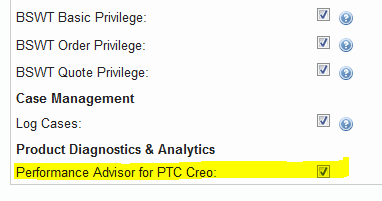
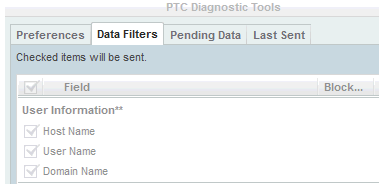
This should be configured for users with proper privileges, assigned through the eSupport Account Privileges for Performance Advisor for PTC Creo, and if this data have been willingly sent in unencoded form for that purpose by configuring the "PTC Diagnostic Tools" data filters:


Background

There is no easy way to find out the correlation between the masked data "User_ID" and "UUID" and their counterpart like User Name and Host Name even if this data have been willingly sent in unencoded form for that purpose by configuring the "PTC Diagnostic Tools" data filters.

Therefore the Performance Advisor, a tool that would be really useful, loses a great part of its effectiveness because of difficulties needed to identify quickly in the dashboard the failing sessions using masked data instead of actual User Name/Host Name and the work needed to maintain those mappings up to date.

In a company with a lot of users and workstations those difficulties, and the overload required, make this tool useless.

47 replies

Jun 14, 2016 5:52 PM UTC

Hi Marco

Hopefully in the next release we will be able to tie the report of the unused apps to your license file.  Feature tracking was a huge project and there was only so much we could achieve in the first release.

Re SPRS - please file them with Technical Support ASAP as development are currently working on open sprs.

thanks

Jim

Dec 7, 2016 7:24 AM UTC

Hi,

recently I watched video showing Performance Advisor new functionality. In this video the solution for translating of UserID and MachineID into "readable names" was presented.

Solution:

  • use Chrome browser
  • install Word Replacer II extension into Chrome
  • use Word Replacer II to replace UserID/MachineID with custom name

MH

velicoAuthor
Dec 7, 2016 5:30 PM UTC

Hi Martin,

at first glance it seems a good workaround.

After having inserted some custom names in "Word Replacer II" I get what I expected in the dashboard.

Therefore. shortly, I will check it extensively.

Thanks

Mariano

Dec 7, 2016 5:44 PM UTC

Do you have any easy way to import 400 users?  Looks like I need to compose an XML input file. Not to hard just take some time....

Dec 7, 2016 8:12 PM UTC

You can create script which generates replacement definition for your 400 users. See example of code for 2 replacements (definitions are separated by comma).

{

  "version": "2.0.10",

  "replacements": [

    {

      "repA": "OLD_TEXT1",

      "repB": "NEW_TEXT1",

      "type": "Simple",

      "case": "Maintain",

      "active": true

    },

    {

      "repA": "OLD_TEXT2",

      "repB": "NEW_TEXT2",

      "type": "Simple",

      "case": "Maintain",

      "active": true

    }

  ]

}

MH

Dec 8, 2016 2:49 AM UTC

This really seems like a workaround (hack) to something PTC should be providing out of the box.

Dec 8, 2016 3:05 PM UTC

I created an autoit file to convert a csv file to required format to import.

------- Start of autoit file

#include <GUIConstants.au3>
#include <Array.au3>
#include <File.au3>
#include <String.au3>

Opt("MustDeclareVars", 1)

Global Const $CSVFILE = "P:\text\diag\import.csv"
Global Const $DELIM = "," ;the delimiter in the CSV file
Global $i, $arrContent, $arrLine, $res = 0
Global $GroupsIn = "C:\temp\swap.txt"
Global $file ="";
Dim $orginal, $replace,$last;

$file = FileOpen($GroupsIn, 1)

FileWrite($file,"{" & @CRLF )
FileWrite($file,'  "version": "2.0.10",' & @CRLF )
FileWrite($file, '  "replacements": [' & @CRLF)

$res = _FileReadToArray($CSVFILE, $arrContent)
;~ MsgBox(0,"Array Legth",Ubound($arrContent))
$last = Ubound($arrContent);


If $res = 1 Then
    For $i = 1 To $arrContent[0]
;~   MsgBox(0,"Array Legth",Ubound($arrContent))
;~   MsgBox(0,"Array Number",$i)
  $arrLine = StringSplit($arrContent[$i], $DELIM)
        If IsArray($arrLine) And $arrLine[0]<>0 Then
;~         _ArrayDisplay($arrLine)
  $orginal = $arrLine[2]
  $replace = $arrLine[1]
  FileWrite($file,"    {" & @CRLF )
  FileWrite($file,'      "repA": "'& $orginal & '",'& @CRLF )
  FileWrite($file,'      "repB": "'& $replace & '",'& @CRLF )
  FileWrite($file,'      "type": "Simple",'& @CRLF )
  FileWrite($file,'      "case": "Override",'& @CRLF )
  FileWrite($file,'      "active": true'& @CRLF )
   If $i < ($last - 1) then
    FileWrite($file,"    },"& @CRLF )
;~    Need to write the last line differently for import.
   Else
    FileWrite($file,"    }"& @CRLF )
   EndIf
        Else
            MsgBox(48, "", "Error splitting line!")
        EndIf
    Next
Else
    MsgBox(48, "", "Error opening file!")
EndIf

FileWrite($file,"  ]" & @CRLF )
FileWrite($file,"}" & @CRLF )
FileClose($GroupsIn)

----end of autoit file

CSV would be formatted like this.

user,uid

I suppose if you wanted you could have autoit prompt to where to get the file and where to save the file.  Right now it is "hard" coded...

Good luck

Mar 17, 2017 11:21 AM UTC

I would like to thank all the persons sharing there thoughts, idees and solutions.

At the moment we have a user startup script collecting the User_ID and UUID to a text file.

after converting the text file and importing it in WordReplacer, Performance Advisor became "readable" 

Keep up the good work and hopefully PTC will enable it in the short Future

Mar 17, 2017 10:13 PM UTC

It is incredible that this new admin feature has so many votes...it is only for admins! 🙂  Hopefully they will do it...every time I see the subject line in the email notification that someone wrote on this idea I mistakenly think it is PTC announcing that they finished implementing it! 🙂

Apr 24, 2017 8:47 AM UTC

2 years with this "hack".  We need something better.  I won't be in Boston in June....hope those that will be, keep pressing this issue.