
Jan 21, 2014 12:26 PM UTC
Acknowledged

Combined State in drawing does not carry Style

Related products:Creo Parametric

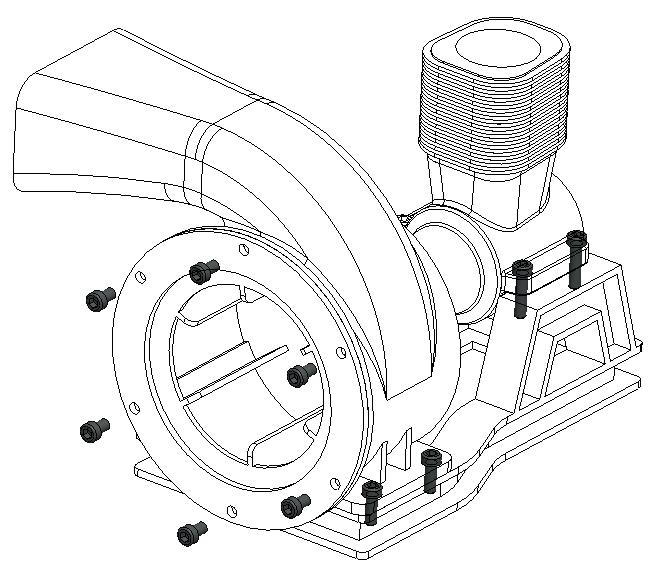
Although you can add a Style to a Combined State in 3D mode, you cannot take advantage of it in a drawing view.

The drawing Combined State should carry style too, so that we can create an assembly view with different display styles for its components.

i.e.: To hightlight one component in an assembly with Shading, while the rest of the components remain No Hidden.
Snap 2014-01-21 at 12.25.16.png

21 replies

Nov 21, 2022 4:40 PM UTC

Explicitly for appearance states, but part of the overall package of combined states mentioned above:


Often times parts require coatings that might be a portion of a model appearance, but will also require a designated area for specificity. In using "real-world" colors, the variances may be too subtle or colors blend in with a background. This prompts users to stray from actuality, which is less clear (with regard to design intent) upon model assessment and hinders the occasional downstream rendered outputs, when requested. This can all be managed by model appearance states, but it is also needed in drawings when we show shaded views for coating callouts. The age-old methods of highlighting via sketch, general notation, and/or hatched area (on surfaces that it's feasible, at least) will suffice, but it's extra work to replicate what an appearance state can do in the model.


In this scenario, I find myself coloring a component as it appears in the real world, and adding designated areas as necessary for particular coatings. Then, if it's not clear when translated to a drawing, I use designated areas to highlight and visibly change model appearance for shaded drawing views. Basically, I toggle the "drawing appearance" off in the model via layers, as well as in all views that are not shaded to avoid the pink surface edges, while I unhide this layer in a shaded view for accurate/ideal depiction.


A lot of this can be avoided by defining appearance states in the model that can then translate to the drawing, with a simple toggle of a designated area layer thereafter for explicit callouts.

Feb 28, 2023 7:26 PM UTC

Submitted an idea, but see that this one already existed since 2014!  This would be very useful in assembly drawing, documentation literature, etc.  We also manufacture welded assemblies.  If we could show the solid weld as "shaded", and the fabricated parts as "no hidden" in the drawing it would be very useful for our welders to see where the weld is located.

Mar 1, 2023 8:47 AM UTC
Mar 20, 2024 10:11 PM UTC

I'm excited this has been acknowledged. I have this same issue and the functionality is almost there. That's a theme in Creo, however. I often find myself going down a workflow that feels logical and intentional only to be hardstopped by something like this where Creo just doesn't have that last bit of function to complete the thought. This is especially punctuated for Creo since they pride themselves on model definition for everything in the drawing (notes and dimensions namely). Seems like a miss when your display style needs to be defined view by view instead of what is already set in the combined state.  Hopefully, it won't be another ten years before it's solved.

Mar 21, 2024 3:21 AM UTC

The idea is only 10 years old, soo, maybe Creo 20 we actually get it?!

Jun 4, 2025 2:32 PM UTC

Recently moved from SW where you can have several views in the same drawing, of the same assembly with different levels of detail. All can use the same BOM to keep things consistent. It's essential for clear, easy assembly drawings without having to make a separate subassembly or exploded view for each and every build step.


I'm amazed how many of these kinds of usability issues I've come across while getting to grips with Creo, which were requested 10+ years ago, and still haven't been implemented.

Sep 3, 2025 8:36 PM UTC

This issue is frustrating because it is misleading to provide the functionality in the drawing to choose a combined state, but then not show what you would expect when you choose one.  What is the officially recommended workflow to replicate the desired functionality?  You are supposed to use simplified reps?

Sep 4, 2025 1:38 PM UTC

In only 4 months this will be a 12 year old request.    Probably there is a book idea about a software engineer that want so badly to solve this but was blocked at every turn, only to be the last thing they do before retiring.    But, seriously yes this is still a good idea.   Along with the related concepts of having the annotations in a combined state appear in the drawing.  Which should have been a feature starting in Wildfire 2.0.

Sep 4, 2025 2:07 PM UTC

So @N.Barnes is saying it's definitely on the FAST TRACK! I got it!  

My opinion, worth $0.00, PTC has mostly stopped "enhancing" drawing mode, there are a few changes occasionally, nothing really significant.

They  are pouring  all their enhancements in to Model Based Definition...which has left drawing enhancements stagnant...and where to MOST customers convey there manufacturing information...drawing mode.  Sure, there are some doing MBD, it's a lofty goal for all the CAD software makers, eliminate the need for drawings. 

But hey, you guys have hope!!!  Hope is an great thing. They'll get to it soon, just wait!

I'm really trying to be funny, not negative, not pessimistic, but, I just can't hold out any hope for anything related to drawing enhancements.
Signed,

Not Negative Nancy   (sorry to anyone out there named Nancy)

Sep 12, 2025 11:36 PM UTC

It was sad to see that there was not a single 2D drawing enhancement in Creo 12.

This idea for using the Style in drawing mode is very usefull indeed and there are no workarounds possible.

About MBD, the tables were enhanced in MDB mode in 3D, but not "ported" to the 2D drawing mode. I even thought that it would be using the same code base instead of duplicating functionality with a different code base.