
Jun 18, 2015 7:38 AM UTC
Archived

Change notice facility to up-itaration as well as revise

Related products:Creo Parametric

Currently only one option to automatically create resulting objects is available when change a notice is being created.

This is the revise button.

This creates a new revision and in our workflow sets the resulting newly revised object back to In "Work status" from its "Released" status which means the previous revision is still the Released revision until the change has been completed and then the newly revised object gets upgraded to "Released"
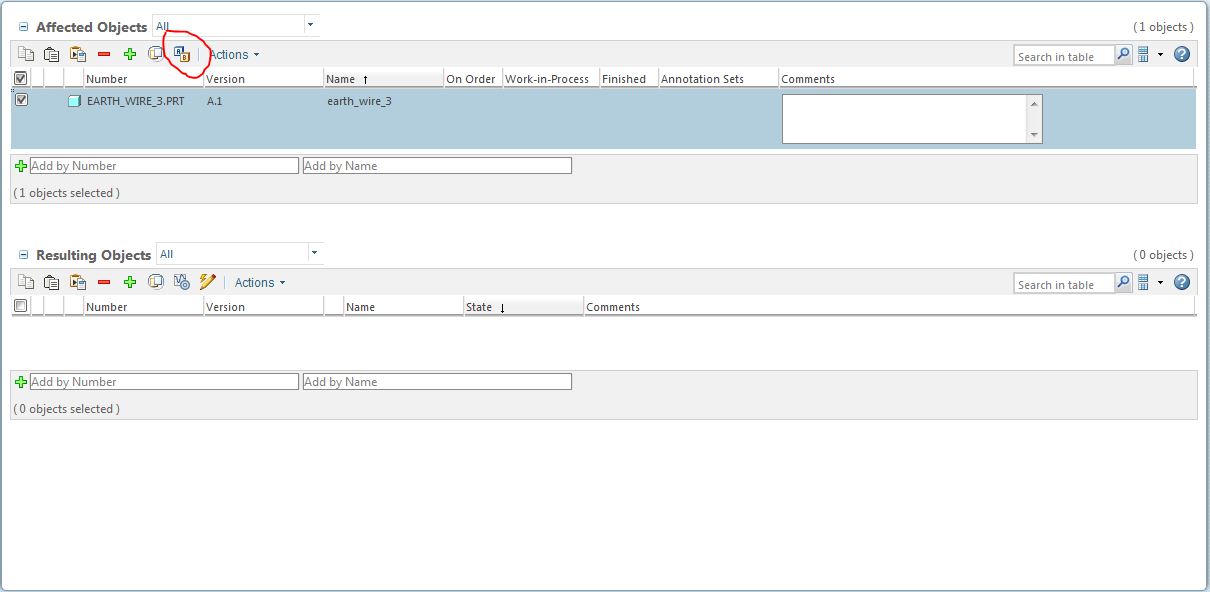
Fig1.JPG

However if I want to create a change that will have a minor effect on an object such as a spelling mistake on a drawing or an incorrect mating in an assembly etc. it does not warrant a full revision it makes the transition by iteration for example V 1.1 to V 1.2 instead of V 1.1 to V 2.1.

This is not currently possible. As there is no way to up-iterate then no resulting object can be created. If the Object in question is at"Released" then the change is happening to a "Released" Object (in our system no one can check in a modified released part). It becomes impossible to make an iteration change on a "Released" part without the intervention of a Library Manager or Administrator to set the permissions for the assignee to modify and check in a "Released" part. This is not good.

I would like to see an additional button alongside the Revise button that says "iteration". selecting this will create a new iteration of the object,(exactly like the way the "Revise" button works) and set it to "In Work" status such that it can be modified and checked in.

the Change process can then take it through to "Released" exactly the same way a Revised object is processed.


This would be an incredibly useful feature.

    12 replies

    knicholasAuthor
    Jun 18, 2015 7:38 AM UTC

    Great Idea

    1-Visitor
    Jun 18, 2015 7:48 AM UTC

    Kevin,

    you have to vote up for your idea.

    Jun 18, 2015 10:56 AM UTC

    While I am fully for giving access and taking away when abused... this is one area I'd raise caution to.

    Comments based on Windchill 10.0.  (and hoping to move forward soon!) so this may be outdated....

    Our company adopted a little different philosophy regarding this topic.  The number of people accessing is also a factor but I offer as fodder.

    Key individuals were given separate "local admin" login rights to allow objects to have their states reset.  Once the "typo" task was complete, the object is either re-promoted by the operator or the state was set to released by the local admin.  Version control is already built in as you can see.

    typo-control.jpg

    Now, in the spirit of this request, what perhaps this "button" should do is be able to allow the demotion of an object/collection of objects to those that have this "local admin" right.  If needed, to be able to logout as a normal user and allow to login as the local admin and vice versa.  For smaller companies with few users, this local admin could be everyone but as the number of users escalates, only a select few should be able to do this.

    Note: this is currently available to those that have these rights.  It is not visible to those that do not

    setstate.jpg

    What I am suggesting is to bump this ability into the search/browse side instead of the detail side.  Reason: the drawing and the model (or other objects like .pdf's or doc's) need to be adjusted also and it would be much easier to be able to select and perform the demotion in one action rather than separate ones.

    So if Kevin Nicholas agrees, I will vote up the idea.


    ron

    knicholasAuthor
    Jun 18, 2015 11:12 AM UTC

    I am new to this forum.

    How do I vote up my idea please?

    Jun 18, 2015 11:30 AM UTC

    on the top of this thread, you will see a box with "0" in it.

    alongside, there are arrows, one up and one down.

    Hover over it and you will see it hi-lites.

    select up arrow as "for"

    select down as "nay"

    knicholasAuthor
    Jun 18, 2015 12:48 PM UTC

    Thanks

    knicholasAuthor
    Jun 18, 2015 12:58 PM UTC

    I thought I had replied earlier but see it has not come through

    I agree Ron St.Pierre Thanks please vote up the idea

    knicholasAuthor
    Jun 18, 2015 1:09 PM UTC

    HiGreg White Maybe you will agree to vote this idea up?

    Jun 18, 2015 8:13 PM UTC

    I assume from your request, that your company will allow changes to a released object (minor, clerical, or otherwise) without revising the object.  In addition, I assume your company would allow multiple iterations of the same revision be at “Released”.  i.e. A.5 and A.6 are both at “Released”; A.5 with the minor error, and A.6 without.   [A CM person just gasped somewhere]

    Perhaps the iterate functionality (of sorts) can be accomplished today via existing methods/functionality.

    For the purpose of my idea:

    • Assume your life cycle states are NOT workflows, but simple statuses meaning an object can move from any one state to another without progressing through a series of states.
    • A “promotion” action in Windchill is a simple state change, not a change from a “lesser” state to a “higher” state.  Promotion request = life cycle state change request.

    If you change your life cycle template to allow "promotion" from "Released" to "In Work", configure a new or existing organization role for the “clerical” change with the access controls to allow “promotion” from “Released” to “In Work”, create a new promotion preference (maybe), and setup a workflow for the process, you may be able to do what you’re looking to do.

    The “clerical change” workflow would look something like the following:

    • Design Drafting/Engineering creates a promotion request to move the objects from “Released” to “In Work”; promotion preference????
    • The objects are moved from the “Released” state  to “Under review” (or whatever your company calls this state) and are locked (by the system); The promotion request does this, not the user; This is similar to what a “normal” promotion request would do;
    • The workflow emails the approvers of this change request (hopefully limited to a single CM person);
    • The approver approves the change;
    • The objects life cycle state changes back to “In Work” and are unlocked; there is no “Released” version anymore (it was wrong it the first place), only the life cycle state has changed , not the version (revision.iteration); [This is where the idea breaks from creating a new iteration (copy) of the released object]
    • Design Drafting/Engineering makes the change and checks the objects back into Windchill; the iteration changes.
    • Use your normal promotion workflow to promote the new iteration back to “Released”; or perhaps a simplified promotion workflow would be allowed for the clerical change made.

    Our company doesn’t allow such a change once the object is released, so I haven’t tested this process.

    I would propose another use case for iteration of objects vs. revise (although it’s not my preferred solution):

    Collaborative Design Studies

    1. The only way to collaboratively work in PDMLink or Pro/Intralink is to check objects in otherwise no other users can see the objects.  [Assuming you’re not using ProjectLink or such.]
    2. The only way to perform a design study on released objects collaboratively is to revise the objects to a new revision changing the life cycle state to a state that allows check in.

    If you need to perform a collaborative design study like “Investigate whether we can shave X pounds of weight from this assembly”, you need to revise almost every object in the assembly as well as the top assembly.  Now multiple people can work collaboratively on their piece of the design study.

    Personally, I don’t care if there are gaps between what revisions are actually released, but may folks have difficulty understanding that concept.  If we release revision A, and then C, the question is always “where’s rev B?”

    knicholasAuthor
    Jun 19, 2015 8:37 AM UTC

    Thanks Daniel

    We are a relatively small company but growing so right now don't have the resource available to manage and run a detailed process as we simply don't have enough people for the roles required for the stages in a protracted workflow.

    In addition our MRP system is not "Linked" to Windchill except for when a promotion or change is actually processed. the Operations team are part of this process. at the time of promotion or change the revised (or up-iterated) documents get transferred into the MRP database. so we are only ever useing the latest version and issue of a "Released" document in our Material Manufacturing Planning system.

    So without being able to up-iterate and set the status to "Awaiting Release" or "in Work" on the new iteration we are actually working on we are actually modifying a "Released" document.

    it would be better if like in the revise situation, for example we have  V1 at "Release " while the V2 is at "In Work" until the Change is completed and set to Release part of closing down the Change notice is the addition of the revised document into MRP.

    The idea of promoting down to "In Work" and then back up to "Released" would be OK but is a bit clunky? Maybe we can sort something out. As you say with a workflow. We are still relatively new to working with Windchill and the disjoint between Windchill and our MRP system makes it a bit challenging at times.

    Legacy documentation is a good case in point where several revisions have been jumped (so like you we don't care about gaps) in order to bring them in line with our pre Windchill System.