
Jan 9, 2024 6:44 AM UTC
Solved

Unable to see label of action created in action framework

Hi,


I am unable to see label when I create one action in Parts details page.

Action is there, it is clickable and the link opens. But can not see the label name.
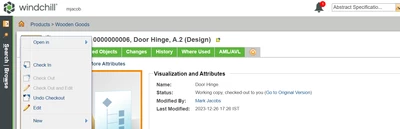
 

DS_10805287_0-1704780942060.png

I created CustomAction.java file in actionFramework package

package actionFramework;


import wt.util.resource.*;


@RBUUID("actionFramework.CustomAction")

public class CustomAction extends WTListResourceBundle {


@RBEntry("Open In Google")

public static final String Google_Des = "custom.openInGoogle.description";


}


Jan 9, 2024 9:21 AM UTC

Hi @Divyanshi 

If you change RBInfo file, you always need to restart the system.

Also with deleting a temp files. 

You had done something wrong if your "Open in" text disappeared. 

if you user RB info define all following sets label, description, tooltip

PetrH

30 replies

Jan 9, 2024 7:43 AM UTC

Hi @Divyanshi 

Have you restart the server? Or have you used a reload actions? HelesicPetr_1-1704786137262.png


There is no issue, you just need to set a label in the custom-actions that the name is shown.

I use your config and I don't have any problem with the action

HelesicPetr_0-1704786078101.png

<action name="openInGoogle">
<description>Open In Google</description>
<label>
	Open In Google
</label>
<command windowType="popup" url="https://www.google.com/" />
</action>

PetrH

DivyanshiAuthor
Jan 9, 2024 7:49 AM UTC

I'm trying this. Hope this time it works for me.