
Dec 8, 2016 8:48 AM UTC
Question

How enable dual sign functionality on Problem Report as shown in attched image.

Hi,

When i am going through Change management videos on YouTube , found below video "PTC Windchill PDMLink Change Process Webinar - YouTube".

In this they shows a Problem Report with Dual sign functionality, as per the presenter this is not customization, its configuration.

Is any one know how to enable dual sign in functionality as shown in below image ?

Here is the screen print from above video.
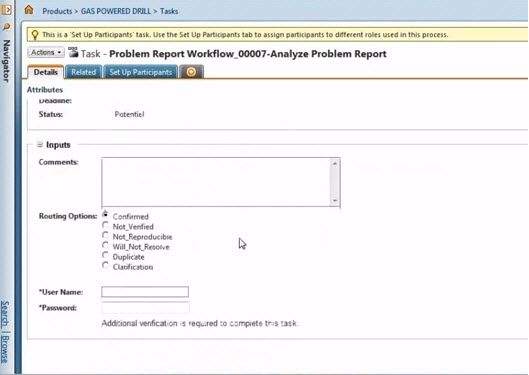
Dual Sign.jpg

Thanks,

Vivek

2 replies

Jan 31, 2017 8:32 PM UTC

Hi Vivek Uchekar‌

Have you tried "Signing Required" in Workflow Template Administration?

signing.png

Regards,

Shirish

Jan 31, 2017 9:27 PM UTC

If you want both the username and password you need to use the "FDA Compliant" Signature engine.  You can follow the directions here.  You also need to set Signature Required on your workflow activity as above.

http://support.ptc.com/cs/help/windchill_hc/wc102_hc/index.jspx?id=WFChp_ElectronicSigSetup&action=show