
Oct 5, 2023 10:30 AM UTC
Solved

Customize Modeled Enumerations panel missing

Hi all,


Looking at customizing lifecycle states in a sandbox, adding my own states, I should have access to a "Customize Modeled Enumerations panel" under Site - Utilities - Type and Attribute Management. However, I only see the usual five "Manage,,," panels. 
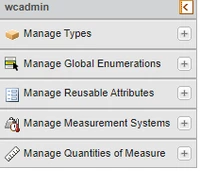
Zoltn_0-1696501584248.png

Guides tell me not to do this directly in files, but use the utility.

I'm trying to find out what I'm missing, but no luck so far in PTC help pages here. Can someone point me in the right direction, please?
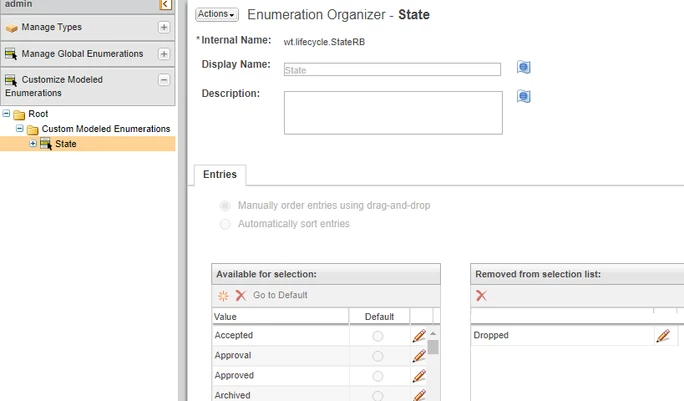
 

https://support.ptc.com/help/windchill/r12.1.2.0/en/index.html#page/Windchill_Help_Center/etutil/TypeMgrModeledEnumEnumSelect.html#wwID0EEWEW

Oct 5, 2023 12:33 PM UTC

Hi @Zoltán 

What Windchill version do you use? this is available on 12.1 + 

In the older versions you need to use windchill shell enumcustomize utility

HelesicPetr_0-1696509456501.png


PetrH

3 replies

ZoltánAuthor
Oct 5, 2023 12:18 PM UTC

Answering myself, probably via Windchill Shell.... but I don't get the guide in the Help Center then.

  1. Open Windchill shell.
  2. Type enumCustomize. Hit Enter.
  3. Enumerated Type Customization Utility will open.
  4. Browse to <Windchill>\codebase\wt\lifecycle\StateRB.RB.ser and open it

Zoltn_0-1696508245781.png


Oct 5, 2023 12:33 PM UTC

Hi @Zoltán 

What Windchill version do you use? this is available on 12.1 + 

In the older versions you need to use windchill shell enumcustomize utility

HelesicPetr_0-1696509456501.png


PetrH

ZoltánAuthor
Oct 5, 2023 12:40 PM UTC

Aahh, and here I am playing with marbles on 12.0.2.10, looking at the guide for 12.1.2.0.

So it's a new thing then. Gotcha.