Jan 15, 2025 3:46 PM UTC
Solved

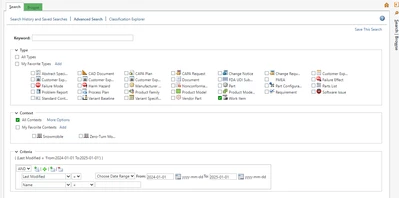
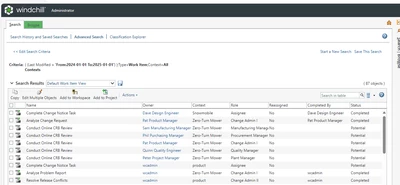
Add last modified date to work item advanced search

I am using Windchill PDMLink Release 13.0 and Datecode with CPS 13.0.2.0

I would like to be able to filter work items by their last modified date - how would I be able to add this as an attribute to an advanced search.

Here are the errors that I faced
none
    FadelAnswer
    3-Newcomer
    Jan 15, 2025 6:53 PM UTC

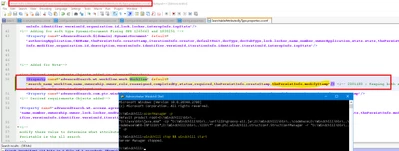
    edit advancedSearch.wt.workflow.work.WorkItem property in SearchableAttributesByType.properties.xconf to add thePersistInfo.modifyStamp : 

    Fadel_0-1736966722488.png


    run xconfmanager -p and restart :

    Fadel_1-1736967143623.png


    Fadel_2-1736967171867.png

    good luck 


    4 replies

    Community Manager
    Jan 15, 2025 3:47 PM UTC

    Hi @AL_9355918 


    Thank you for your question! 


    I’d like to recommend to bring more details and context to your initial inquiry. 

    Please add screenshot(s) to better understand what you are trying to do in your process. 


    Please refer to this guideline to make your questions more likely to receive a quick and useful answer. 

    This will increase your chances to receive meaningful help from other Community members. 


    Thank you for your participation and please let me know if you need further assistance! 


    Best regards,

    3-Newcomer
    Jan 15, 2025 6:25 PM UTC

    follow the same logic as in https://www.ptc.com/en/support/article/CS180432 , but the workitem 

    FadelAnswer
    3-Newcomer
    Jan 15, 2025 6:53 PM UTC

    edit advancedSearch.wt.workflow.work.WorkItem property in SearchableAttributesByType.properties.xconf to add thePersistInfo.modifyStamp : 

    Fadel_0-1736966722488.png


    run xconfmanager -p and restart :

    Fadel_1-1736967143623.png


    Fadel_2-1736967171867.png

    good luck 


    Jan 16, 2025 9:09 AM UTC

    Thank you so much!