Feb 28, 2023 7:54 AM UTC
Solved

Add dropdown list in activity

Hi Comunity;

I need to bring the fields in the red box below as a list, how can I do this?
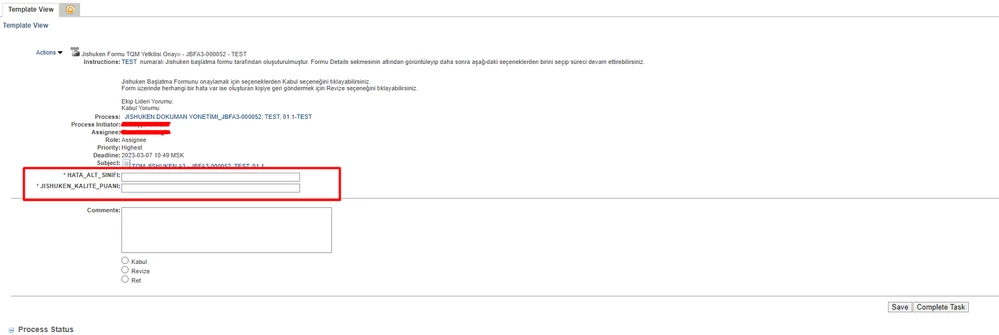
smcvr_0-1677570704408.png


Mar 2, 2023 8:32 AM UTC

Hi @smcvr 

You need to learn how to use IDE with annotations (Eclipse, NetBeans, InteliJIdea atc...)

"_HataAltSinifi" is autogenerated class by annotations. 


PTC Supports Eclipse as a IDE that can be used directly with Windchill. 


Windchill PLM - Customization with Eclipse IDE

CS63697: How to install Eclipse IDE for Windchill PLM

Using Eclipse

Example Create Pet Class


PetrH

8 replies

Feb 28, 2023 12:19 PM UTC

My solution was rather complex to this same problem. I was showing a team input as a drop down. Required a custom JSP template and data utility to format the drop down list. Have you tried making the variable something other than text? Possibly a vector or List object?

smcvrAuthor
Feb 28, 2023 12:36 PM UTC

I tried wt.fc.EnumeratedType but no result

Feb 28, 2023 1:58 PM UTC

Hello @smcvr 

I did it several years ago, and it is not easy as you can think. 


A PTC Article CS36017 describes how to achieve the dropdown list in the task page.


hope this can help.


PetrH

smcvrAuthor
Mar 2, 2023 7:08 AM UTC

Screenshot_3.png

Screenshot_4.png

Screenshot_5.png

I tried the steps but I'm having trouble adding the java file do you have any information about it?

Mar 2, 2023 7:10 AM UTC

Hi @smcvr 

You need to define path to class

the value <path_to_class> is not correct

PetrH
