May 5, 2023 12:47 PM UTC
Solved

search for dimension in drawing by windchill

Is possible to search a dimension in 2D by this page in windchill?
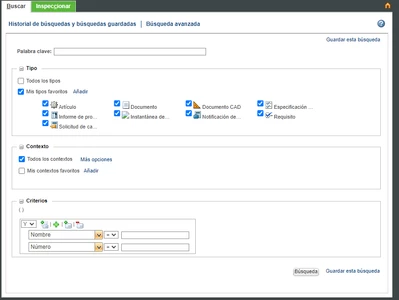
jtorres_0-1683290598672.png

Is possible to search a dimension in 3D by dimension 3D, in windchill too.



d_grahamAnswer
May 8, 2023 5:29 PM UTC

It is possible by creating a designated parameter in the drawing and a relation to link the designated parameter to the appropriate parameter.

Then you’d create a corresponding attribute in Windchill.

You could then search on the corresponding attribute.

7 replies

May 5, 2023 1:01 PM UTC

Hello,


I guess when you are speaking about the MBD Models, which has 3D dimensions in it. If you are checking in CAD data into the windchill, it's going to send metadata into the DB (like type, number, name etc.) and physical model files will go into the vault. Windchill Database will not have a details about your the geometry and it's MBD notes or dimensions.

That's why windchill will not have a control to index that information, That's the reason why it's not possible to search using 3D or 2D dimensions in windchill using search functionality.

Regards,
Hemant Chaugule

May 5, 2023 1:08 PM UTC

Short answer no but you can index drawings and search for text like in notes. 

May 8, 2023 4:30 PM UTC

If your publishing is working and you have PDFs generated as Published Content links, search will look into content of the WTDocuments... 

May 5, 2023 2:09 PM UTC

I haven't done this myself, but I believe that if the dimension is designated as a control characteristic, there is a way to find it in Windchill.


Capture.PNG

d_grahamAnswer
May 8, 2023 5:29 PM UTC

It is possible by creating a designated parameter in the drawing and a relation to link the designated parameter to the appropriate parameter.

Then you’d create a corresponding attribute in Windchill.

You could then search on the corresponding attribute.

jtorresAuthor
May 23, 2023 1:00 PM UTC

Thanks, this solution may be used for me