
Jul 26, 2023 12:18 PM UTC
Solved

how to upload .tbl to windchill as table file instead document

Looking for guidance to upload the .tbl files into my windchill library. 


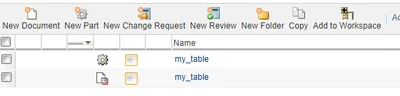
When i try to upload them into windchill, it appearing as a DOCUMENT instead of table file which cant be imported to the drawings. Refer attached image. 


There are few tables already exists in the windchill library which can be imported to the drawings thru " Table from file" option and their display icons looks different. Please help 


jbaileyAnswer
Jul 26, 2023 12:34 PM UTC

WC 12.0.2 and Creo 9.0.4 (your mileage may vary with different versions)


  1. From Creo, save the table into a Windchill workspace. 
  2. Check the table into Windchill from the workspace (Be sure to set the location).
  3. To retrieve into a drawing, browse to the PDM location.
  4. Enjoy your table in Windchill

jbailey_0-1690374602994.png


1 reply

jbaileyAnswer
Jul 26, 2023 12:34 PM UTC

WC 12.0.2 and Creo 9.0.4 (your mileage may vary with different versions)


  1. From Creo, save the table into a Windchill workspace. 
  2. Check the table into Windchill from the workspace (Be sure to set the location).
  3. To retrieve into a drawing, browse to the PDM location.
  4. Enjoy your table in Windchill

jbailey_0-1690374602994.png