Mar 10, 2017 5:33 PM UTC
Solved

How to enter Due Date in a Change Activity?

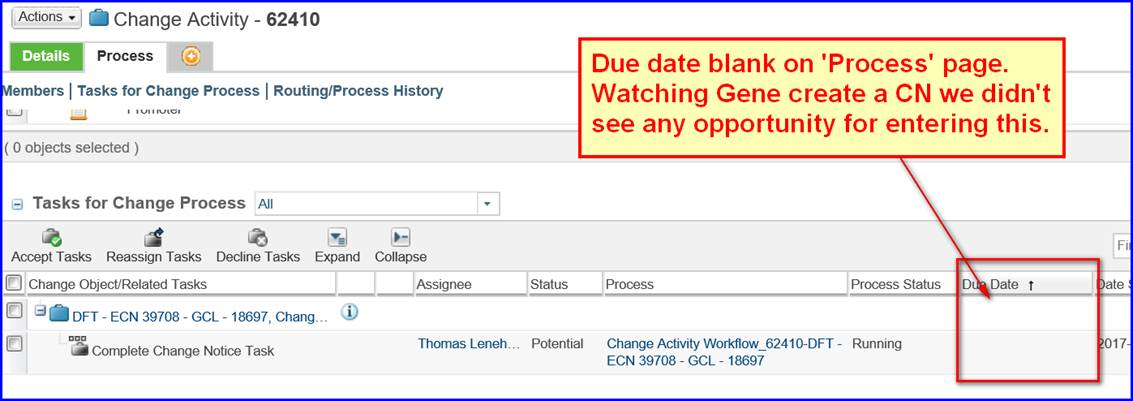
So we currently use Change Management in Windchill to manage our engineering changes, and have noticed that there appears to be a date field in the change activity that never gets filled out.   I am curious as to what this date field is for and how to get it to populate with data?   (See attached screenshot for details.)

-marc
20170310-112910.png

BenPerryAnswer
Mar 11, 2017 12:21 PM UTC

Marc DeBower‌,

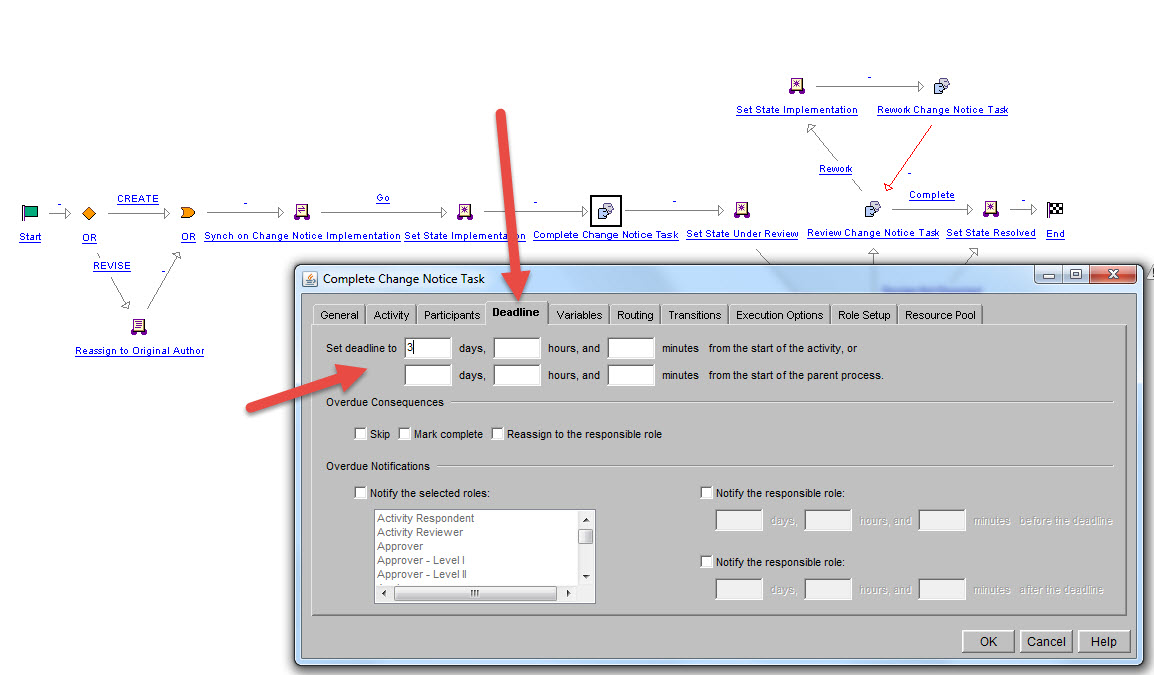
That is the Due Date or Deadline of each particular workflow task, when you enable deadlines on your tasks.  You can have some tasks with deadlines, and some tasks without deadlines.

A few cautions ... Windchill's functionality is a little weak in this area.  It doesn't take into account working hours.  So if the deadline is 3 hours, and the user receives a workflow task at 4:00 PM, it will be overdue at 7:00 PM.

2017-03-11_6-18-01.jpg

4 replies

BenPerryAnswer
Mar 11, 2017 12:21 PM UTC

Marc DeBower‌,

That is the Due Date or Deadline of each particular workflow task, when you enable deadlines on your tasks.  You can have some tasks with deadlines, and some tasks without deadlines.

A few cautions ... Windchill's functionality is a little weak in this area.  It doesn't take into account working hours.  So if the deadline is 3 hours, and the user receives a workflow task at 4:00 PM, it will be overdue at 7:00 PM.

2017-03-11_6-18-01.jpg

mdebowerAuthor
May 12, 2017 4:40 PM UTC

Finally had a chance to test this and it works just like Ben describes.  My only hang up was I started looking in the Change Notice Workflow not the Change Activity Workflow.

However, if you want to set a deadline for the default Audit task, you will need to modify the Change Notice Workflow.

Change Activity Workflow:

  • Change Notice Tasks
  • Review Tasks

Change Notice Workflow:

  • Audit Task
Mar 13, 2017 3:53 PM UTC

Hi Mark,

You can also edit the deadlines manually, the Product Manager can edit them in the Tasks table, then overdue tasks get highlighted red. I looked for a way to grant permission for other users but I can't find any.

2017-03-13_153614.bmp

Regards

Rob

Mar 14, 2017 11:10 AM UTC

Very cool, Robert Hart‌.  I have never seen that before.  Thanks for sharing.