
Aug 20, 2022 11:07 AM UTC
Solved

Copy and paste activities in project schedule - running project

We are unable to copy paste the activities in running project schedule.


Copy and paste available during project plan creation (Defined and scheduled state)
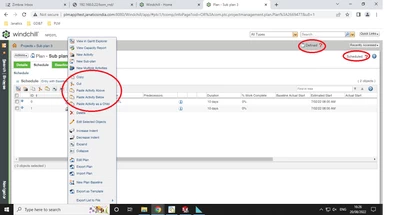
Sathish_Rosario_2-1660993550456.png


Copy and paste NOT available during project running (Running and Inprocess)
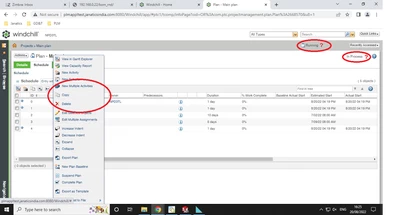
Sathish_Rosario_3-1660993558775.png


Since copy and paste feature is not available, we are creating existing activities repeatedly, when required.


Any work around and am I missing something?


Thank you

Sathish Rosario
 

Aug 22, 2022 6:45 AM UTC

Hi @Sathish_Rosario 

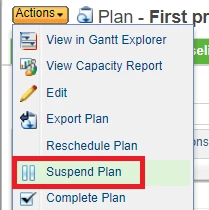
If the process plan is in a process or executed and is autoexecuted you can edit the plan if it is paused (suspended). 

HelesicPetr_0-1661150644355.png

PetrH

4 replies

Aug 20, 2022 11:15 AM UTC

Are you using Manual Execution or Automatic Execution? There are specific differences between the two and it sounds like you should move to Manual Execution if you are not executing a static process.

Check out the Execution of Plans topic in the Windchill Help Center.

https://support.ptc.com/help/wnc/r12.0.2.0/en/#page/Windchill_Help_Center%2FPlanMgmtProjectProgramExecutionRef.html%23

Aug 22, 2022 3:26 AM UTC

We are using automatic execution plan.


During the project running, we need to add some missed out activities.


Thank you.

Aug 22, 2022 6:45 AM UTC

Hi @Sathish_Rosario 

If the process plan is in a process or executed and is autoexecuted you can edit the plan if it is paused (suspended). 

HelesicPetr_0-1661150644355.png

PetrH