Jun 4, 2019 8:20 PM UTC
Solved

CAD Structure - Single Level Report - How to filter out components in suppressed assemblies?

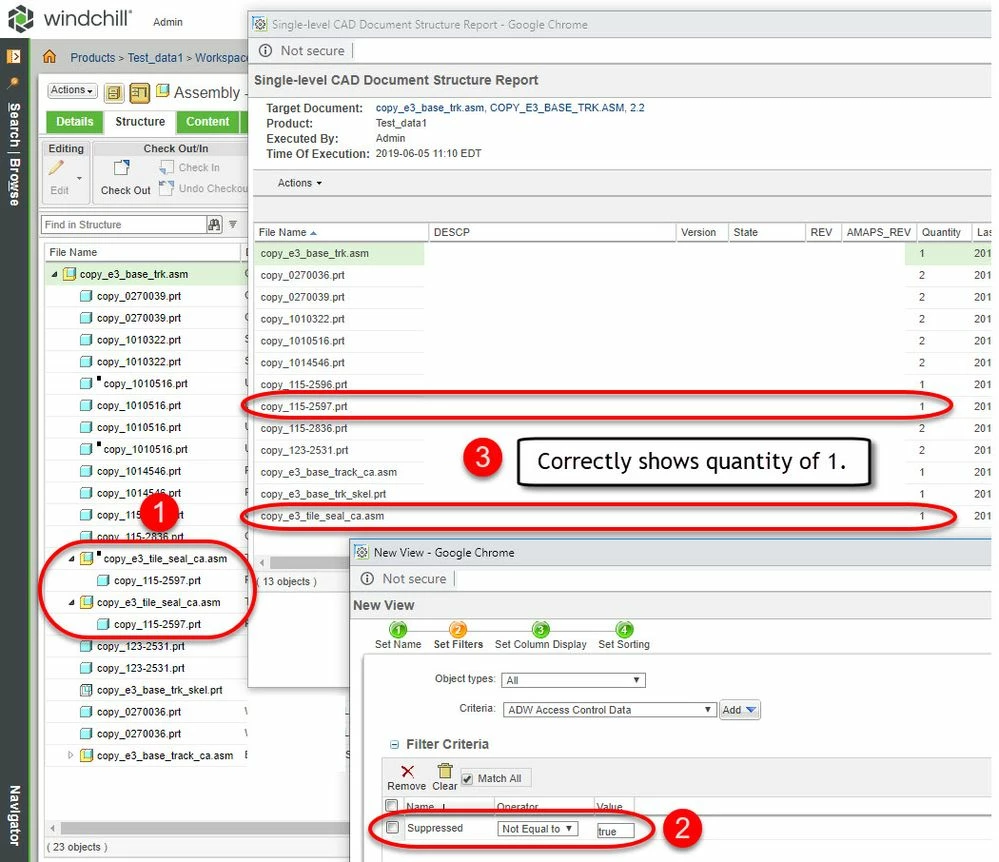
Wondering how I prevent components inside suppressed sub-assemblies from appearing on the CAD structure, single level report.  The multilevel report is correctly filtering out the suppressed components but the single level report is not.


I've messed around with the 'manage structure views', and I do have a condition for 'suppressed not equal to true', but that seems to apply to each component directly.  It does not filter out components used by suppressed sub-assemblies.  Any idea how I get a flat, single level report that does not include items used by suppressed sub-assemblies?  Thanks.

 

Windchill CAD Structure - Single Level Report.png

Jun 5, 2019 3:19 PM UTC

Could be a error with your build code? It seems to work on Windchill 11.0 M030-CPS14.


Windchill Flat Structure Report - Supressed Assemblies.jpg

5 replies

Jun 5, 2019 3:19 PM UTC

Could be a error with your build code? It seems to work on Windchill 11.0 M030-CPS14.


Windchill Flat Structure Report - Supressed Assemblies.jpg

TomUAuthor
Jun 5, 2019 4:05 PM UTC

If you suppress the second occurrence of that assembly does the 115-2597 part completely disappear from the single level report?

Jun 5, 2019 4:35 PM UTC

Seems to be working correctly. I am doing this in my workspace so I don't have to check in changes.


Windchill Flat Structure Report - Supressed Assemblies v2.jpg