Mar 14, 2018 6:48 PM UTC
Solved

Add To Workspace - No Config Spec

How do I add objects to a workspace without using a config spec filter?


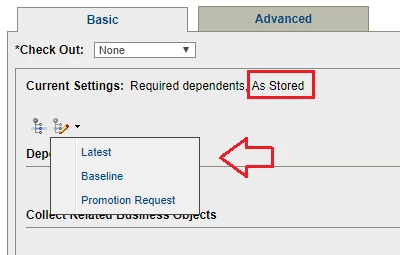
Say I search for objects last modified in a very narrow date range and want to add those exact versions to a workspace.  They may be the latest or they may not be.  Choosing the "Latest" filter doesn't collect the correct versions and the "As Stored" filter isn't listed as a choice.  What is the right way to add the exact versions of the objects returned from a search to a workspace?  Thanks.
TomUAnswer
Mar 14, 2018 8:31 PM UTC

I think I found the solution.


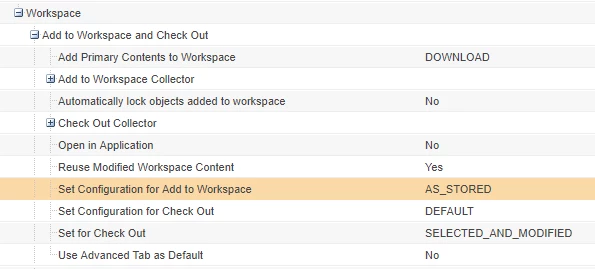
What do you have this preference set to:

Add To Workspace Preference.PNG

We have it set to "DEFAULT" (the OOTB value.)


I think temporarily changing this preference to "AS_STORED" is the trick. It preserves the "As Stored" config spec during collection, even when it isn't selectable in the filter.


Add To Workspace Filter.png 

13 replies

Mar 14, 2018 7:10 PM UTC

When I did a search just now for files created between 2 dates, I then checked the ones I wanted and highlighted one with the RMB and selected Add to workspace. The files are collected with the Basic tab. Switch to the Advanced tab and it says they are collected with the As Stored spec.

This is in Windchill 11.0 m030.


TomUAuthor
Mar 14, 2018 7:15 PM UTC

Don't select just one, select them all.

Mar 14, 2018 7:33 PM UTC

Selected all, Add to Workspace, switch to Advanced tab. Still shows As Saved.