
Sep 7, 2018 11:43 AM UTC
Question

Making model parts annotations/labels in Vuforia Studio

I am trying to include annotations/labels for parts in my 3D model in a way that these labels remain attached to those parts when I am moving the camera around, but have not found a way to do it in Vuforia Studio. I can add 3D labels with billboard visibility, but I cannot "attach" the label to a specific part (e.g. using lines). Looking at some PTC videos I found an example where they label parts of a motorcycle (see attached image below), but I cannot figure out how to add those particular widgets in Vuforia Studio.


Any hints/help is much appreciated. Thanks!
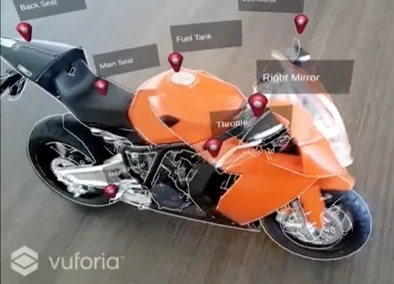
 

Vuforia motorcycle annotations.png


3 replies

Oct 12, 2018 12:19 AM UTC

I think you'll find that these labels that you're seeing have been created with the line in them like this:


step1a.png


The trick is to build the line/arrow into to the image and then put the end of it in a corner or center of an edge.  Then you can use the image widget pivot property to make the end of the line/arrow the fixed point so it will stay attached to the model and the rest of the image will rotate around this point:


image_widget_pivot.png


So for my image shown, I make the pivot the bottom left and then the dot at the end of the line stays fixed in space and attached to the model.


Hope this helps.

Oct 12, 2018 12:22 PM UTC

Yup @AllanThompson has the only way I know of. I would really like to see some dynamic leaders in a future release but for now it's all images with the leaders built in. I do this a lot for calling out bolt torques, I have the bubble shown below with the pointer in 4 different radial positions and use as needed.


2018-10-12 08_18_39-Design - Vuforia Studio.png

Jan 31, 2019 12:41 PM UTC

@tmccombie : Is there anything on the roadmap? Using the annotations that were created in Creo Illustrate would be a useful tool.