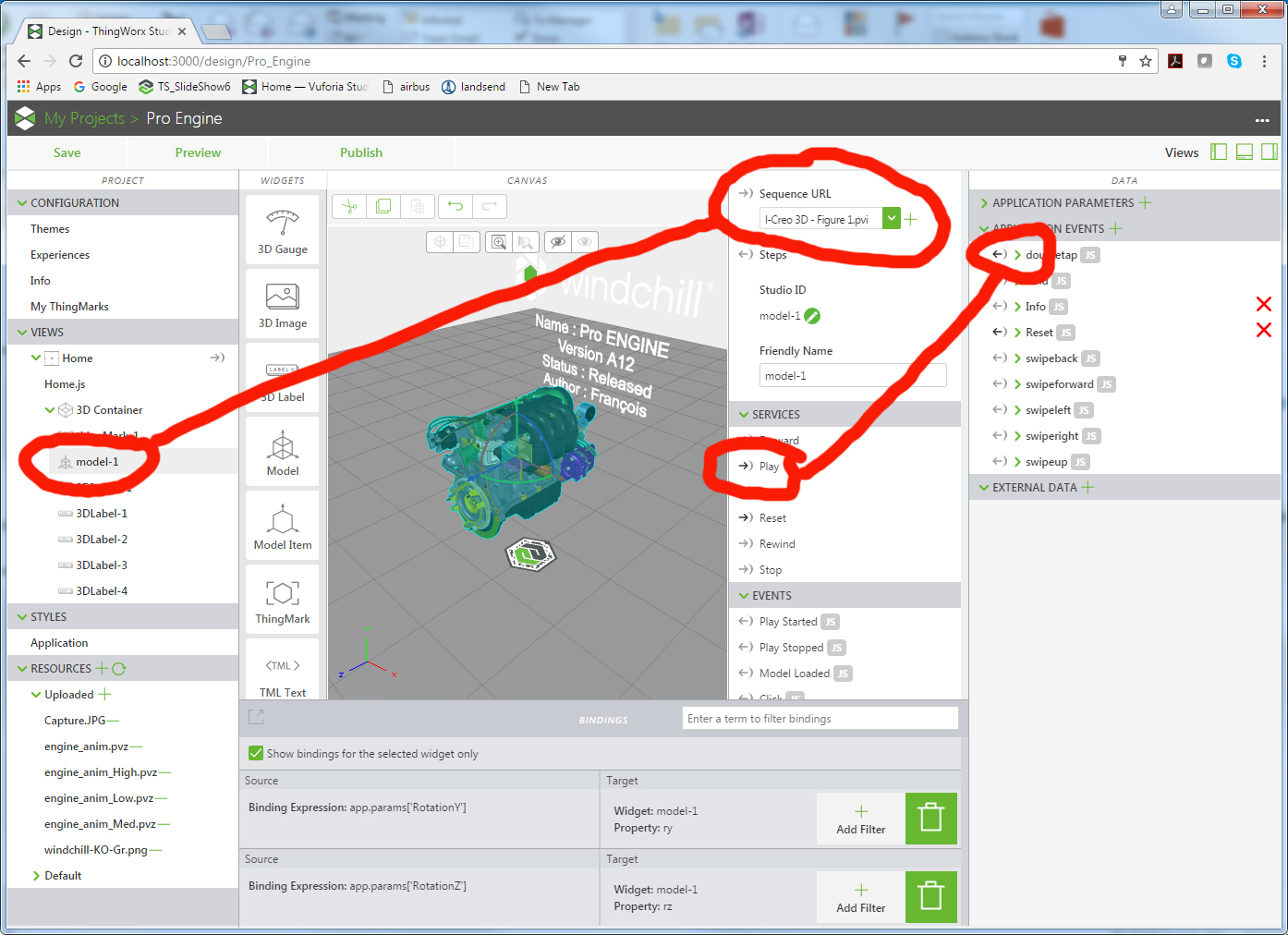
To bind the "Double Tap" with playing your animation (sequence in Creo Illustrate) you just need to drag the "DoubleTab" arrow to the "Play" Service Arrow .. making sure before that you have selected a Sequence for your model :
Gestures are a bit complex with HoloLens, and at times the movement should be slow and precise. Can you please provide more details on which gesture isn't working. Also are you using the latest version?
I guess pinch is kind of HL gesture, in ThingWorx View - there are gestures like swipe-left, swipe-right, double-tap etc., which are more used for experience actions. We have listed all the gestures and its corresponding movements in the 'Getting Started with HoloLens' guide, did you try those gestures? Are you facing issues with those gestures?
Ok, how do I bind the sequence to the gesture? I have created a figure with animation and figure with sequence in CreoIllustrate. I do not see the way to bind it to anything in TWS
To bind the "Double Tap" with playing your animation (sequence in Creo Illustrate) you just need to drag the "DoubleTab" arrow to the "Play" Service Arrow .. making sure before that you have selected a Sequence for your model :
Windchill Satisfaction Survey
Help shape the future of Windchill. Take our 5-minute survey and share your feedback.