Jul 9, 2018 6:21 AM UTC
Solved

Buttons pressed & unpressed

Hi,

I am facing this case. I have 3 buttons.

If i 'pressed' button1, i want button2 and button3 to be 'unpressed'.

If i 'pressed' button2, i want button1 and button3 to be 'unpressed'.

If i 'pressed' button3, i want button2 and button1 to be 'unpressed'.


How do i bind them?

Or how to create code for them?

Jul 11, 2018 9:35 AM UTC


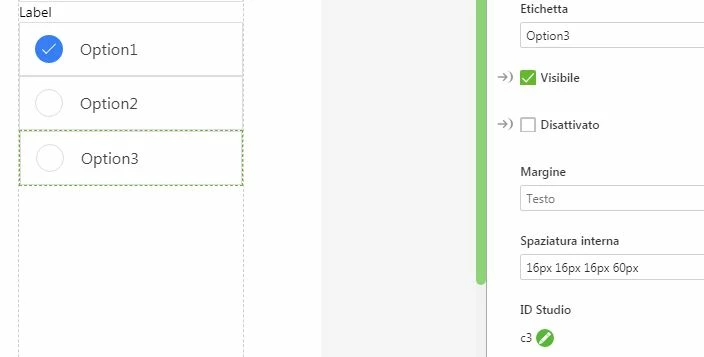
 Capture.JPG

i maked a simulation of Radio button width CheckBox .


Make 3 widget CheckBox   and change the id width 


c1         event click    call     sw();

c2         event click    call     sw();

c3         event click    call     sw();


write thiks code :


$scope.sw=function() {

var sw=this["me"].widgetName;

$scope.view.wdg['c1'].value=false;
$scope.view.wdg['c2'].value=false;
$scope.view.wdg['c3'].value=false;
// ----------------- widget to mark select ---------------------

$scope.view.wdg[sw].value=true;

};


bind this function to 3 checkbox into event click.

set to active one of the widget for start position.

when you press on one of the checkboxes he changes the status to the others,just like a radio button widget.


I hope my help has been useful.


Giuseppe

 

8 replies

Jul 9, 2018 7:52 AM UTC

Use RadioButton instead 😉 

tllamAuthor
Jul 9, 2018 10:59 PM UTC

Sorry. I should have mention i am working on Thingworx Studio.

Any idea how i can resolve this issue?

Jul 10, 2018 5:31 AM UTC

Are you working on a HoloLens-Project or is it for mobile devices?

tllamAuthor
Jul 10, 2018 5:36 AM UTC

For mobile devices. I am using Ipad.

Jul 10, 2018 5:52 AM UTC

Hi,

in the Project panel to the left, you can find “Application” under “Styles”. If you click that you have a coding area just like the home.js. Except, that you use CSS here. Your code could look like this:


.NormalButton {

font-family: Arial;

font-weight: bold;

text-align: center;

width: 200px;

background-color: white;

border-radius: 10px;

}


.NormalButton:hover {

background-color: #468499;

color:white;

}


You can assign that code to a button by writing “NormalButton” (without quotation marks)  in the class field of your button.

If you want them to stay pressed, you should use radio buttons, like CarlesColl wrote.

tllamAuthor
Jul 10, 2018 6:56 AM UTC

I am using Thingworx Studio. And Thingworx Studio dont have radio button.

By the way, the above is CSS coding for the appearance of the button when 'pressed' and 'unpressed'.

Jul 10, 2018 7:54 AM UTC

Usually you should use toggle buttons for that purpose. You could do a bindig that if one putton is pressed, the others get unpressed. Therefor you have to click and hold the arrow of “pressed” and drag it on one of the other buttons. Than select not pressed. Then do this with all other buttons. Unfortunately it didn’t work at my project. Maybe some bug?

@AllanThompson had the same issue. Seems like you can solve it with code.


https://community.ptc.com/t5/Studio/Toggling-a-toggle-button-with-another-toggle-button/m-p/529986

ther-toggle-button/m-p/529986

Jul 11, 2018 9:35 AM UTC


 Capture.JPG

i maked a simulation of Radio button width CheckBox .


Make 3 widget CheckBox   and change the id width 


c1         event click    call     sw();

c2         event click    call     sw();

c3         event click    call     sw();


write thiks code :


$scope.sw=function() {

var sw=this["me"].widgetName;

$scope.view.wdg['c1'].value=false;
$scope.view.wdg['c2'].value=false;
$scope.view.wdg['c3'].value=false;
// ----------------- widget to mark select ---------------------

$scope.view.wdg[sw].value=true;

};


bind this function to 3 checkbox into event click.

set to active one of the widget for start position.

when you press on one of the checkboxes he changes the status to the others,just like a radio button widget.


I hope my help has been useful.


Giuseppe