Mar 30, 2020 8:24 AM UTC
Solved

valuedisplay widget

I use a value display widget to make it red if it's smaller than 10, and

bigger than 10, smaller than 20 blue, finally

bigger than 20, smaller than 30 green.

What can I do?

Mar 30, 2020 8:40 AM UTC

Hi,


You can use state base formatting , if you are using valuedisplay widget (not ptcs-valuedisplay).

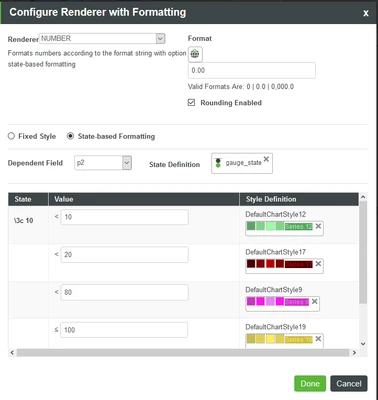
State base should look like this in Properties of widget > Value Format (this is an example, you need to adjust the values):

raluca_edu_0-1585557565334.png

Hope it helps,

Raluca Edu

6 replies

Mar 30, 2020 8:40 AM UTC

Hi,


You can use state base formatting , if you are using valuedisplay widget (not ptcs-valuedisplay).

State base should look like this in Properties of widget > Value Format (this is an example, you need to adjust the values):

raluca_edu_0-1585557565334.png

Hope it helps,

Raluca Edu

JackEomAuthor
Mar 30, 2020 9:05 AM UTC

Thank you for answering me, Raluca Edu.


but Like the photo 'test2" I don't see the "< "as you


I worked with Photo "test" 


Is it right to do this?


Mar 30, 2020 10:19 AM UTC

Hi,


It is ok as in 'test' image, you need to create state definition first.

Sorry, I forgot to mention you that.


Raluca Edu