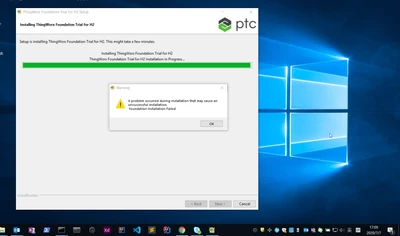
Looking over the logs once more I can indeed see that the JAVA_HOME is set correctly to the JDK as it should be. However what I did notice was that you are using Java 11. Per the ThingWorx 9.0 System Requirements ThingWorx 9.0 only supports Oracle JDK 8 Update 241 or higher.
Can you please try to reinstall using Java 8 instead of Java 11?
Can you please confirm if you have set the JAVA_HOME environment variable on this machine? This should be set to the JDK install path prior to launching the installer.
Looking over the logs once more I can indeed see that the JAVA_HOME is set correctly to the JDK as it should be. However what I did notice was that you are using Java 11. Per the ThingWorx 9.0 System Requirements ThingWorx 9.0 only supports Oracle JDK 8 Update 241 or higher.
Can you please try to reinstall using Java 8 instead of Java 11?
Were you able to resolve your issue by replacing the java version? If so, please mark the previous post as the Accepted Solution for the benefit of others with the same issue.
Thank you for participating in our community!
Regards.
--Sharon
Windchill Satisfaction Survey
Help shape the future of Windchill. Take our 5-minute survey and share your feedback.