
Sep 11, 2019 2:30 PM UTC
Question

Relational Database Extension - Complex Input Parameters for SQL?

Hello,


we want to store some data for long term where the dataset maybe become huge and has frequent updates. The community recommends not to use DataTables for this usecase.

So I installed the Relational Database Extension and was quickly able to establish the connection and create the required tables. But now I run in some trouble as the datatable has a lot of columns and we transport the data in infotables around, I would like these infotables or JSONS as Parameters for the SQL-Query/Command.

How can I access these kind of parameters?
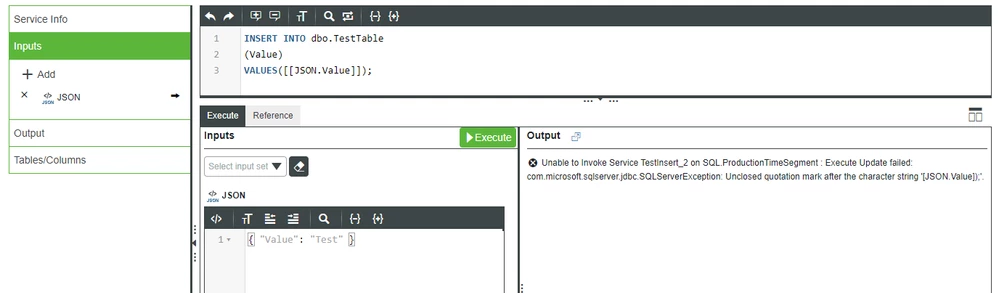
 

2019-09-11 16_34_08-Services _ SQL.ProductionTimeSegment.png

This example fails with an exception:

Unable to Invoke Service TestInsert_2 on SQL.ProductionTimeSegment : Execute Update failed: com.microsoft.sqlserver.jdbc.SQLServerException: Unclosed quotation mark after the character string '[JSON.Value]);'.


Additional Question: How can I handle secure dynamic SQL, e.g. create an Table machting a given DataShape?

2 replies

Sep 12, 2019 1:45 PM UTC

Hello,


Regarding your additional question, here's what we did in a similar scenario (dataShapeName is input parameter):

var formatType = function(baseType, dataShape) {
 switch(baseType) {
 case 'STRING': return 'varchar(255)';
 case 'INTEGER': return 'int';
 default: return '???';
	}
};

var out = '';
var shape = DataShapes[dataShapeName];
if (shape.description) out += '-- ' + shape.description + '\n';
out += 'CREATE TABLE ' + dataShapeName + ' (\n';

var fields = shape.GetFieldDefinitions().rows;
for (var i = 0; i < fields.length; ++i) {
 var field = fields[i];
 out += '\t' + field.name + ' ' + formatType(field.baseType, field.dataShape);
 if (i < fields.length - 1) out += ',';
 if (field.description) out += ' -- ' + field.description;
 out += '\n';
}
out += ');\n';

Things["SystemRepository"].SaveText({
	path: '/' + dataShapeName + '.sql',
	content: out
});

/ Constantine

atondorfAuthor
Sep 13, 2019 5:55 AM UTC

Hi Constantin, 


thanks for the code. Very helpfull.


Greetings


Andreas