Apr 3, 2024 2:05 AM UTC
Solved

Questions about checkboxes

Hello everyone! I've already selected the first box, so how do I get the second box to auto-match based on the things I've selected in the first box?
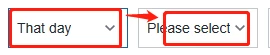

企业微信截图_1712109609369.png

RockoAnswer
Apr 3, 2024 6:23 AM UTC

In that case the selectedItemsChanged event and the Selected Text would be bound to a service called e.g. "GetSubcategories". That service would deliver the right set of values for the second dropbox. The result of the service would be bound to the dropbox.

11 replies

Apr 3, 2024 2:28 AM UTC

HI @Snoopy_hu ,


Please try with dropdown property of 'SelectedText'.

Arun_C_0-1712111277563.png


Thanks & Regards,

Arun C


Snoopy_huAuthor
Apr 3, 2024 2:30 AM UTC

Ok thanks, which property should I bind using the drop down property

Apr 3, 2024 2:49 AM UTC

Binding should be like the below image.

Property - SelectedText from source Dropdown 1 to SelectedText of destination Dropdown  2.

Arun_C_0-1712112464670.png

Thanks & Regards,

Arun C