
Oct 16, 2019 7:10 PM UTC
Question

Issues while connecting azure iot hub and thingworx

I am following the resource guide

https://developer.thingworx.com/en/resources/guides/azure-iot-hub-connector-quickstart

to connect between azure iothub and thingworx.

I am using the setup as follow, I have connection server and the thingworx foundation install on the same machine.

I have edited the config file of connection for azure as well as thingworx foundation. I have added the appKey and thingworx host and port in "transport.websockets" section


transport.websockets {
// ThingWorx platform application key
app-key = "0d277e85-944d-4e85-8ec6-2c16a903c74e"

// One or more platforms can be specified here, comma separated
platforms = "ws://192.168.43.77:8080/Thingworx/WS"
}

But when I am running the connection server using the precompiled I am getting the error as shown in screenshot
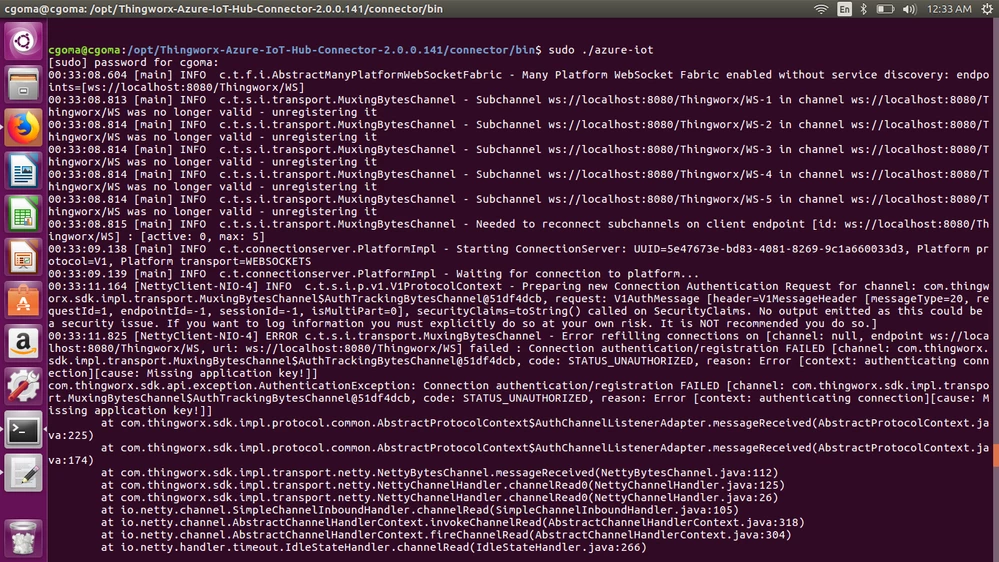
twx-conn-server-error.png


Please let me know if running connection server and twx foundation on same machine is causing this issue.

Let me know if someone faced similar type of issue.

16 replies

Oct 17, 2019 6:41 PM UTC

Hi @cgoma.


Please provide the azure-iot.conf file for further review.  You can mask any sensitive data.


Regards.


--Sharon

cgomaAuthor
Oct 20, 2019 5:30 PM UTC

Hi @slangley 

Thanks for your reply.

Please find attached azure-iot.conf file for your reference.

Oct 24, 2019 4:31 AM UTC

Hi @cgoma 


We are able to connect between TWX an Azure, but we are using TWX 8.5 and IoT hub connector 3.0.


Configuration method is different for IoT hub 2.0 & 3.0.  It will be helpful if you share cxserver log file also.


Regards,

VR


Oct 26, 2019 5:04 PM UTC

@cgoma You'll get the same error if the app key does not exist, double-check if it is correct.


/ Constantine

cgomaAuthor
Nov 21, 2019 6:02 AM UTC

@Constantine 


I did not find any issue with the application key. I double checked it and I had used the multiple application key.

Oct 30, 2019 1:51 PM UTC

Hi @cgoma.


Have you found a solution to your Azure IoT Hub connectivity issue?  If one of the previous responses helped you to resolve it, please mark the appropriate post as the Accepted Solution.  If you found a different solution, please feel free to post it in a new reply and mark that as the Accepted Solution.


Regards.


--Sharon

Nov 8, 2019 9:02 PM UTC

Hi @cgoma.


Please lt us know if you have resolved your issue.  If so, please mark the appropriate reply as the Accepted Solution for the benefit of others on the community.


Regards.


--Sharon

cgomaAuthor
Nov 21, 2019 6:03 AM UTC

This issue is not solved yet.