
Jun 4, 2019 12:30 AM UTC
Solved

Imaging Functions

Hi All,

I currently try to use "ImagingFunctions" from Imaging Tools Extension, but i have some problems

1) I can't input image parameter. I try these two ways but none of them work

image: "/Thingworx/MediaEntities/DogJPG" /* IMAGE */
image: "C:\Users\Desktop\Thingworx8\ManU.jpg" /* IMAGE */


2) What is the meaning of these parameters?
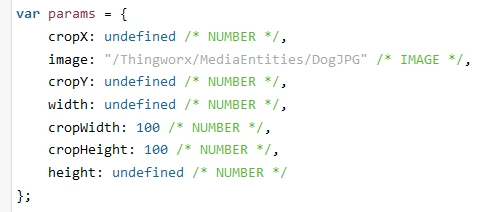
image.png

Thanks!

Jun 4, 2019 6:12 PM UTC
  • Please add an input parameter of base type image to the service where you are trying to use the "ImagingFunctions".
  • As you add the input parameter, choose the check box that says "Has Default Value"
  • It would then provide an option to upload the image.
  • Assign the input parameter name to the image variable in the params object.
  • You can get rid of cropX, cropY, cropWidth, cropHeight properties from the params object. They are used to crop the  image.
    var params = {
    	image: inputimage /* IMAGE */,
    	width: 760 /* NUMBER */,
    	height: 400 /* NUMBER */
    };
    // result: IMAGE
    var result = Resources["ImagingFunctions"].ConvertImage(params);


Best regards,

Rajesh,


2 replies

Jun 4, 2019 6:12 PM UTC
  • Please add an input parameter of base type image to the service where you are trying to use the "ImagingFunctions".
  • As you add the input parameter, choose the check box that says "Has Default Value"
  • It would then provide an option to upload the image.
  • Assign the input parameter name to the image variable in the params object.
  • You can get rid of cropX, cropY, cropWidth, cropHeight properties from the params object. They are used to crop the  image.
    var params = {
    	image: inputimage /* IMAGE */,
    	width: 760 /* NUMBER */,
    	height: 400 /* NUMBER */
    };
    // result: IMAGE
    var result = Resources["ImagingFunctions"].ConvertImage(params);


Best regards,

Rajesh,


QuanndAuthor
Jun 18, 2019 11:58 PM UTC

Thanks Rajesh!

That works.