
Solved
How we can handle offset in thingworx
/**
**/
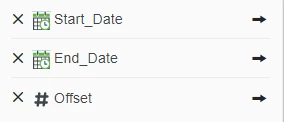
Composer INPUT Offset = result = (new Date()).getTimezoneOffset(); ----Note: Input (offset) shoud be from In Composer (Expression)
try {
var startDateSelected;
var endDateSelected;
var StrandName = Strand_Name;
if (Offset === undefined || Offset === null || Offset === 0) {
Offset = (new Date()).getTimezoneOffset();
}
var diff1 = (Offset - (new Date()).getTimezoneOffset()) * -1;
var diff2 = (Offset - (new Date()).getTimezoneOffset()) * 1;
if (Start_Date !== undefined) {
startDateSelected = dateAddMinutes(Start_Date, diff1);
}
if (End_Date !== undefined) {
endDateSelected = dateAddMinutes(End_Date, diff1);
}
// result: INFOTABLE dataShape: "CastingStrandParameterLog_DS"
var result1 = Things["Postgresql_TH"].CastingStrandReportForVisualization({
Enddate: endDateSelected /* DATETIME */ ,
Startdate: startDateSelected /* DATETIME */ ,
StrandName: StrandName /* STRING */
});
var sorted_infotable = result1;
var rowSize = sorted_infotable.getRowCount();
me.tes = rowSize;
for (var m; m < rowSize; m++) {
if (diff2 !== 0) {
sorted_infotable.rows[m].timestamp = dateAddMinutes(sorted_infotable.rows[m].timestamp, diff2);
}
}
var result = sorted_infotable;
} catch (e) {
logger.error("Thing: DataServices_TH Services: CastingStrandReportForVisualization ERROR: " + e.message + "Line Number: " + e.lineNumber);
}