Apr 19, 2018 5:07 AM UTC
Solved

How to change color scheme for Progress Gauge widget for various value ranges?

Hello,

I am using Progress Gauge widget to show some data. My requirement is to change the color of Progress gauge widget when value changes, for example I want color "Red" for 0 to 30 , color "yellow" for 31 to 60 etc.

I am using ThingWorx 8.2.


Thank you.
hchananaAnswer
Apr 19, 2018 6:34 AM UTC

Greetings @ras,


To fulfill you requirement, please follow the below steps:

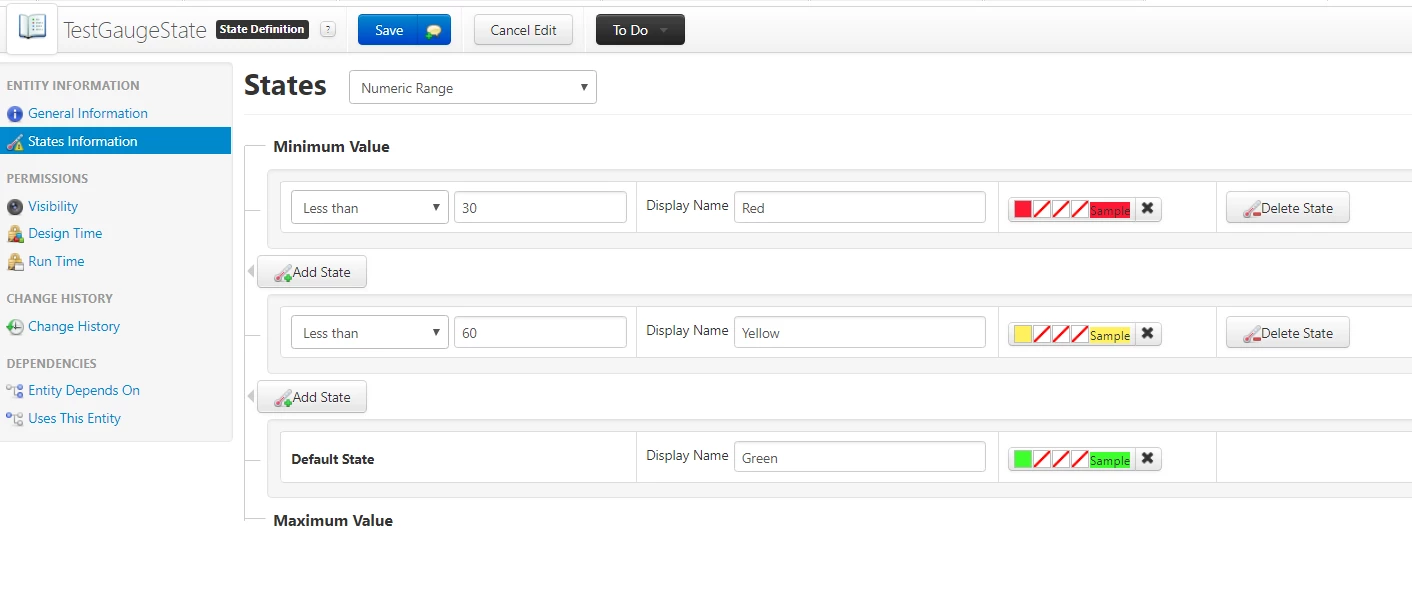
1) Create a State definition and define the States information in it as per your requirement. Refer screenshot for reference.


SD.PNG


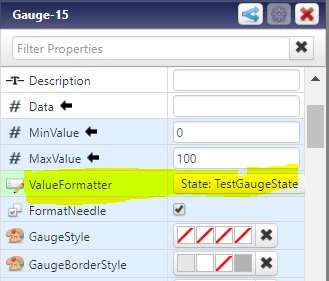
2) Apply the State Definition to the Gauge by changing the property named 'ValueFormatter'


Property.PNG


If my response has answered your question, please mark as Accepted Solution, for the benefit of others who may have the same question.


Regards,

Himanshu


3 replies

hchananaAnswer
Apr 19, 2018 6:34 AM UTC

Greetings @ras,


To fulfill you requirement, please follow the below steps:

1) Create a State definition and define the States information in it as per your requirement. Refer screenshot for reference.


SD.PNG


2) Apply the State Definition to the Gauge by changing the property named 'ValueFormatter'


Property.PNG


If my response has answered your question, please mark as Accepted Solution, for the benefit of others who may have the same question.


Regards,

Himanshu


rasAuthor
Apr 19, 2018 10:10 AM UTC

Thanks @hchanana