
Jun 3, 2022 12:47 PM UTC
Solved

Customizing date picker

Hey Guys,


Can anyone tell me how to apply custom css to date picker widget to change the background color of the buttons inside the date container(Done & Today).


Please refer the attachment. I wanted to change the default color to red .
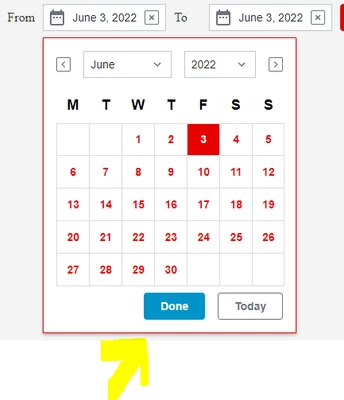
 

JANAKIRAMAN_P_0-1654260495445.png


Thanks,

Jan

abjainAnswer
Jun 4, 2022 8:28 AM UTC

@JANAKIRAMAN_P : Please find attached entity for this . Basically you will have to inspect in chrome developer tools and find the element where CSS need to be applied. I have used the following CSS in the attached entity.

ptcs-datepicker-calendar::part(day){
color: red ;
}

2 replies

abjainAnswer
Jun 4, 2022 8:28 AM UTC

@JANAKIRAMAN_P : Please find attached entity for this . Basically you will have to inspect in chrome developer tools and find the element where CSS need to be applied. I have used the following CSS in the attached entity.

ptcs-datepicker-calendar::part(day){
color: red ;
}

Jun 5, 2022 6:04 AM UTC

Hi @abjain ,


Thanks for your response, this helps.


--

Jan