
Oct 17, 2017 12:33 PM UTC
Question

setting symbol_font to legacy by default for new parts and assemblies

Does anyone know how to set symbol_font to legacy by default for new parts and assemblies?

I have tried changing it in my config files but I can't get it to work.


The issue is, that unless both the assembly and or part file and the drawing file have symbol_font set to legacy, this strange offset happens to my diameter symbol:
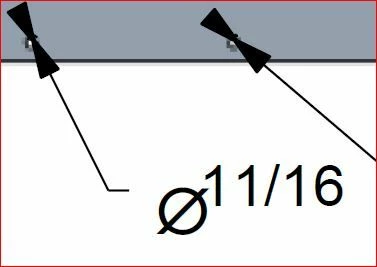
diameter symbol offset.JPG

3 replies

Mar 26, 2024 10:22 PM UTC

Did you solve this?

I am wondering the same question.

I want to set symbol_font to "legacy" for new assemblies and drawings in config.pro file


Anyone have the proper method?

Mar 27, 2024 1:33 PM UTC

Font selection is not done in the config.pro files but in your company's .dtl setting file.

This from my detail configuration file.


! These options control text and line fonts
!
default_annotation_font isofont
symbol_font ASME
!

Mar 27, 2024 3:04 PM UTC

I'd also suggest you test "stroked_asme" for the symbol font. We have had some issues with Legacy where things like the diameter symbols show up as boxes. We don't use ASME because we are not using true-type fonts for our text and the ASME ends up looking bold while the stroked_asme doesn't.