
Aug 22, 2023 9:20 AM UTC
Solved

Import of legacy Creo file to Creo Parametric
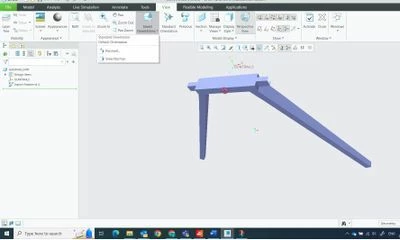
Creo View Screenshot 2023-08-21.jpg

I am using Creo Parametric Release 9.0 and Datecode9.0.0.0

I've just dug out on old, legacy (10 years) creo parametric file and opened in Parametric 9. When I look under View->Saved Orientations I don't get the standard lists of Front, Back, Top etc (see screenshot above). Do I need to somehow convert to latest Creo version to recover that, or is there something else I should do? Or do I need to start again? Under File I do not see File>Import.

hadardorAnswer
Sep 12, 2023 6:13 AM UTC

Hello, 

I checked part you attached and it does not look a Creo native file .. It should be from STEP/IGES or any other format imported into Creo and then saved as .prt.

It can also be created by create a new file by an empty template like what StephenW said.

For such files, there is no predefiend view orientation.


3 replies

Aug 22, 2023 10:32 AM UTC

If the views you are looking for aren't there it likely means that they never were. We have Pro/Engineer files that date back far longer than I'd care to remember (1990s) and if I open one of them the views that were created for it are still there. You could just redefine the views - probably much simpler than rebuilding the geometry in the file.

As for import, the only place I see that is via Get Data->Import, but that seems to be only intended to bring in non-Creo data, like STEP, IGES, etc.

Aug 22, 2023 11:17 AM UTC

Just to add to what Ken said, views names are not standard, they are something that is part of your start part established by whoever manages your system. A empty creo part has no view names, no datums, no layers, no parameter, no relations, nothing, it's empty.

If you have to deal with these parts alot, I would suggest making a mapkey that orients and saves the view and any other info you would like to have included.

hadardorAnswer
Sep 12, 2023 6:13 AM UTC

Hello, 

I checked part you attached and it does not look a Creo native file .. It should be from STEP/IGES or any other format imported into Creo and then saved as .prt.

It can also be created by create a new file by an empty template like what StephenW said.

For such files, there is no predefiend view orientation.