
Apr 7, 2025 2:32 AM UTC
Solved

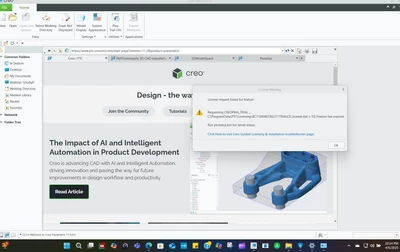
When I try to use Creo, I get the message Error -10

Hi,


I have installed the PTC Creo late February.

Now, when I try to use it I get the message shown in the picture below:
 

BI_12885999_0-1743992816694.png

What is wrong?

I do not get it.

It looks like the PTC license has been cut.........


Any thoughts?


Thank you!

Apr 7, 2025 10:27 AM UTC

Hi,

in February you installed TRIAL version. TRIAL license is valid for couple of days, only.

If you are student then you can use Student license.

1.] uninstall TRIAL version of Creo

2.] install Creo using information included in following documents.

https://apps.ptc.com/schools/references/install_creo11_schools_standard.pdf

https://apps.ptc.com/schools/references/install_creo11_unistudent_standard.pdf


1 reply

Apr 7, 2025 10:27 AM UTC

Hi,

in February you installed TRIAL version. TRIAL license is valid for couple of days, only.

If you are student then you can use Student license.

1.] uninstall TRIAL version of Creo

2.] install Creo using information included in following documents.

https://apps.ptc.com/schools/references/install_creo11_schools_standard.pdf

https://apps.ptc.com/schools/references/install_creo11_unistudent_standard.pdf