Feb 19, 2015 8:22 PM UTC
Solved

Shell tool failure

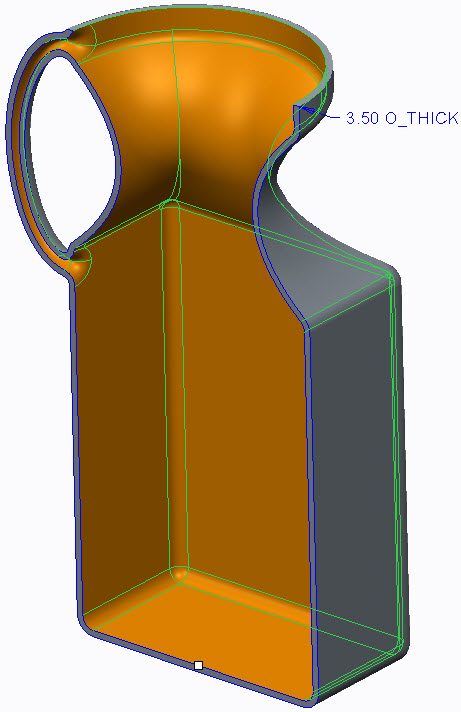
I drew a bottle by starting with a rectangle and then did a circle to square sweep. The top circle was then extruded and the bottom square also extruded. I select the top and shell but Creo fails to perform the operation. It doesn't say why. Any ideas on how to make this a shell?

    sm_01Answer
    Feb 19, 2015 11:08 PM UTC

    Valid values for the shell thickness are 1.5-3.75 based on the geometry you have. The handle is very small compared to the rest of the bottle and is the limiting factor in the shell thickness. Overall, your geometry is clean, has no error and should shell quite easily. Try suppressing the handle and its rounds and you’ll see the difference.

    If you need the wall thickness larger than 3.75, just increase the size of your sketch for the handle sweep.

    bottle.jpg

    1 reply

    sm_01Answer
    Feb 19, 2015 11:08 PM UTC

    Valid values for the shell thickness are 1.5-3.75 based on the geometry you have. The handle is very small compared to the rest of the bottle and is the limiting factor in the shell thickness. Overall, your geometry is clean, has no error and should shell quite easily. Try suppressing the handle and its rounds and you’ll see the difference.

    If you need the wall thickness larger than 3.75, just increase the size of your sketch for the handle sweep.


    bottle.jpg