
Aug 27, 2014 8:50 PM UTC
Question

How to Fix "Fatal Error Encountered. A traceback has been written"

Problem Outline:

After installing Creo 2.0, and while attempting to launch it the following error message appears...

"Fatal error encountered. A traceback has been written to C:\Users\Public\Documents\traceback.log. Please send it to Technical Support."

This problem is because of an issue with an Intel Embedded Graphics card. This can happen when the Intel card is either the primary or a secondary GPU on the machine. The problem is most common on Creo 2.0 datecodes M090-M010.
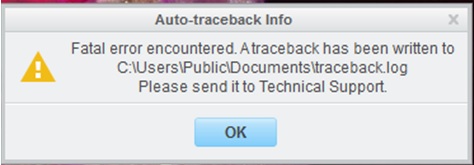
Fatal_Error.jpg


Solution:

Fortunately the solution to his problem is relatively simple. By placing a configuration file in the "start-in" location of Creo 2.0 (by default it's public documents) Creo 2.0 will handle the integrated card in a different way, bypassing the error.

  1. Download the attached config.pro file
  2. Move the config file to C:\Users\Public\Documents
  3. Restart Creo 2.0

    23 replies

    Aug 30, 2014 5:23 PM UTC

    Thank you!!!

    Aug 31, 2014 11:02 AM UTC

    This solution did not work for me, any other suggestions? I have tried to install and reinstall this program over and over but I continuousely get this same error message. I am trying to download the student version, if that makes any difference. Any help would be greatly appreciated!

    MarkCheliAuthor
    Sep 1, 2014 4:34 PM UTC

    Hi Markie,

    There's one other possible solution and that involves switching out the contents of the config.pro file in the instructions above. Simply open the config.pro file located in the public documents folder with a text editor (such as notepad) and then change the text to read...

    graphics win32_gdi

    This should be the only line in the config.pro file. Let me know if you have any questions!

    Sep 1, 2014 6:39 PM UTC

    That doesn't seem to have worked either. I have followed the instructions on the download, so I'm not sure what it could be? I'll attach the traceback and see if that helps.

    Nov 26, 2014 5:00 AM UTC

    Hi,

    Thanks alot.

    I am facing this issue many times. Your post really works.

    Thanks again.

    Nov 24, 2015 7:49 PM UTC

    One of our users has just started experiencing this error.  We've tried the solution described, but it hasn't had any effect.  Do you have any suggestions?

    https://support.ptc.com/appserver/cs/view/solution.jsp?n=CS101097

    Jan 17, 2018 4:41 PM UTC

    Hi, this didn't work for me etiher.


    Can you help me out? Here's my traceback file


    Mar 23, 2018 12:26 PM UTC

    I too am encountering this fatal error continuously. My traceback file is attached, and I've tried all the suggested fixes in the forums.

    Sep 28, 2018 12:16 PM UTC

    it will work but after that again show the message

    Sep 2, 2019 5:43 AM UTC

    Hi, I am facing the same issue in Creo 5, While working on Part modeling can i use this config.pro file fix the.problem?

    Nov 13, 2019 1:00 PM UTC
    I to have same issue with fatal error encountered. A tracerback has been written in creo 5.0
    Kindly anybody help me get out of this issue.
    I am operating with windows 10 OS with 2 GB AMD Radeon graphics card.
    Problem arises few min after start working with part modeling.
    Please help.
    Thank you
    Nov 13, 2019 1:21 PM UTC

    Hello,


    First, please try updating the graphic card driver and make sure it is working properly.

    If this don't fix the issue, Try this:

    Right-click on the Creo Parametric shortcut on the desktop and go to properties. Add space after the existing target path and then -g:win32_gdi. Click on apply and run the Creo

    Thanks,

    Alex

    Dec 22, 2019 11:29 AM UTC

    This same error occured with using sketching in CREO 6.0.2.0 student edition, please help me with it, attaching a trace file.


    My laptop specs are as follows,

    Laptop: Lenovo Ideapad 510s

    RAM: 8GB

    Processor: Intel i5-7200U CPU@ 2.5Hz

    System: 64bit

    Graphics card 4GB: 1. Intel HD Graphics 620

                                     2. NVIDIA GeForce 940MX

    Dec 23, 2019 3:49 PM UTC

    @Alex_Cazacu 

    Jan 4, 2020 5:31 AM UTC

    how to fix the traceback error..my traceback file is..

    May 18, 2021 2:43 PM UTC

    Plz give me creo 7.0 version file