
Jan 8, 2014 10:38 AM UTC
Solved

Creating a mould cavity
mould+problem.jpg

Hi Folks

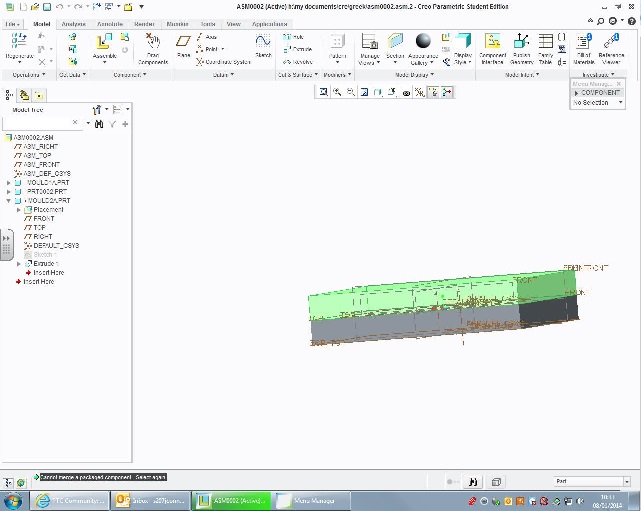
just tried doing the walkthrough for the Mould cavity and came up with this problem 'Cannot merge a packaged component. select again'. now the parts have been made up in a mould form ie. base (mould1A), part and top (mould2A) but it wont let me form the cavity. Now it must be something pretty obvious but I can't figure it out.

can anyone please help?

Jeremy

    JohnFAnswer
    Jan 8, 2014 11:31 AM UTC

    You must assemble both parts of the mould fully before attempting the cutout. The small white rectangles in the model tree tell you that the part is not fully constrained hence the 'packaging' error message.

    Mould1 should be assembled using 'Default', them assemlble Mould 2 to Mould 1 using Rigid contraints Mate and Align. Once done you should have no trouble using the Component Operation to create the cut-out.

    4 replies

    Jan 8, 2014 10:44 AM UTC

    Packaged implies that our component is not completely constrained, it still has degrees of freedom. In the model tree, you will see a small white box next to any "packaged" component.

    Jan 8, 2014 11:04 AM UTC

    Hi Adam

    thanks, what I seem to have is on the Mould2A it has two white boxes, one smaller than the other and attached to the larger at the bottom offset, I presume this means a problem?

    mould problem.jpg

    JohnFAnswer
    Jan 8, 2014 11:31 AM UTC

    You must assemble both parts of the mould fully before attempting the cutout. The small white rectangles in the model tree tell you that the part is not fully constrained hence the 'packaging' error message.

    Mould1 should be assembled using 'Default', them assemlble Mould 2 to Mould 1 using Rigid contraints Mate and Align. Once done you should have no trouble using the Component Operation to create the cut-out.