
Nov 9, 2017 7:37 PM UTC
Solved

Performance Calculation for a Line Resource

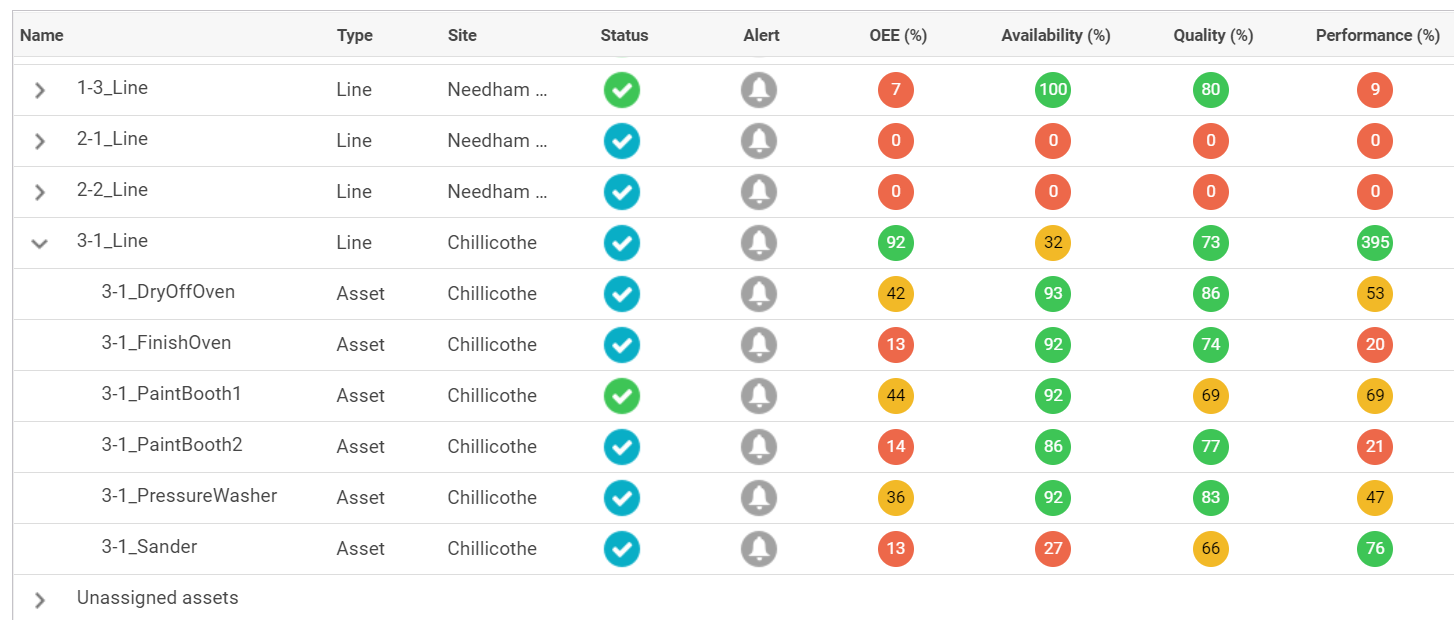
For a Line resource "3-1_Line", I have configured the Status to be that of the "bottleneck" Asset resource - "3-1_PaintBooth2" and part counts to come from the final Asset in the line "3-1_FinishOven"..  The availability for the line is less than the asset since it was configured later and the part counts match up well for quality - 73% vs. 74%.  Not sure why I get a 395% performance value though for the line?????  Shouldn't the line performance value be based on the configured part counts and ideal run rate?
Nov 9, 2017 8:05 PM UTC

Your configuration looks correct. The actual formula used is Performance = (Total Count / Run Time) / Ideal Run Rate. I am not sure where they are reading Run Time from, I suspect they are using Line value. I believe you want to use your bottle neck Run Time Value. I am not sure how to achieve this in the UI. However you can override the CustomizedPerformanceCalculation service  in PTC.Factory.StatusExpressionResourceProvider. It takes ThingId and ootb calculated value as input.

Thanks,

Varathan

4 replies

Nov 9, 2017 7:43 PM UTC

John,

What is the Performance Metrics Configuration you have at Line level?

Thanks,

Varathan

jristeyAuthor
Nov 9, 2017 7:47 PM UTC

For the line, I have configured the same as the final Asset in the line:

Nov 9, 2017 8:05 PM UTC

Your configuration looks correct. The actual formula used is Performance = (Total Count / Run Time) / Ideal Run Rate. I am not sure where they are reading Run Time from, I suspect they are using Line value. I believe you want to use your bottle neck Run Time Value. I am not sure how to achieve this in the UI. However you can override the CustomizedPerformanceCalculation service  in PTC.Factory.StatusExpressionResourceProvider. It takes ThingId and ootb calculated value as input.

Thanks,

Varathan