
Dec 24, 2022 4:01 PM UTC
Solved

Ramping on constant load rough

Hello,

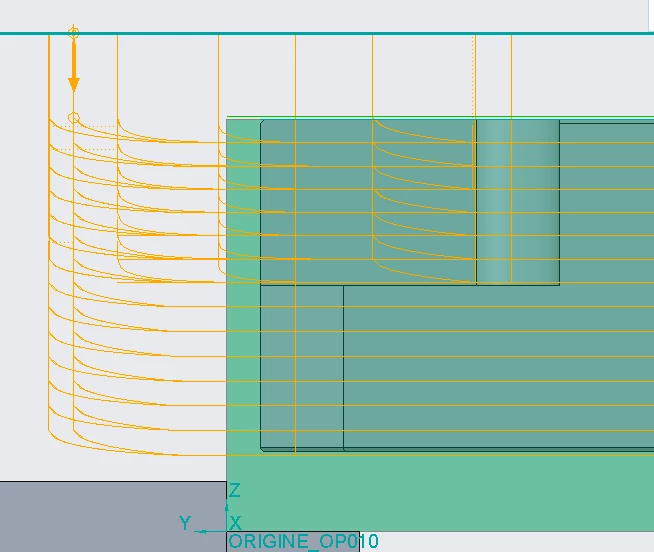
Every time i select "constant load" on a rough sequence, Creo add a at the start of each trajectory a ramping. It is not a correct arc but a succession of straight segments. The huge problem is that in practice, during machining my milling machine moves jerkily and vibrates enormously to follow all the segments. With other types of scanning, i do not have this problem, the cut start on the right Z position.


(Volume milling with cst load option = same problem)


Rough with cst load :
000975.png


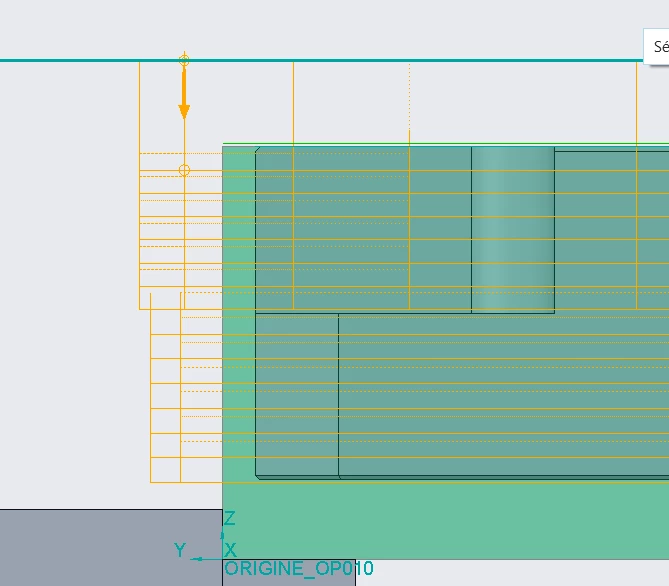
Rough with "Follow contour or spiral"
000977.png


Any idea to remove this "ramping" ?


Thanks in advance.
RJ_FRAnswer
Jan 12, 2023 7:16 AM UTC

Hello,

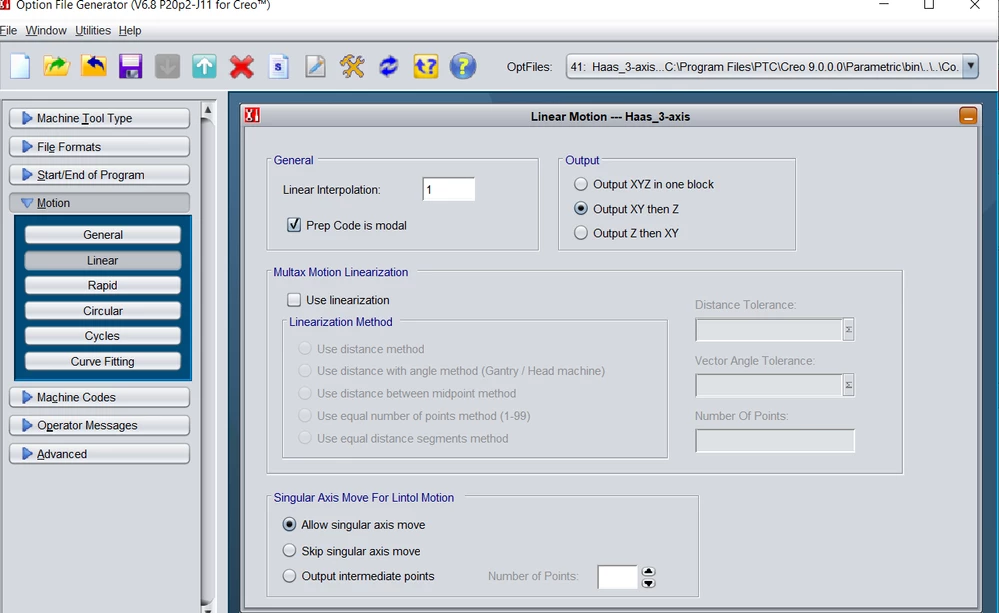
Haas control, i try G187P1, it works a little bit better. And i found an other problem in my code. The post processor output X & Y moves in on block and Z in another. With micro segments it could be the cause of the vibration problem.


000992.png


I have solve this with the first option in the postpro : one block for X,Y & Z


7 replies

Dec 24, 2022 5:30 PM UTC

Please specify which version of the program you are using.

RJ_FRAuthor
Dec 24, 2022 6:15 PM UTC

Creo 9.0.0.0

Dec 27, 2022 10:36 PM UTC

I don't know of a way to completely eliminate those movements, but in there are some parameters that can be set to help.

LIFT_TOOL_CLEARANCE set to zero or a small clearance will eliminate many of the retracts.

MIN_RETRACT_DISTANCE controls when the procedure decides to lift or stay in the cut.. Set to a value larger than your machining feature will eliminate most of the remaining retracts with the exception of transitions to different slices.

You could also set your tolerance to something like .01 to have fewer segments.

The HSM machining option is much better for this type of tool path and much smarter, in my opinion.

RJ_FRAuthor
Jan 2, 2023 1:46 PM UTC

Hello,


I do not have the HSM module, Creo Advance package only.

I have already activated these two options and there is no effect.

Jan 2, 2023 7:12 PM UTC

Which control does your machine use?  I had this issue on a HAAS and was able to correct it by using "G187 P1" so that the control would smooth the motion.  I also had to use a correct tolerance setting, like bmuller suggested. 


Alternatively, it might help to adjust the "ramp angle" parameter.

RJ_FRAuthorAnswer
Jan 12, 2023 7:16 AM UTC

Hello,

Haas control, i try G187P1, it works a little bit better. And i found an other problem in my code. The post processor output X & Y moves in on block and Z in another. With micro segments it could be the cause of the vibration problem.


000992.png


I have solve this with the first option in the postpro : one block for X,Y & Z


Jan 13, 2023 9:44 PM UTC

Thanks for sharing the final solution!