
Jan 19, 2025 7:35 PM UTC
Solved

Clamp Force (Tonnage) Calculation

We are being requested to provide an estimated clamp tonnage from our mold sampling department. Has anyone used Creo Tool Design to calculate clamp tonnage? Is there a feature for this? I  know Creo understands molding surfaces versus molding surfaces, parting line, and the molding part has the material assigned to it. Therefore, It would be nice for Creo to provide the user a estimate as  to how many ton (force) to keep the mold closed during injection.
tbraxtonAnswer
Feb 5, 2025 2:27 PM UTC

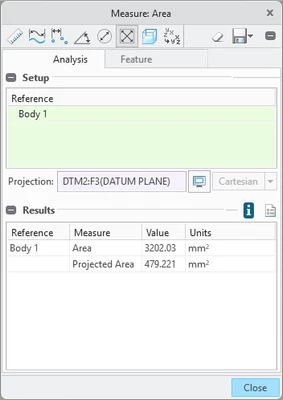
You can get the projected area without EMX by using measure area and specify a projection reference. In the example below you see the surface area of the selected body and the projected area of that body on a plane in the model in the results of a measure area analysis in a part model. 


tbraxton_0-1738765584702.png


6 replies

Jan 20, 2025 5:00 PM UTC

Applications > Mold / Cast; Switch to Mold & Cast Tab > Analysis Group > Projected Area


Save this analysis feature. This will provide the projected area needed to calculate the clamp force needed as a function of the injection pressure. You can write a relation to use this area and the injection pressure to make the calculation in the part model if desired. 


To Calculate the Surface Area of a Cavity

Jan 25, 2025 2:45 PM UTC

@tbraxton thanks for the response. I will test this and see if it will suffice the request. 

Jan 24, 2025 4:15 AM UTC

Hello @dplachinski, 


You have a response on your topic. If it helped to answer your question please mark the reply as the Accepted Solution. 
Of course, if you have more to share on your issue, please let the Community know so other community members can continue to help you.

Thanks,
Vivek N.
Community Moderation Team.

Jan 31, 2025 1:40 PM UTC

To calculate the clamp force directly from within EMX  you can use this feature (still requires you to enter the injection pressure).


EMX Assembly > EMX Tools > Calculate Clamping Force

Feb 5, 2025 1:59 PM UTC

@tbraxton thanks for the reply. However, we do not have EMX.

tbraxtonAnswer
Feb 5, 2025 2:27 PM UTC

You can get the projected area without EMX by using measure area and specify a projection reference. In the example below you see the surface area of the selected body and the projected area of that body on a plane in the model in the results of a measure area analysis in a part model. 


tbraxton_0-1738765584702.png