10 replies

Mar 30, 2023 11:50 AM UTC
Mar 30, 2023 5:05 PM UTC

Is your Quick Client on the same server than KepServerEX? May be you need to use the DCOM settings, just let me know

Mar 31, 2023 1:47 AM UTC

it's on the same server. How use DCOM settings?

Mar 31, 2023 6:41 AM UTC

So, if it's on the same server, you don't need DCOM Setting.

Anyway, you need to setup the DCOM, when you use Server and Client on different server, usually for OPC DA. So, just for informatiion, here is a link from PTC support How tu use DCOM: https://www.ptc.com/en/support/article/CS293793

I need to investigate you case.

Dec 22, 2023 1:46 PM UTC

@KW_10638986,


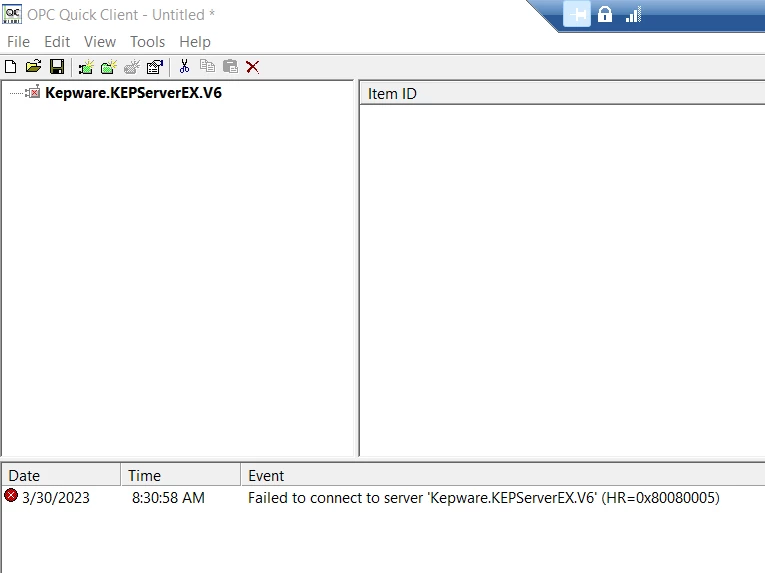
Are you running KEPServerEX with a valid license? You will encounter a blank Quick Client if the KEPServerEX 2 hour demo period has expired which will require a reset of the KEPServerEX runtime to reset the demo period. If you are running the application with a current license or an unexpired demo period and are seeing an issue with the Quick Client connection, you may need configure your Microsoft DCOM settings for the OPC DA connection to succeed. 


Thanks,


*Chris 

Dec 22, 2023 1:54 PM UTC

Thank you Chris – I understand that the demo times out after a couple of hours, but I believe that our licensing is good; is that what this is indicating? Again, all was working well until maybe a week ago….

upload_-aW1hZ2UwMDEucG5n-7590378821867722161..png

TOM MAXWELL
Senior Systems Administrator
TMaxwell@bedford.com

Bedford Industries
1659 Rowe Ave
Worthington, MN 56187 USA

1.507.376.4136 • 1.877.BEDFORD (233.3673)
fax: 1.507.376.6742
bedford.com | elastitag.com | closeit.com | tagback.com

Bedford Industries will be closed Monday, December 25 for the Christmas Holiday.

Nov 28, 2024 7:02 AM UTC

Hi


Have the same 800040002 error in quick client, Resolution is enable OPC DA 


KZ_11595927_0-1732777366602.png

BR, Krzysiek