
Modifying ThingWorx Property Aspects - A Programmatic Approach
Background
Should I Persist a Property?
It's a best practice in ThingWorx to consider carefully which properties to persist, as discussed in this article. In general, it's better to avoid persisting properties that represent rapidly-changing telemetry.
Property names that might warrant further investigation would be things like speed, GPSlocation, oilTemperature, RPM, etc. These values probably change frequently. This could lead to many database updates, and could lead to database performance issues if there are thousands of Things with those properties.
Persisted properties should be ones that don't change often. In other words, relatively stable metadata about a Thing like lastCalibrationDate, LocationName, loadCapacity, RegistrationDate, and so on.
Persisted properties really only matter at Thing startup. Good questions to ask when deciding to persist a property are, "Do I need this value at Thing startup for some type of initialization? Is this a characteristic of the Thing we want to store while ThingWorx is not running? Does this value change frequently? Will the device populate this a current value as soon as it starts running?"
How Do I Find and Change Persisted Properties?
ThingWorx Composer
To find out whether a property is persistent, navigate to the Thing Shape, Thing Template, or Thing in which you are interested. On the, "Properties and Alerts," tab, anything with a check under the database icon will be persisted:
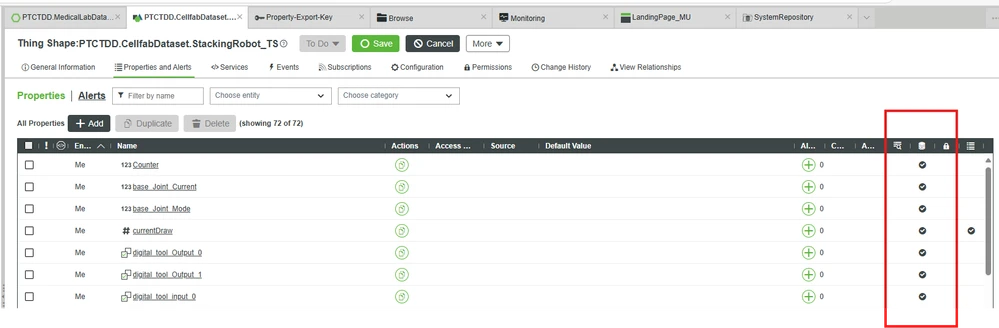 Persisted properties - Composer view
To edit the Persist aspect of a property, click on that property and change the Persist value:
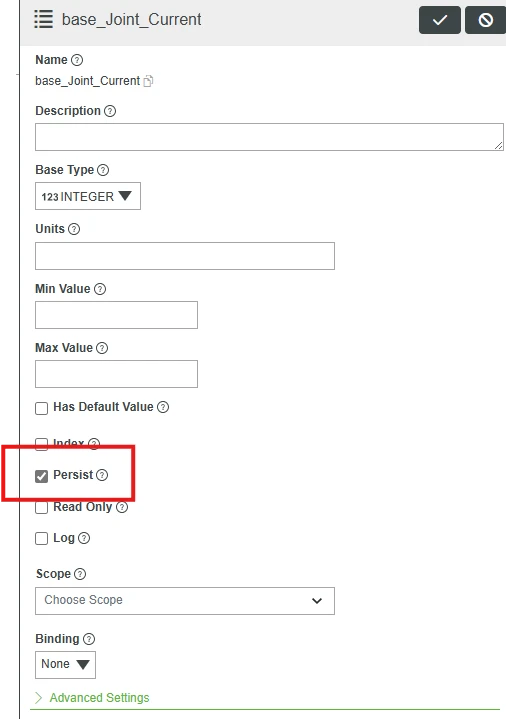
ThingWorx Export
What if you want to find all the persistent properties in your ThingWorx solution without clicking around the ThingWorx Composer and looking for them?
One technique is to perform an export of the entities in which you are interested in XML format (keeping entities in projects helps a lot here). Once you have the XML export, you can use your preferred search tool to look for, aspect.isPersistent="true".
<?xml version="1.0" encoding="UTF-8" standalone="no"?>
<Entities build="b253" majorVersion="9" minorVersion="6"
    modelPersistenceProviderPackage="PostgresPersistenceProviderPackage" revision="1"
    schemaVersion="1160" universal="">
    <ThingShapes>
        <ThingShape aspect.isEditableExtensionObject="true" aspect.isExtension="true"
            aspect.isSystemObject="false" className="" description="" documentationContent=""
            homeMashup="" lastModifiedDate="2024-11-07T19:42:52.322Z"
            name="PTCTDD.CellfabDataset.StackingRobot_TS" projectName="PTCTDD.CellfabDataset"
            tags="">
            <PropertyDefinitions>
                <PropertyDefinition aspect.cacheTime="0.0" aspect.dataChangeType="null"
                    aspect.isLogged="false" aspect.isPersistent="true" baseType="INTEGER"
                    category="" description="" isLocalOnly="false" name="base_Joint_Current"
                    ordinal="0" />
You may change this value in bulk using the following steps:
- Save a copy of the original export so you can re-import it into ThingWorx if you make a mistake.
- Determine which properties you'd like to modify.
- Use your favorite editor, search/replace tool, or script to change the isPersistent aspect to false. Note - if a property is defined by an extension, and that extension is not editable, the isPersistent aspect of the property cannot be changed.
- Save your modified export as a separate document.
- Import the modified export into ThingWorx.
- Check the import dialog for, "Successful Import." If there are problems, look at the ThingWorx Application Log. Spot check properties in Composer to make sure your changes have taken place.
- If you need to roll the import back, use the original export you saved.
ThingWorx API
It is possible to modify properties programmatically using ThingWorx APIs. For example, you could GET the following ThingShape, SMH-Example-ThingShape:
GET /Thingworx/ThingShapes/SMH-Example-ThingShape HTTP/1.1
Host: pp-2503171513hk.portal.ptc.io:443
Accept: application/json
appKey: xxxxb52d-xxxx-xxxx-xxxx-427312d4xxxx
This call returns the following ThingShape definition (abridged for conciseness):
{
    "propertyDefinitions": {
        "PropertyTwo": {
            "sourceType": "Unknown",
            "name": "PropertyTwo",
            "aspects": {
                "isPersistent": true,
                "dataChangeType": "VALUE"
            },
            "isLocalOnly": false,
            "description": "",
            "sourceName": "",
            "category": "",
            "baseType": "STRING",
            "ordinal": 3
        },
        "PropertyOne": {
            "sourceType": "Unknown",
            "name": "PropertyOne",
            "aspects": {
                "dataChangeType": "VALUE"
            },
            "isLocalOnly": false,
            "description": "",
            "sourceName": "",
            "category": "",
            "baseType": "STRING",
            "ordinal": 2
        }
    },
    "instanceRunTimePermissions": {}
        ]
    },
    "subscriptions": {},
    "remoteServiceBindings": {},
    "eventDefinitions": {},
    "serviceImplementations": {},
    "aspects": {},
    "designTimePermissions": {}
    ...
}
By looking at the aspects under PropertyTwo's definition, we can see that isPersistent is true. We can actually change that aspect to false and PUT it back to our ThingWorx instance (the request body is abridged for clarity):
PUT /Thingworx/ThingShapes/SMH-Example-ThingShape?reason=Changed PropertyTwo to not persisted. HTTP/1.1
Host: pp-2503171513hk.portal.ptc.io:443
Accept: application/json
appKey: xxxxb52d-xxxx-xxxxx-xxxx-427312d4xxxx
Content-Type: application/json
Content-Length: 372456

{
"propertyDefinitions": {
 "PropertyTwo": {
 "sourceType": "Unknown",
 "name": "PropertyTwo",
 "aspects": {
 "isPersistent": false,
 "dataChangeType": "VALUE"
},
"isLocalOnly": false,
"description": "",
"sourceName": "",
"category": "",
"baseType": "STRING",
"ordinal": 3
},

...
In case it's not clear, this is the process we just followed:
- Used a GET request to get a ThingShape definition.
- Looked for the property aspect we wanted to change and modified it in the response body.
- Used the modified response body as the body of a PUT request on the same ThingShape.
This procedure simulates an import. We can extend this is a very useful way. If we write these calls in a language that has an HTTP library, we can automate the task of modifying a big list of property aspects.
Programmatically Changing Property Aspects
Here are some guidelines for writing a utility that changes property aspects in your favorite language, with your favorite libraries:
- General principles
- Use a library that can make asynchronous HTTP calls. If you're modifying hundreds or thousands of entities, you do not want to wait for one call to finish before you start another. Your program will take forever to finish if you line up thousands of requests, nose-to-tail.
- Because you want to make asynchronous calls, use a request throttling library. If you fire off thousands of simultaneous HTTP requests, you will effectively perform a denial-of-service attack on your own server. Pick a library that can worry about rate-limiting your requests for you.
- Asynchronous programming involves concepts like Promises and callbacks. Break your requests into manageable groups of requests and send them off in chunks. That way, you'll return results periodically, rather than firing all your requests at once and having to wait for them ALL to finish before getting any feedback on whether things are working.
- Main steps
- Create a list of entities on which you'd like to operate. You could generate that list programmatically or create a list/map/array of entities after doing analysis on your persisted properties.
- Break that list into manageable chunks and start to loop through the chunks.
- Send each chunk of entities through an asynchronous HTTP library. Use request throttling.
- GET the entity definition for each entity.
- Search though the JSON that is returned for the property you want to change.
- Modify the isPersisted aspect by setting it to false.
- PUT the modified entity definition back to the server.
- Caveats
- Make sure to export all the entities you plan to modify before running your code. You can undo any inadvertent damage you cause with a re-import of your backed-up entities.
- Thing Shapes have a different format for property definitions than Thing Templates and Things. You have to account for the differences in your search/modify code. This article has more information.
- If an entity is defined in an extension, and that extension is not editable, you cannot modify any of its property definitions.
- When you PUT the modified entity back to the server, you're going to get a, "200 OK," response whether it ultimately succeeds, or not. ThingWorx is just saying, "I have successfully received your PUT request." ThingWorx then does the work. If that work fails, you'll be able to query the Application Log for problems, but not until everything has finished. You'll want to filter Application Log entries as follows to isolate import issues:
- origin: 'c.t.c.ImportProcessor'
- searchExpression: '.*Ignoring.*'
Sample Code
The following code sample is provided without any warrantee or guarantee. It is intended merely to show the general outline of a script you can write in your language of choice, using the libraries you know. This code has not been QA'd. It has been run only against dev servers that can be easily restored. USE AT YOUR OWN RISK.
The sample code is written in node.js and uses the axios library to handle asynchronous HTTP calls and request throttling.
The code assumes there's a config.json file in the following format:
{
    "applicationKey": xxxxb52d-nnnn-nnnn-nnnn-nnnnnnd42866",
    "host": "pp-samplesever.portal.ptc.io",
    "port": "443",
    "protocol": "https",
    "arrayChunkSize": 50,
    "requestsPerSecond": 25
}
The values for arrayChunkSize were picked by trial and error. Against a typical ThingWorx deployment, with a couple thousand entities, they seem to work pretty well. If you wanted to optimize those values, particularly requestsPerSecond, you could monitor the ThingWorx metrics endpoint and tune for maximum throughput without overwhelming any queues.
Here's the sample code. This lists all the changeable persistent properties for all the ThingShapes on a ThingWorx instance. It provides a basic framework you could modify for your own purposes.
The code mentions a csvUtils.js file. It is included all the way at the end of this article to reduce clutter:
/* This script solves a common ThingWorx challenge:
* - You have a large number of things on which you need to perform an action.
* - You need to iterate over a large list of things and make an API call about each thing.
* - If you send all the API calls at once, you either crash the server, your computer, or your script never finishes.
*
* This script is a utility that goes through all the ThingShapes in an instance.
* It lists all the properties and their metadata.
*
* It uses the axios http library to make TWX API calls. The library is asynchronous, so it uses
* JavaScript Promises to handle the asynchronicity. Promises aren't enough, though. If you fire
* off a bunch of API calls all at once, you'll exhaust memory on the calling machine or the server
* by filling up queues with thousands of API calls. This script solves that problem by using request
* throttling.
*
* You can generalize the technique any time you have a large list of TWX items and you need to make an
* API call about them. You just have to find the API endpoints you want to call, substitute them in this
* code, and reimpliment the methods that parse the results.
*/

// Throttling and web request libraries
import axios from 'axios';
import axiosThrottle from 'axios-request-throttle';

// Put configuration items in config.json
import config from './config.json' assert { type: 'json'};

// CVS utilities for our module
import { checkForFile, removeFile, sendRecordsToCSVFile } from './csvUtils.js';

// Collect needed info from config file
let applicationKey = config.applicationKey;
let protocol = config.protocol;
let host = config.host;
let port = config.port;

const twxURL = `${protocol}://${host}:${port}/Thingworx`

/* Use the axios-request-throttle package to prevent DoSing the TWX server. Tune this
* call using the requestsPerSecond value in config.json */
axiosThrottle.use(axios, { requestsPerSecond: config.requestsPerSecond });

/* This is a utility function that iterates through a list, calling a function that
* returns a promise on each item in the list. It returns an array of Promise responses.
* If you need to loop through a list of entities and call, say, a web service on each entity,
* this is your function. Pass the list as the first parameter (array of strings, for example)
* and a function that returns a Promise as the second parameter. */
function awaitAll(list, asyncFn) {
 const promises = [];

 list.forEach(x => {
 promises.push(asyncFn(x));
 });

 return Promise.all(promises);
}

/* This is a utility function to break giant arrays into smaller ones. For entities
* with many sub-entities, node can become overwhelmed by outstanding promises, so we need to
* process information in smaller pieces.
*/
const breakArrayIntoChunks = (originalArray, startingIndex, chunkSize) => {
 let maxChunkEndIndex = startingIndex + chunkSize;
 let endOfChunk = originalArray.length < maxChunkEndIndex ? originalArray.length : maxChunkEndIndex;
 let arrayChunk = originalArray.slice(startingIndex, endOfChunk);

 return (arrayChunk);
}

/* This is a utility function to assemble the array of promises returned
* by the call to awaitAll with getThingShapeMetaData as the async
* function as the argument. It expects very specific input and does no
* error checking. Developer beware.
*/
const assemblePromisesIntoPropertyList = (promisesArray) => {
 /* The response we'll get is an array of Promises. We have to loop through
 * the promises and break them down into actual data. */
 let propertyMetaDataArray = [];
 promisesArray.forEach(promise => {
 if (promise.length !== 0) {
 propertyMetaDataArray.push(promise);
 }
 });
 return (propertyMetaDataArray);
}

/* This is the first call we make. It gives us a list of ThingShapes. If you wanted to
* implement a call to a different REST service that returned a list of entities to iterate,
* you could follow this pattern.
*/
const getThingShapes = (twxURL, appKey) => {
 // Define the REST service to call
 let spotlightSearchService = `${twxURL}/Resources/SearchFunctions/Services/SpotlightSearch/`;

 /* Set up body of request. Note the maxItems parameter. It may need adjustment,
 depending on the number of entities in your instance. */
 let data = {
 "searchExpression": "**",
 "maxItems": 5000,
 "withPermissions": true,
 "sortBy": "lastModifiedDate",
 "isAscending": false,
 "searchDescriptions": true,
 "includeInheritedThingShapes": true,
 "aspects": {
 "isSystemObject": false
 },
 "types": {
 "items": [
 "ThingShape"
 ]
 },
 "excludeFilters": [],
 "context": "searchFilter",
 "projectName": "",
 "searchText": "",
 "tags": [],
 "thingShapes": {},
 "thingTemplates": {},
 "suppressEntityContext": true,
 "excludedAspects": {
 "deprecated": {}
 }
 };

 // Set up the parameters for the Axios call
 let config = {
 method: 'post',
 url: spotlightSearchService,
 headers: {
 Accept: "application/json",
 appKey: appKey,
 'Content-Type': 'application/json'
 },
 data: data
 };

 // Make the call and return it as a Promise
 return axios(config);
};

/* This is a parsing function that is specific to the results returned from the
* TWX REST API call /Services/ThingShapes/. If you generalize this technique to a
* different API call, implement a parsing function specific to the format of
* your results.
*/
const processThingShapeList = (response) => {
 let thingShapeData = response.data;
 let thingShapes = [];

 for (let index = 0; index < thingShapeData.rows.length; index++) {
 let row = thingShapeData.rows[index];
 let currentShape = row.name;
 thingShapes.push(currentShape);
 }
 return thingShapes;
};

/* This is a function to call the /ThingShapes/<shapeName> service in TWX. If you're
* calling a different API, use this pattern to implement your call.
*/
 const getRawMetaDataForThingShape = (twxURL, shapeName, appKey) => {
 let thingShapeMetaDataService = `${twxURL}/ThingShapes/${shapeName}`;

 var config = {
 method: "get",
 url: thingShapeMetaDataService,
 headers: {
 Accept: "application/json",
 appKey: appKey
 }
 };

 return axios(config);
};

/* This is a parsing function that is specific to the results returned from the
* TWX REST API call /ThingShapes/<thingshapename>. That call returns a LOT more information
* than what is used here. This function is written to solve a problem where
* only a subset of the data is extracted.
*/
const processThingShapeMetadata = (rawThingShapeMetadata) => {
 let propertyArray = [];

 //Some shapes have no properties. We have to check for that, or we'll get undefined errors.
 if (Object.keys(rawThingShapeMetadata.propertyDefinitions).length !== 0) {
 let propertyDefs = rawThingShapeMetadata.propertyDefinitions;
 for (let propKey in propertyDefs) {
 // Define this inside the loop so we push a new copy each time through
 let currentPropertyMetadata = {};

 // ThingShape-level metadata
 currentPropertyMetadata.parentType = `ThingShape`;
 currentPropertyMetadata.thingShapeName = rawThingShapeMetadata.name;
 // ThingShape aspects - may or may not be defined
 ("isExtension" in rawThingShapeMetadata.aspects) ? currentPropertyMetadata.isExtension = rawThingShapeMetadata.aspects.isExtension : currentPropertyMetadata.isExtension = false;
 ("isEditableExtensionObject" in rawThingShapeMetadata.aspects) ? currentPropertyMetadata.isEditableExtensionObject = rawThingShapeMetadata.aspects.isEditableExtensionObject : currentPropertyMetadata.isEditableExtensionObject = false;
 ("isSystemObject" in rawThingShapeMetadata.aspects) ? currentPropertyMetadata.isSystemObject = rawThingShapeMetadata.aspects.isSystemObject : currentPropertyMetadata.isSystemObject = false;
 // Important for keeping modifications concurrent
 currentPropertyMetadata.lastModifiedDate = rawThingShapeMetadata.lastModifiedDate;

 // Property-level metadata
 currentPropertyMetadata.name = propertyDefs[propKey].name;
 currentPropertyMetadata.baseType = propertyDefs[propKey].baseType;
 currentPropertyMetadata.category = propertyDefs[propKey].category;
 currentPropertyMetadata.description = propertyDefs[propKey].description;
 currentPropertyMetadata.isLocalOnly = propertyDefs[propKey].isLocalOnly;
 currentPropertyMetadata.ordinal = propertyDefs[propKey].ordinal;
 currentPropertyMetadata.sourceName = propertyDefs[propKey].sourceName;
 currentPropertyMetadata.sourceType = propertyDefs[propKey].sourceType;
 // Aspects
 ("isIndexed" in propertyDefs[propKey].aspects) ? currentPropertyMetadata.isIndexed = propertyDefs[propKey].aspects.isIndexed : currentPropertyMetadata.isIndexed = false;
 ("isReadOnly" in propertyDefs[propKey].aspects) ? currentPropertyMetadata.isReadOnly = propertyDefs[propKey].aspects.isReadOnly : currentPropertyMetadata.isReadOnly = false;
 ("defaultValue" in propertyDefs[propKey].aspects) ? currentPropertyMetadata.defaultValue = propertyDefs[propKey].aspects.defaultValue : currentPropertyMetadata.defaultValue = undefined;
 ("isPersistent" in propertyDefs[propKey].aspects) ? currentPropertyMetadata.isPersistent = propertyDefs[propKey].aspects.isPersistent : currentPropertyMetadata.isPersistent = false;
 ("isLogged" in propertyDefs[propKey].aspects) ? currentPropertyMetadata.isLogged = propertyDefs[propKey].aspects.isLogged : currentPropertyMetadata.isLogged = false;
 ("dataChangeType" in propertyDefs[propKey].aspects) ? currentPropertyMetadata.dataChangeType = propertyDefs[propKey].aspects.dataChangeType : currentPropertyMetadata.dataChangeType = '';

 propertyArray.push(currentPropertyMetadata);
 }
 }
 return propertyArray;
}

/* This method is implemented as a promise so we can call the method that calls the
* method that calls the API that gets a list of ThingShape metadata. Why a separate method?
* We want to call the API, but we want to return a format that is more useful to us
* than the results of the API call. Hence, we wrap up the call and the processing of
* the results in one method.
*/
const getMetaDataForThingShape = (shapeName) => {
 return new Promise(function (resolve, reject) {
 const appKey = config.applicationKey;

 let propMetaData = [];
 getRawMetaDataForThingShape(twxURL, shapeName, appKey)
 .then((response) => {
 let rawThingShapeMetadata = response.data;
 propMetaData = processThingShapeMetadata(rawThingShapeMetadata);
 return propMetaData;
 })
 .then((propMetaData) => {
 resolve(propMetaData);
 })
 .catch((error) => {
 console.log(error);
 reject(error);
 });
 })
};

/* Sends the data about ThingShapes to the console in CSV format. */
const printThingShapeDataArray = (propertiesArray) => {
 propertiesArray.forEach(property => {
 console.log(`${property.name},${property.baseType},${property.category},${property.description},${property.isLocalOnly},${property.ordinal},${property.sourceName},${property.sourceType},${property.isIndexed},${property.isReadOnly},${property.defaultValue},${property.isPersistent},${property.isLogged},${property.dataChangeType},ThingShape,${property.thingTemplateName},${property.isExtension},${property.isEditableExtensionObject},${property.isSystemObject},${property.lastModifiedDate}`);
 });
};

/********************* MAIN CALLING CODE *************************/
// Print out headers for the console output
console.log(`Property Name,Base Type,category,description,isLocalOnly,ordinal,sourceName,sourceType,isIndexed,isReadOnly,Default Value,isPersistent,isLogged,dataChangeType,Parent Type,Parent Name,isExtension,isEditableExtensionObject,isSystemObject,lastModifiedDate`);

const filePath = './data/ThingShapeProperties.csv';

let headerArray = [
 { id: 'name', title: 'Property Name' },
 { id: 'baseType', title: 'Base Type' },
 { id: 'category', title: 'category' },
 { id: 'description', title: 'description' },
 { id: 'isLocalOnly', title: 'isLocalOnly' },
 { id: 'ordinal', title: 'ordinal' },
 { id: 'sourceName', title: 'sourceName' },
 { id: 'sourceType', title: 'sourceType' },
 { id: 'isIndexed', title: 'isIndexed' },
 { id: 'isReadOnly', title: 'isReadOnly' },
 { id: 'defaultValue', title: 'Default Value' },
 { id: 'isPersistent', title: 'isPersistent' },
 { id: 'isLogged', title: 'isLogged' },
 { id: 'dataChangeType', title: 'dataChangeType' },
 { id: 'parentType', title: 'Parent Type' },
 { id: 'thingShapeName', title: 'Parent Name' },
 { id: 'isExtension', title: 'isExtension' },
 { id: 'isEditableExtensionObject', title: 'isEditableExtensionObject' },
 { id: 'isSystemObject', title: 'isSystemObject' },
 { id: 'lastModifiedDate', title: 'lastModifiedDate' }
];

getThingShapes(twxURL, applicationKey)
 .then((response) =>
 processThingShapeList(response))
 .then((thingShapeList) => {
 let upperBound = thingShapeList.length;
 let startingIndex = 0;
 let chunkSize = config.arrayChunkSize;

 /* We don't want an old csv file to grow and grow, and we only want to print one
 set of headers, so we make this check to start fresh every run. */
 let fileExists = checkForFile(filePath);
 if (fileExists) {
 removeFile(filePath);
 fileExists = false;
 }

 while (startingIndex < upperBound) {
 let currentArrayChunk = breakArrayIntoChunks(thingShapeList, startingIndex, chunkSize);
 startingIndex += chunkSize;
 awaitAll(currentArrayChunk, getMetaDataForThingShape)
 .then((response) => {
 let propertyArrayArray = assemblePromisesIntoPropertyList(response);
 for (let i = 0; i < propertyArrayArray.length; i++) {
 let currentPropertyArray = propertyArrayArray[i];
 printThingShapeDataArray(currentPropertyArray);
 fileExists = sendRecordsToCSVFile(headerArray, currentPropertyArray, filePath, fileExists);
 }
 });
 }
 })
.catch((error) => console.log(error));
If you have questions please comment on this article or email The PTC Platform Connectivity Solutions Team.
CSVUtils.js:
import * as fs from 'fs';
import { createObjectCsvWriter as createCSVWriter } from 'csv-writer';

export const createWriter = (appendMode, filePath, headerArray) => {
 return createCSVWriter({
 path: filePath,
 header: headerArray,
 append: appendMode
 });
};

export const checkForFile = (filePath) => {
 return fs.existsSync(filePath);
}

export const removeFile = (filePath) => {
 try {
 fs.unlinkSync(filePath);
 console.log(`Removed ${filePath} to start with a clean slate.`);
 } catch (err) {
 console.error(`Error deleting old file ${filePath}`, err.message);
 }
}

// Sends an array of properties to a CSV file.
export const sendRecordsToCSVFile = (header, propertiesArray, filePath, appendMode) => {
 if (appendMode === false) {
 /* We are at the beginning. Create a CSV writer in *not* append mode
 so the headers get written along with the data. */
 let csvStarter = createWriter(appendMode, filePath, header);
 csvStarter.writeRecords(propertiesArray);
 appendMode = true;
 } else {
 /* We're appending to an existing file that already has headers. */
 let csvAppender = createWriter(appendMode, filePath, header);
 csvAppender.writeRecords(propertiesArray);
 }
 return appendMode;
};