
Finding and Changing Persistent Properties - Lessons Learned
Background
A client was reviewing their ThingWorx data strategy and noticed that a high number of persisted properties were possibly causing database performance issues. The Platform Connectivity Solutions Team was asked to help a client identify, analyze, and change persisted properties to not persisted.
Original Intent of the Project
When we first started working on the project, our intent was to write a utility to find persistent properties and programmatically change a select group of them to not persisted. During that effort, we learned some lessons that we share here.
This is the plan with which we started. We wanted to write a utility that did the following:
- List all entities that define properties.
- Start with Thing Shapes. If users are following best practices, this is where most property definitions will be. Move on to Thing Templates and Things.
- For each entity in the list:
- Use a GET request to get the JSON for the entity.
- Find all persisted properties in the JSON.
- Create a report showing all those properties.
- Give the report to users to help them do some analysis and pick properties to change.
- With the list of selected properties:
- Use a GET request to get the JSON for the entity.
- Modify all the selected persisted properties in the JSON.
- PUT modified definition back on server.
What We Learned As The Project Progressed
Many properties are defined in Thing Shapes and Thing Templates provided by extensions. These Shapes and Templates typically provide essential functionality to meet use cases like remote monitoring, software content management, etc. It is a best practice to build Things out of Shapes and Templates. If a Shape or Template is particularly useful, tens, hundreds, or even thousands of Things will implement it.
The wrinkle - if a property is defined by an extension, and that extension is not editable, the isPersistent aspect of the property cannot be changed.
This is not undocumented behavior. We wanted to measure how much impact it had and empirically prove we couldn't programmatically change properties in non-editable extensions, though.
We wrote code to attempt to change all persistent properties to not persistent to learn what kind of problems we'd have. We learned the following:
- The following properties are not changeable:
- The property is defined in an extension, AND
- The extension does not have the aspect, isEditableExtension, set to true.
- If many Things implement a Thing Template or Thing Shape that comes from a non-editable extension, there will be many properties that cannot have their isPersistent attribute changed. This ties the hands of the person designing a data strategy.
- We used the following approach, which programmatically imitates an entity import:
- GET a Thing/Template/Shape using the ThingWorx API.
- Handle the data in the response as a JavaScript object.
- Loop through the properties defined in the entity. Change their isPersistent aspect to FALSE.
- PUT the Thing/Template/Shape back to the ThingWorx instance using the API.
- We learned that even if a PUT of an entity fails, the API response will return a, 200 OK response. There's no way to look at the response of a PUT to see if there was a problem importing the entity.
- The Application Log can be queried for import errors. If you are careful about the start time of your search, you can run the utility and then immediately query the Application Log and determine which entity imports failed.
A Word About Property Definitions
The code snippet below is JSON that represents a Thing Shape. Anything that is not directly applicable to this explanation has been deleted. In other words, there would be much more information between most of the brackets in an actual API response:
{
 "propertyDefinitions": {
 "AirFlow": {
 "sourceType": "Unknown",
 "name": "AirFlow",
 "aspects": {
 "isPersistent": true,
 "isLogged": true,
 "dataChangeType": "VALUE",
 "cacheTime": 0.0
 },
 "isLocalOnly": false,
 "description": "",
 "sourceName": "",
 "category": "",
 "baseType": "NUMBER",
 "ordinal": 20
 },
 "BatteryCurrent": {
 "sourceType": "Unknown",
 "name": "BatteryCurrent",
 "aspects": {
 "isPersistent": true,
 "isLogged": true,
 "dataChangeType": "VALUE",
 "cacheTime": 0.0
 },
 "isLocalOnly": false,
 "description": "10 amps , when start goes up to 35 amps for few seconds",
 "sourceName": "",
 "category": "",
 "baseType": "NUMBER",
 "ordinal": 18
 }
 },
 "instanceRunTimePermissions": {},
 "subscriptions": {},
 "remoteServiceBindings": {},
 "eventDefinitions": {},
 "serviceImplementations": {},
 "aspects": {
 "isEditableExtensionObject": true,
 "isExtension": true
 },
 "designTimePermissions": {},
 "description": "",
 "className": "",
 "effectiveAlertConfiguration": {},
 "serviceMappings": {},
 "effectiveShape": {
 "propertyDefinitions": {
 "AirFlow": {
 "sourceType": "Unknown",
 "name": "AirFlow",
 "aspects": {
 "isPersistent": true,
 "isLogged": true,
 "dataChangeType": "VALUE",
 "cacheTime": 0.0
 }
 }
 },
 "eventDefinitions": {},
 "serviceMappings": {},
 "serviceDefinitions": {}
 },
 "effectiveRemoteEventBindings": {},
 "effectiveRemotePropertyBindings": {},
 "effectiveRemoteServiceBindings": {},
 "configurationTables": {},
 "owner": {
 "name": "SuperUser",
 "type": "User"
 },
 "visibilityPermissions": {},
 "lastModifiedDate": 1730234548020,
 "homeMashup": "",
 "avatar": "",
 "effectiveLocalPropertyBindings": {},
 "remoteEventBindings": {},
 "serviceDefinitions": {},
 "tags": [],
 "remotePropertyBindings": {},
 "runTimePermissions": {},
 "documentationContent": "",
 "propertyBindings": {},
 "name": "PTCTDD.SimulatorFleetTracking.AirCompressor_TS",
 "alertConfigurations": {},
 "configurationTableDefinitions": {},
 "projectName": "PTCTDD.SimulatorFleetTracking"
}
It's important to notice that, for a Thing Shape, there are property definitions in two places.
IMPORTANT - When changing property definitions programmatically, change only those properties defined on the entity itself. For a ThingShape, those are the properties listed under propertyDefinitions.
It is possible to override properties in ThingWorx. It's not recommended, though. You'll create issues when you upgrade ThingWorx or the extensions you use. It's better to modify the properties themselves where they are defined.
Things and Thing Templates have a different format. They, too, have propertyDefinitions under an effectiveShape element. The propertyDefinitions with which you want to work are located under an element called thingShape, however.
{
 "thingShape": {
 "propertyDefinitions": {
 "AALoggedPropOne": {
 "sourceType": "Unknown",
 "name": "AALoggedPropOne",
 "aspects": {
 "isIndexed": false,
 "isReadOnly": false,
 "isPersistent": false,
 "isLogged": false
 },
 "isLocalOnly": false,
 "description": "",
 "sourceName": "",
 "category": "",
 "baseType": "STRING",
 "ordinal": 2
 },
 "AALoggedPropTwo": {
 "sourceType": "Unknown",
 "name": "AALoggedPropTwo",
 "aspects": {
 "dataChangeType": "VALUE"
 },
 "isLocalOnly": false,
 "description": "",
 "sourceName": "",
 "category": "",
 "baseType": "STRING",
 "ordinal": 3
 }
 }
 }
}
A Change of Direction
The attempt to change all the persistent properties programmatically taught us something important. We proved that you can't programmatically change properties that are defined in an extension that is not explicitly marked as editable. Given the number of properties that are typically defined in extensions, this called into question the utility of changing the isPersistent aspect of properties in a bulk operation.
We decided it would be more useful to create a list of properties that are possible to modify. With that list, a user could carefully consider their data strategy and selectively edit properties that had the most impact.
Considerations When Deciding Which Properties Should Be Persistent
Tuning a ThingWorx system is a complex topic that is beyond the scope of this article. However, the following general guidelines apply:
- ThingWorx properties can be divided into two broad categories:
- Metadata about an entity - These are characteristics that are set once and then seldom changed. Examples include serial numbers, model numbers, and information about an entity's physical characteristics. The number of database writes for these properties is likely to be low, and they are typically needed when an entity restarts. It's safe to persist such properties.
- Telemetry from an entity - This is constantly-changing data generated as the entity is operated. The number of changes can be large (chatty) or the data can be big (chunky), or both. Telemetry isn't usually needed to initialize a device when it restarts. There are solid use cases for writing telemetry values to a database, or persisting them, like analytics and data analysis. Make SURE to think seriously about whether a piece of telemetry NEEDS to be persisted, though. Consider the following factors:
- Number of devices sending up the telemetry.
- Frequency of telemetry updates.
- Size of the data sent up in a telemetry update. Especially think about telemetry sent up in data structures like InfoTables.
- The only advantage of persisting a property is it will be stored in the database and loaded on the next startup. While ThingWorx is running, properties will be stored in memory and will be available. You only need to persist a property if it needs to be present when a Thing starts up.
- There's a difference between a logged property and a persisted property. Logged properties are stored as streams of values and can be used for analysis, etc. Things you should consider when logging a property are covered in this article.
- Make sure you understand the source of your issue before embarking on a project like this. You want to make sure you have a problem and you want to work on the right problem. Gather and analyze system metrics to see what the source of the issue is.
- ThingWorx metrics endpoint - https://<instance name>/Thingworx/Metrics
- ThingWorx Monitoring and Alerting Using Prometheus and Grafana
What To Do with the List of Persistent Properties
The utilities we wrote generated a list of properties like the following:
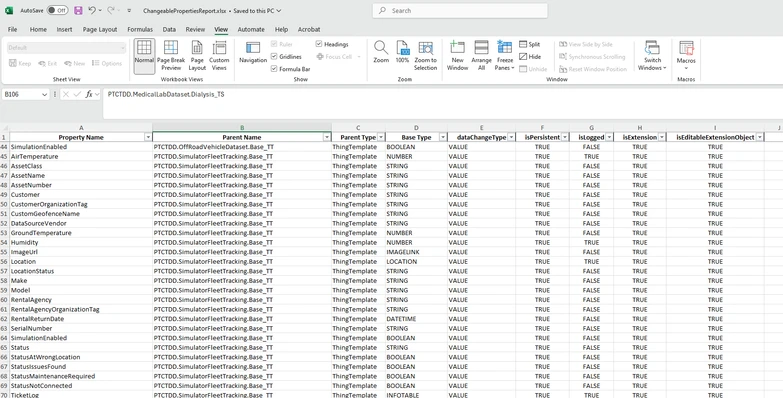
We want to look at the list and determine which properties have the most potential to reduce our number of database writes.
- Look at Parent Name and Parent Type. If it's a Thing Template or Thing Shape, do a lot of Things implement it? If so, one change in a Shape or Template can be multiplied by the number of implementing things.
- Determine which properties are metadata and which are telemetry. In the example list, the following is probably true:
- Metadata - Fairly stable and unchanging. Possibly needed at startup. Probably not a huge potential for reduction in database writes:
- AssetName
- AssetNumber
- Customer
- RentalAgency
- etc.
- Telemetry - Potential for frequent change. A good place to think about whether persistence is needed.
- AirTemperature
- Humidity
- Location (This could be a vehicle. If so, this value could change often.)
- etc.
- Metadata - Fairly stable and unchanging. Possibly needed at startup. Probably not a huge potential for reduction in database writes:
- Look at Base Type. Might there be telemetry coming up in an INFOTABLE? Big potential for savings.
Your data strategy will depend upon your use cases. Make sure, if you're persisting or logging a property, you really need to be doing so.
How Do I Get a List of Changeable Persisted Properties?
If you'd like a list of persistent properties in your ThingWorx instance that you can change, please email The PTC Platform Connectivity Solutions Team.
To help you we'll need temporary access to your ThingWorx instance via an application key. We can work together, and go over the code to be run during a screen sharing session. At the end of the session, you'll have a list of persistent properties you may review to determine whether changes are needed.