
Juni 10, 2016 8:32 PM UTC
New Idea

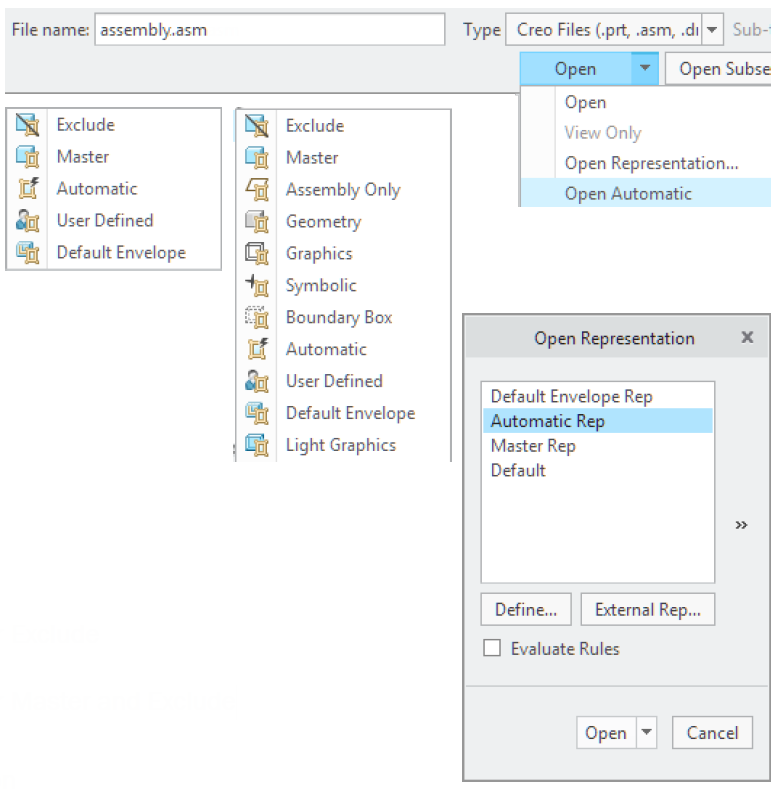
Automatic Representation

The Automatic rep provides the ability to work with the minimum possible level of data when possible and will automatically upgrade to geometry or master rep when needed. There is no longer a need to think which component representation is required.

Upgrading to geometry and master rep can also be done manually by selecting Retrieve.

10-6-2016 22-30-58.png

With the following config.pro option 'hide_pre_creo4_reps' this functionality can be controlled.

“Yes”                                   Hides all pre Creo 4.0 simplified reps except for Exclude

“No”                                    Maintains all pre Creo 4.0 simplified reps

“Maintain_master”(default)     Hides all pre Creo 4.0 simplified reps except for Master and Exclude
8 Antworten

Sept. 20, 2016 3:23 AM UTC

Hi ArnaudVandeVeerdonk,MSc.:

I have a question. How to handle light graphics representation in the Automatic rep?

Sept. 20, 2016 7:54 AM UTC

In Creo 4.0, Light graphics and Automatic rep are separate items. You either retrieve as Light Graphics, which has not changed, or you retrieve as the new Automatic rep.

Sept. 20, 2016 7:48 PM UTC

For clarification Arnaud, Will User Defined reps show up in the "Open Representation" Window for all 3 of the config settings above?  I hope so...

Sept. 22, 2016 9:41 AM UTC

Correct. Irrespective of the chosen setting for "hide_pre_creo4_reps" (see above), the user reps are available. See REP0001 in example image below:

22-9-2016 11-33-41.jpg

Sept. 25, 2016 10:49 PM UTC

Arnaud Van de Veerdonk‌ wrote:

The Automatic rep provides the ability to work with the minimum possible level of data when possible and will automatically upgrade to geometry or master rep when needed.

That's interesting.  Can you explain a little bit more about how it works in practice?  In particular what does "minimum level of data" mean, and how is this computed?  (My best guess is that it will load an envelope part instead of the full assembly if one is available, but I'm not sure.)  And when you "retrieve" the geometry, does it necessarily have to load the master rep, or are there intermediates?  (Such as load the "automatic" rep of children?)  On very large complicated assemblies, you won't necessarily want to switch from minimum level of data to maximum level of data.  (You might want full fidelity at the current level, but still have envelopes or reduced fidelity for large subassemblies.)

About a year ago I wrote a long post about how to set up a system like that in Creo 2; where envelopes are loaded automatically if available, and quickly swappable with one level of more detail when required.  That's overly complicated to set up though.  I wonder if this new "Automatic rep" will address some of those concerns?

And how does this work with family tables?  Will the "automatic rep" for different instances show the correct geometry?  That's a weakness in my approach, as you can only have one "default envelope" for a model, and can't specify different default envelopes for different instances of a family table.

Sept. 26, 2016 1:40 PM UTC

With "minimum level of data" I mean that Automatic Rep will attempt to retrieve the minimum representation/Graphics rep. Automatic rep works in conjunction with On demand settings and retrieves Geometry or Master rep depending on the user's action.

Nov. 17, 2016 1:26 PM UTC

Do you mean use Automatic Rep to open large assembly is faster than use old Graphics rep?

By the way, whether we can measure and run global interference or create drawing file use Automatic Rep? Thank you

回复 • 操作

Nov. 22, 2016 10:15 AM UTC

Opening in Automatic or Graphics rep will be the same. In Creo 4.0 you will be able to do simple (on surface) point to point measurements in Automatic and Graphics reps, but no interference analysis or drawing creation as that requires geometry.