
Aug 26, 2010 1:10 PM UTC

Replace pomocí Unrelated Component

Chyba, kdy nebylo možno nahradit komponentu pomocí funkce Unrelated Component bez AAX, bude odstraněna ve verzích 4.0 M170 (29.října 2010) a WF 5.0 M070 (25.listopadu 2010)

This enhancement detail note states the pairing table will be accessible without AAX. However, when a customer pushes “Edit Ref Table” button, he gets below message.

“Option Pro/ASSEMBLY not ordered, please contact your sales representative.

[1]Please check "Tools->Floating Modules" or Visit http://www.ptc.com/support/apps/sw_trial to try out options.”
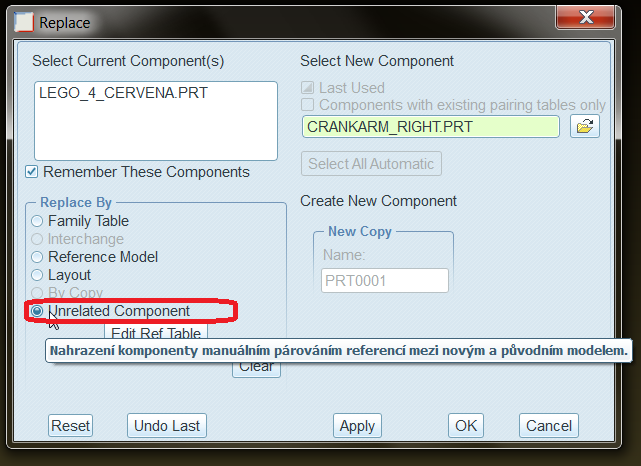
unrelated.png

After fixing the SPR 1824259 the user will be able to access the pairing table without AAX. This will be WF 4.0 M170 and WF 5.0 M070.

    2 replies

    Sep 8, 2010 7:45 PM UTC

    After much searching, this is the only post I have found on this topic.  I was puzzled as to why this function stopped working when we moved up to Wildfire 5, and couldn't find anything about it.  I had used the Edit Ref Table button successfully in Wildfire 4, and very much liked the concept of the pairing table for replacing unrelated components in an assembly, which avoided subsequent component failures resulting from lost references.  This powerful enhancement was very convenient.  But, when we moved to Wildfire 5, this function no longer worked.

    I did a PTC search on the SPR number posted above, which took me to Solution Details - TAN 146733.  According to that, build M070 will once again allow editing of the pairing table as was possible in pre-M110 Wildfire 4, I just won't be able to save the table (I don't need to save it, I just want to be able to edit it to replace components neatly).  So, until M070 comes out, guess it's back to the old way of doing it: redefining the constraints of every child component that fails.  It's hard to go back.  Surprised I haven't seen more posts on this topic.  Thank you for posting this.

    Sep 9, 2010 1:55 PM UTC

    you're welcome.

    R