janv. 12, 2011 9:33 PM UTC

Mapkeys

Earlier this week I have seen a question by a user asking how to create a mapkey. While this is a typical forum question that could easily answered by one of the more experienced users, I started thinking about the topic a bit more.


I had learned already that mapkeys are being used to automate recurring worksteps and thus can drastically increase your productivity. Wouldn’t it be nice then if users leveraged the great new world of Web 2.0 to share “their” mapkeys? Maybe they were already doing so?


So I ran a few quick searches on the Internet as well as PlanetPTC Community – and indeed there were a ton of different resources. Some people even offered to share ”their” mapkey libraries.


However, if you are a newbie in the field – or a total dummy like me – how do you know which ones provide real value, are syntactically correct, or, in short, can be trusted at all?


I called one of our Application Engineers who gave me the advice to check which version a mapkey was created in, as sometimes the syntax changes between software versions. So if a mapkey was created with Pro/ENGINEER Wildfire 3.0 it may not work as intended in Creo Elements/Pro 5.0. He said testing is essential.


So I personally came to the conclusion that learning about the specific mapkeys of other users may only be useful to a certain extent. More important would certainly be to give the users the resources to learn more about the general way mapkeys work, how to create them, and related best practices.


Many people are not aware of the resources that exist within Creo Elements/Pro today. Did you know, for example, that when you activate the “What’s this” button, it will automatically point you to the right entry in the Help menu? In other words, you can easily find good information on mapkeys by doing the following:


Go to the Help menu and pull up the “What’s This?” command…
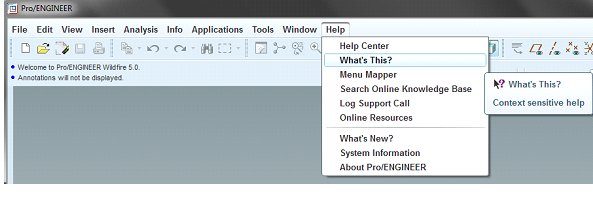
WhatsThis.jpg

…choose the “Mapkey” command in the “Tools” Menu
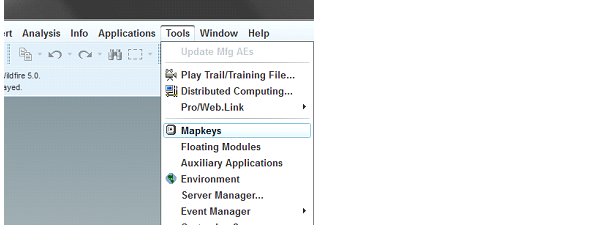
Tools_Mapkeys.jpg
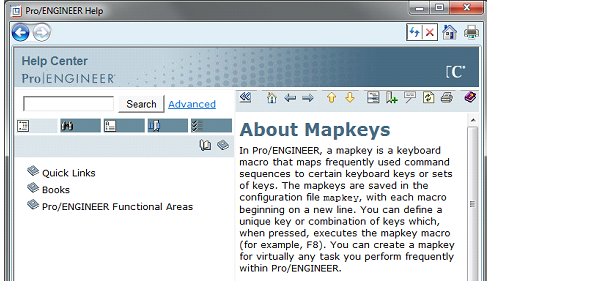
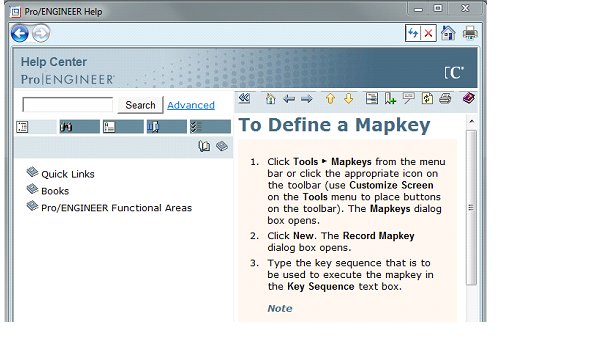
…the Help Center will then open the correct section with the description of mapkeys.
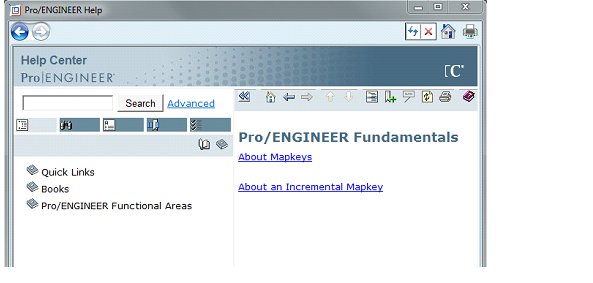
HelpCenter_Mapkeys.jpg


HelpCenter_AboutMapkeys.jpg


HelpCenter_DefineMapkeys.jpg

Do you have any best practices around mapkeys? Anything you have experienced that you would like to share with other users?

Let us know!

Cheers!

Bettina

    6 commentaires

    janv. 14, 2011 7:21 AM UTC

    From my experience I can recommend:

    1. Always use the menuline for mouse picks not the toolbars. Toolbars will vary to much.
    2. Click on all the desired choise's in a menu, no matter that they are preselected when you do the mapkey. Otherwise the mapkey will depend on previous selections as ProE tend to remember this.
    3. Divide ambitious mapkeys into several standalone mapkeys and join them in one mapkey that calls for the execution. That way you can control your mapkey step by step and more easily correct errors.

    /PA

    janv. 14, 2011 9:17 AM UTC

    Palle, this is excellent advice - thanks for sharing!

    janv. 14, 2011 3:04 PM UTC
    • I always start with the Window --> Activate Command because you never know, if the Window you use is also the active one.
    • The Mapkeys can be edited with a Text-Editor. The you can often see lines like this:
      mapkey(continued) ~ Input `preferences` `InputOpt` `maintain_limit_tol_nominal`;\
      mapkey(continued) ~ Input `preferences` `InputOpt` `modelcheck_enabled`;\
      mapkey(continued) ~ Input `preferences` `InputOpt` `modelcheck_enabled`;\
      mapkey(continued) ~ Input `preferences` `InputOpt` `modelcheck_enabled`;\
      mapkey(continued) ~ Input `preferences` `InputOpt` `modelcheck_enabled`;\
      mapkey(continued) ~ Input `preferences` `InputOpt` `model_allow_ref_scope_change`;\
      mapkey(continued) ~ Input `preferences` `InputOpt` `model_tree_start`;\
      mapkey(continued) ~ Input `preferences` `InputOpt` `model_tree_start`;\
      mapkey(continued) ~ Input `preferences` `InputOpt` `model_tree_start`;\
      mapkey(continued) ~ Input `preferences` `InputOpt` `model_tree_start`;\
      mapkey(continued) ~ Update `preferences` `InputOpt` `model_tree_start`;\

      This is because every single key that you use creates an extra line. But the mapkey also works if you leave only the two last lines.
      So if you have to enter a string while you record a mapkey paste it from your clipboard, if possible. Alternatively you can edit your mapkey with a texteditor.
    janv. 19, 2011 2:46 PM UTC

    Great post, Bettina.

    Looking at the bigger picture, Palle's advice shows that when it comes to the design process, specific best practices and proven methods can be more valuable than merely knowing the right clicks and feature functions relating to a certain task. Bettina's point ("to give the users the resources to learn more about the general way mapkeys work, how to create them, and related best practices") is a good one - not just with mapkeys, but in all areas of the product development process.

    janv. 20, 2011 6:31 PM UTC

    I saw these in a ptc/user presentation years ago.. so some are not my original ideas but they are great..

    1.  for mapkeys that you will eventually assign  button to, add a period at the beginning of your mapkey keystroke.  for example .AX  instead of AX as the mapkey stroke.

    2. (this one is my idea) functions from the pre-wildfire days are still available.

    mapkey ED @MAPKEY_LABEL*EDIT TEXT LINE;#modify;#text;#TEXT LINE

    mapkey V @MAPKEY_LABEL*move (detail move);#detail;#move

    mapkey EC @MAPKEY_LABEL*ADD TEXT TO TABLE;#TABLE;#ENTER TEXT

    the EC mapkey brings up the old table side menu in Detail and stands for Edit Cell

    the ED mapkey is the original single line EDiting mode for text in Detail

    the V mapkey is a single pick and place moving mapkey used in Detail

    3. Set up a mapkey to allow you to open and filter drawings only or assys only.  This is really handy.

    My philosophy for mapkeys is to set up some easy and quick one or two-stroke keys for end users that can easily be transferred to others.  more complicated mapkeys can be set up starting with a period or other set of key strokes.

    janv. 30, 2015 9:01 AM UTC

    Hi folks,

    I have prepared for you the tutorials: How to use / create mapkeys in ProE / Creo

    Enjoy

    Regards,

    Vladimir